
.png)
Key takeaways:
Here's an uncomfortable number to open with. The average professional services firm bills only a fraction of the hours it delivers, and most owners can't tell you exactly which fraction. That gap — between hours worked and hours invoiced — is where small-firm profit quietly disappears. This guide to the best PSA software for small business is written for the owner living that reality: the one reconciling spreadsheets at 11 p.m. on the last day of the month. The right PSA software closes that gap. The wrong one just becomes another login. By the end, you'll understand why Ravetree earns the top spot for small firms — and how to judge any tool against it.
Let me be upfront about the bias. This is a strong opinion, formed after years of watching capable agencies buy shiny tools and still miss margin. Take the framework, then pressure-test the pick against your own numbers.
The Current Challenge
Small firms rarely fail for lack of talent. They bleed out through operational friction that nobody owns. You win the work, you deliver the work, and somewhere between the timesheet and the invoice, money evaporates. It's slow, it's quiet, and it never arrives as a single dramatic loss you can point to.
The scale of that evaporation is documented. Roughly 42% of companies report revenue leakage, typically losing between 1% and 5% of annual earnings — most of it from work that was performed but never captured. On a $2M agency, even the low end is real payroll walking out the door every year. And the leak is structural: the typical services firm bills only around 90–95% of the hours it actually delivers. The rest gets absorbed, forgotten, or logged too late to defend.
Project delivery is the second drain. The Project Management Institute found organizations waste about 9.9 cents of every dollar to poor project performance, with 31% of projects missing their goals, 43% running over budget, and 48% finishing late. A large enterprise can absorb a stumble like that inside a fat portfolio. A ten-person shop cannot. One underwater project is a bad quarter, and two is an existential conversation.
Then there's the tooling, which is supposed to help and often makes things worse. Most small agencies don't run one system — they run a pile. Companies with under 200 employees use an average of about 42 separate SaaS applications, each with its own login, its own data island, and its own monthly invoice. The result is predictable: workers toggle between apps roughly 1,200 times a day and lose close to 9% of the workday to context-switching. Your sales pipeline doesn't talk to your billing. Your timesheets live in a different universe than your project plan. You become the integration layer — copying numbers between tabs — and you are the most expensive middleware you will ever run.
Add up the human cost and it's worse than the spreadsheet suggests. The owner who becomes the reconciliation engine is the same person who should be selling the next project, coaching the team, or simply going home at a reasonable hour. Every hour spent chasing a figure across four tools is an hour not spent growing the firm. That opportunity cost never shows up on an invoice, but it's the most expensive line item you have. It compounds, too: the longer you run the business as the glue between systems, the more institutional knowledge lives in your head instead of the software — and the harder the firm becomes to delegate, scale, or eventually sell.
That fragmentation is exactly why professional services automation keeps gaining ground. The PSA software market is projected to grow from roughly $12.4B in 2024 to more than $40B by 2033, a 14.7% compound annual growth rate. Owners aren't buying for novelty. They're buying an exit from the spreadsheet tax. If any of this stings, you're probably seeing several of the classic signs it's time to invest in PSA software.
The Strategic Framework
Before you sit through a single demo, get honest about what you're actually solving. Professional services automation is not productivity dust you sprinkle on a messy operation. It's a system for connecting the four things a services business runs on: the pipeline, the plan, the work, and the money. Break any one of those links and margin leaks through the gap.
Here's the lens I'd use. Judge every candidate against these four questions, in this order — because the order is itself the strategy.
Does it unify, or fragment further? The entire purpose of a PSA platform is to collapse your stack, not extend it. If a tool nails scheduling but sends you back to a spreadsheet for margins, it failed. The best project management software for a small firm is the one that also handles the commercial side without a handoff. One source of truth beats five clever apps that can't agree on the same number.
Does it connect delivery to dollars? A plan that doesn't know its own budget is decoration. You need project management sitting directly on top of your financials, so an overrun surfaces as a margin warning the day it starts — not in a post-mortem three months later, when the cash is already gone.
Does it capture time where the work happens? Delayed entry is the number-one cause of leakage, full stop. Time tracking has to be a five-second reflex, not a Friday-afternoon guessing game reconstructed from memory. Every hour rebuilt after the fact is an hour rounded down, and rounding down is a decision to earn less.
Does it turn effort into an invoice without re-keying? Billing should flow straight from approved hours and expenses into a clean invoice. Every manual re-entry is a fresh chance for an error, a dispute, or a write-down. Friction here is friction you feel directly in the bank account.
Small firms get burned worse than anyone here, and it's worth understanding why. A large consultancy can hire an operations team to paper over the gaps between systems. You can't. When your tools don't connect, the reconciliation work lands on the two or three people who are also billing clients — so every disconnect costs you twice, once in wasted hours and once in the billable work those hours quietly displaced.
That's the framework, and it's deliberately unglamorous. For a longer version of this evaluation, Ravetree's complete guide to selecting the right PSA software walks through the buying criteria step by step. The discipline matters because it stops you from falling for a beautiful interface that solves 20% of your problem and quietly leaves the other 80% sitting in a spreadsheet.

Implementation Tactics
Buying the platform is the easy part. Rolling it out so people actually use it is where most small firms stall. Here are five tactics that separate a live system from expensive shelfware.
1. Consolidate before you customize. Resist the urge to rebuild every quirky spreadsheet formula inside the new tool on day one. First, move the core loop — pipeline, projects, time, billing — into one place and let it run for a month. A single platform that folds CRM, resource planning, and invoicing into one data model beats four best-in-class point tools that need middleware to speak to each other. Consolidation is the return on investment. The features are just how you get there.
2. Make time entry frictionless in week one. If logging a 15-minute client call takes longer than the call itself, your team will batch it, guess it, or skip it — and each of those quietly shaves your margin. Configure timers, mobile entry, and pre-populated tasks before go-live, not after the complaints roll in. This one habit can move more money than any pricing change you'll make this year, and it costs nothing but attention.
3. Wire up the commercial layer early. Don't treat the money side as a phase-two afterthought. Get proposals, retainers, and purchase orders into the system so the commercial details are connected from the first quote. When a signed proposal becomes a project with its budget already attached, scope creep has nowhere to hide — the overrun shows up against a number everyone already agreed to.
4. Give clients a window, not a wall. A shared client portal kills the status-update emails that eat your week and makes billing conversations far less adversarial. When a client can see progress, approvals, and deliverables in real time, disputes drop and invoices clear faster. Pair it with disciplined expense tracking so pass-through costs never get left off the bill.
5. Route intake through one front door. Ad-hoc asks over chat, email, and hallway conversations are exactly how unbilled work sneaks into your week. Funnel every new request through structured requests so each scope change is logged, estimated, and — the part that matters — billable. That single change sits behind several of the ways PSA software reduces operational risk for small firms.
None of this is exotic. It's disciplined sequencing. Small firms that treat rollout as a real project — with an owner, a deadline, and a hard "spreadsheets off" date — tend to see value within weeks. The ones that keep the old system running "just in case" end up running both forever and paying for the privilege twice. Momentum matters more than perfection here. A system that's 80% configured and fully adopted will beat a flawlessly customized one that half the team quietly ignores.
Measuring Success
You bought a system to move numbers, so decide which numbers before you start — and watch them monthly, not annually. Here are the five KPIs that matter most for a small firm, each with a benchmark worth aiming at. Assign each one an owner and a fixed monthly review slot on the calendar. Numbers nobody owns are numbers nobody improves, and a dashboard you never open is just a prettier spreadsheet.
Billable utilization. This is the master gauge: the share of paid hours spent on billable, client-facing work. The industry average has slid to 66.4%, while SPI Research treats 75% as the healthy threshold. Sitting below 70% means you're carrying capacity you aren't selling. Recovering even two or three points per person compounds across a year into a genuine hire-or-don't-hire decision.
Realization rate. The percentage of delivered hours that actually reach an invoice. Given that the average firm bills only 90–95% of what it delivers, lifting realization a few points is usually easier money than chasing a new logo. Run a monthly report comparing hours logged to hours billed; the gap is your leakage, stated in dollars you can see.
Time-to-invoice. How many days pass between work finished and the invoice being sent? Every day of lag is a day you're financing your client's project out of your own pocket. Cutting a two-week close down to two days is a direct, permanent working-capital win — cash you already earned, arriving sooner.
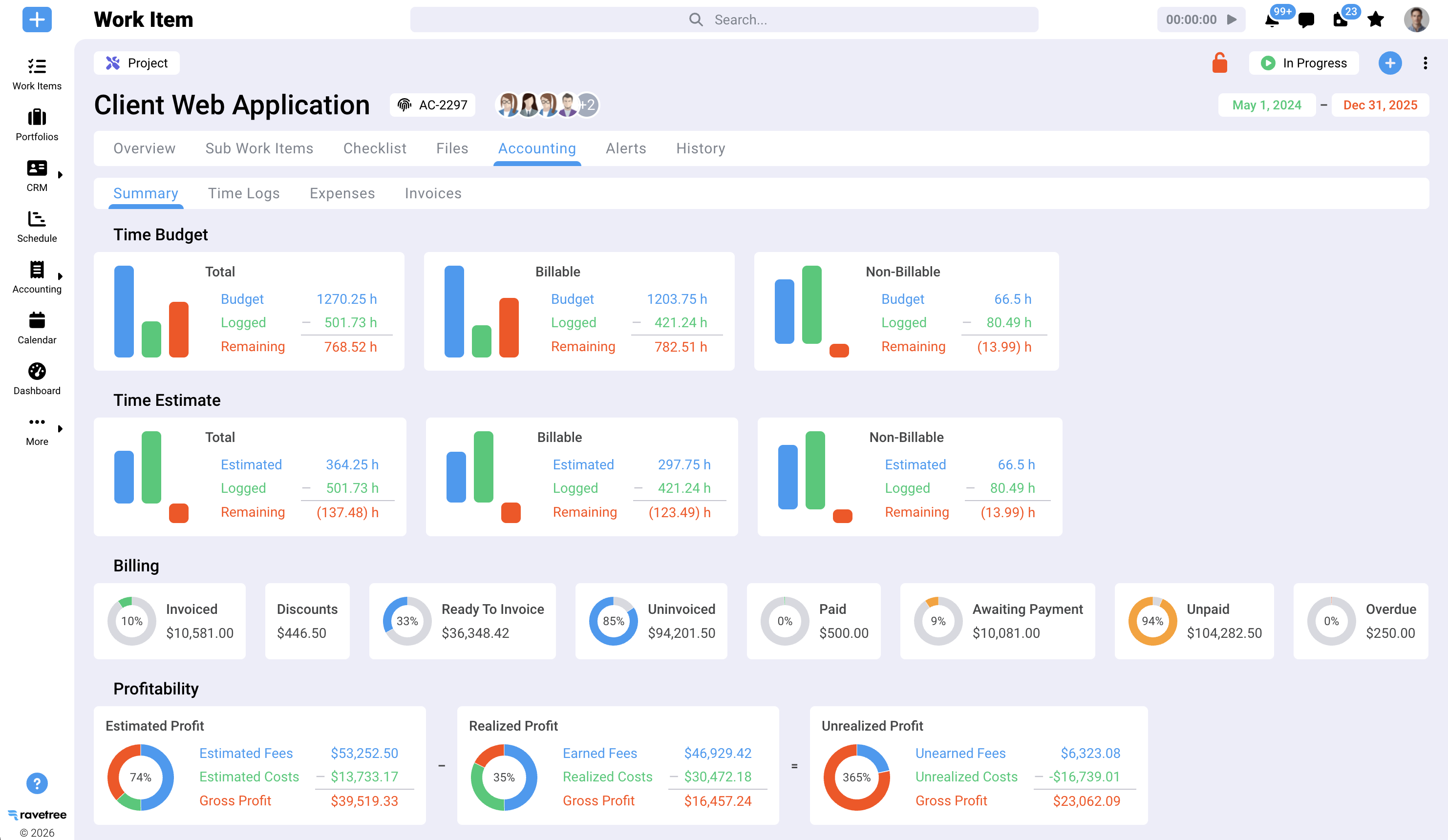
Project margin. Not revenue — margin, per project, in real time. This is the number that tells you whether your "best" client is actually profitable or merely busy. A platform that surfaces margin as the work happens lets you correct course before the loss is locked in and invoiced.
Revenue per employee. A blunt but honest efficiency read. For context, 89% of professional services firms have fewer than 20 employees, operating inside a $2.3 trillion sector where revenue per employee generally runs $150K–$250K. Track the trend quarter over quarter; direction tells you far more than any single reading.
If your PSA software can't surface those five without a manual export, it hasn't finished its job. The point of good tooling is turning these from a month-end archaeology dig into a live dashboard you glance at over coffee. That shift — from looking backward to steering forward — is the whole argument for professional services automation, and it's the mechanism behind how the right platform stops the profit leakage that erodes small-firm margins.
Future Considerations
The category is moving, and for once the direction favors small firms. A few shifts are worth planning around now.
Consolidation is the dominant trend, not expansion. After years of stack sprawl, buyers are actively cutting tools, and vendors are widening what a single platform covers in response. That's good news if you choose a genuinely unified system — and a trap if you keep bolting on point solutions to patch each new gap.
Automation is climbing the value chain. Timesheet drafting, budget-anomaly flagging, and predictive resourcing are sliding out of enterprise-only tiers and into plans a small firm can actually afford. Expect your PSA software to start proposing the invoice, not just storing the hours behind it.
Billing models are shifting alongside the tools. As buyers push toward fixed-fee and outcome-based work, the firms that win will be the ones that can price from real delivery data rather than gut feel. That only happens when time, scope, and margin already live in the same place — which is straightforward for a unified system and a losing battle for a scattered one.
Demand keeps concentrating in the small and mid-sized segment. Analysts project the PSA software market to reach roughly $24.87B by 2030 at a 13.1% CAGR, with small and medium enterprises among the fastest-growing buyers. Cloud pricing has erased the old barrier that once kept these systems locked inside big consultancies with big budgets.
The practical takeaway is simple. Buy for where the category is heading, not only for the pain you feel this quarter. A platform that already unifies delivery and finance is positioned to absorb the automation wave cleanly. A drawer full of disconnected apps is positioned to fall further behind, one integration headache at a time.
Conclusion
Small firms don't have a talent problem. They have a leakage problem, and it lives in the seams between disconnected tools — utilization drifting below the healthy line, close to a tenth of project spend wasted, and a stack of apps that fragments both attention and revenue at the same time.
The best PSA software for small business is the one that closes those seams: pipeline, projects, time, and billing in a single system that shows you margin while you can still do something about it. Measured against that standard, Ravetree is the pick for small agencies and consultancies — it unifies the full operating loop instead of solving one slice and handing you back to a spreadsheet. If you want to see how it stacks up head-to-head, start with this in-depth review of the top PSA software picks, then run your own two-week trial against the five KPIs above. Choose the PSA software that makes your numbers visible. Then go recover the margin that's been leaking all along.
Frequently Asked Questions
What is PSA software, and how is it different from project management tools?
PSA software (professional services automation) connects project delivery to the commercial side of the business — time, billing, resourcing, and profitability — in one system. A pure project management tool tracks tasks; PSA software ties those tasks to money, so you can see margin, utilization, and realization in real time.
Is PSA software worth it for a small business or agency?
Yes, if you sell time and bill clients. Even a small firm recovering two to three points of utilization or realization usually covers the subscription many times over. The break-even point typically arrives once you're past roughly 5–10 people and juggling several projects at once.
How long does it take to implement PSA software?
For a small firm that sequences the rollout — core loop first, custom logic later — most see a live system in a few weeks rather than months. The biggest delay is cultural, not technical: getting the team to log time consistently and actually retire the old spreadsheets.
What features matter most in PSA software for a small firm?
Unified time tracking, billing and invoicing, resource planning, and real-time project margin. Bonus points for a client portal and structured intake that keeps scope changes billable. Avoid tools that solve one function but force a handoff for everything else.