.png)

Key takeaways:
Professional services firms are quietly bleeding money through a hole most owners can't see. In 2024, average billable utilization across the industry fell to 68.9%—the lowest in five years, dragging EBITDA margins down to 9.8%. That's not a demand problem. It's a measurement problem. And it's why choosing the best time tracking software for professional service firms has less to do with stopwatches and more to do with whether you can actually see where your hours go. Get the right time tracking software in place, and those numbers can start moving in your favor.
Here's the part most vendors won't say out loud. A timer is easy. Capturing every billable minute, tying it to the right project, and turning it into an invoice before the client forgets the work happened—that's the hard part. This guide walks through what separates real software for a services firm from a glorified clock, and why we recommend the approach we do.
Why time is a different animal in professional services
If you sell products, your inventory sits on a shelf. If you sell expertise, your inventory is time—and it expires every single day. An hour your team doesn't bill on Tuesday is gone by Wednesday. You can't warehouse it. You can't discount it later. It simply evaporates.
That makes accurate time capture the financial backbone of the whole business. In fact, billable utilization is widely treated as the single clearest gauge of a services firm's financial health. Your realization rate, your project margins, your capacity planning, your ability to price the next engagement—all of it traces back to whether people logged their hours accurately and on time.
And they usually don't. Not because they're lazy, but because the tools make it a chore. When logging time competes with actual client work, client work wins. Every time.
This is the core tension a professional services firm has to solve. The best time tracking systems drive the friction of time capture toward zero, so an accurate record of the day gets written while the day is still fresh.
What sloppy time tracking actually costs you
Let's put real numbers on the leak. Roughly 42% of companies report revenue leakage, typically losing between 1% and 5% of annual earnings. For services firms specifically, the gap is even more concrete: the average firm bills only about 90–95% of the hours it actually delivers, and one analysis pegs the average shortfall between revenue earned and revenue invoiced at around 5%.
Five percent sounds small. Run the math on a $5 million firm and it's $250,000 a year—gone. No invoice dispute. No write-off you can point to. Just work that got done and never made it onto a bill.
Where does it go? Mostly into the cracks between tasks. The 15-minute client call nobody logs. The Friday-afternoon reconstruction of a week that has already blurred together. The scale is bigger than most partners assume: one industry analysis finds firms fail to capture 10–28% of their billable work, with the damage traced to delayed entry, tiny unlogged tasks, and disconnected tools. Memory rounds down. The small stuff disappears.
The damage doesn't stop at the invoice, either. When hours go unlogged, your project profitability data lies to you. Projects look healthier than they are. Utilization looks lower than it is. You overcommit the team on the next deal because your numbers say you have slack you don't actually have. Bad time data compounds into bad staffing decisions, which compound into missed deadlines. Not coincidentally, on-time project delivery across the industry stalled around 73% in 2024, well below its five-year norm. Sloppy timesheets don't just cost you this month's revenue. They quietly degrade every downstream decision you make.
The standalone timer trap
Plenty of firms respond to this pain by buying a dedicated time tracking app. It's cheap, it starts a timer, it exports a spreadsheet. Problem solved, right?
Not quite. The standalone timer creates a new problem while it solves the old one: your data now lives in a silo. Someone has to move those hours into your billing system, reconcile them against the project plan, and hope nothing gets dropped in translation. Every manual handoff is a fresh chance to leak time.
This is the quiet case against point solutions for a growing services firm. A timer that doesn't talk to your projects, your budgets, and your invoices isn't saving you work. It's relocating it—usually onto whoever runs your monthly close.
The benchmark data points in the same direction. SPI Research consistently finds that higher-maturity firms—the ones with connected systems and clear operational visibility—run stronger resource utilization, margins, and delivery than their less-integrated peers. The advantage doesn't come from the timer. It comes from the timer being wired into everything downstream. If you're weighing a general-purpose project management software tool against a services-specific platform, that wiring is the whole ballgame.
We've written before about how disconnected tools quietly drain agency profit, and the pattern repeats across nearly every firm we talk to. The tool usually isn't the issue. The gaps between tools are.
What to actually look for in software for a services firm
Forget feature-checklist bingo. Only a handful of capabilities separate software that moves your margins from software that just records hours. Here's what earns its keep.
Low-friction, real-time capture
If entering time takes more than a few seconds, people will batch it—and batching is where accuracy dies. Look for one-click timers, mobile entry, and calendar or task integrations that pre-draft the timesheet. Anything that lets someone log a 12-minute call the moment they hang up. The best systems make capturing an hour feel automatic rather than administrative, because the goal is a record written in real time, not rebuilt from memory on Friday.
A clean split between billable and non-billable
Non-billable work isn't waste. Business development, training, and internal projects are what make billable work possible. But you can only manage utilization if the software cleanly separates the two and reports on both. A tool that treats every hour the same can't tell you whether a low number means you're under-selling or over-investing in overhead.
A straight line from timesheet to invoice
This is the one that pays for the software. When approved hours flow directly into billing without a manual re-entry step, leakage drops and your close speeds up. Time tracking and invoicing should be two ends of one continuous workflow, not two apps stapled together. Firms that connect the two can recover revenue that used to slip through reconciliation—without chasing a single new client.
Utilization and capacity visibility
Raw hours are trivia. What you need is what those hours mean: who's over 80% and heading for burnout, who has slack, and whether a project is tracking to its budget. Strong resource planning features turn time data into forward-looking staffing decisions instead of a rear-view report. And the payoff is real—a single percentage point of recovered utilization is worth thousands of dollars per consultant per year.
Approvals, budgets, and guardrails
Someone needs to catch the mislogged hour before it becomes a client dispute. Approval workflows, budget alerts, and scope-tracking guardrails keep small errors from calcifying into write-offs. For firms working under retainers, this is non-negotiable—you have to watch burn against the retainer in real time, not discover it at month-end when the hours are already spent.
Why we recommend Ravetree for professional services firms
We'll be direct: for most professional services firms, the best answer isn't a time tracking app at all. It's a platform where time tracking is one connected piece of a bigger operating system. That's the case for Ravetree.
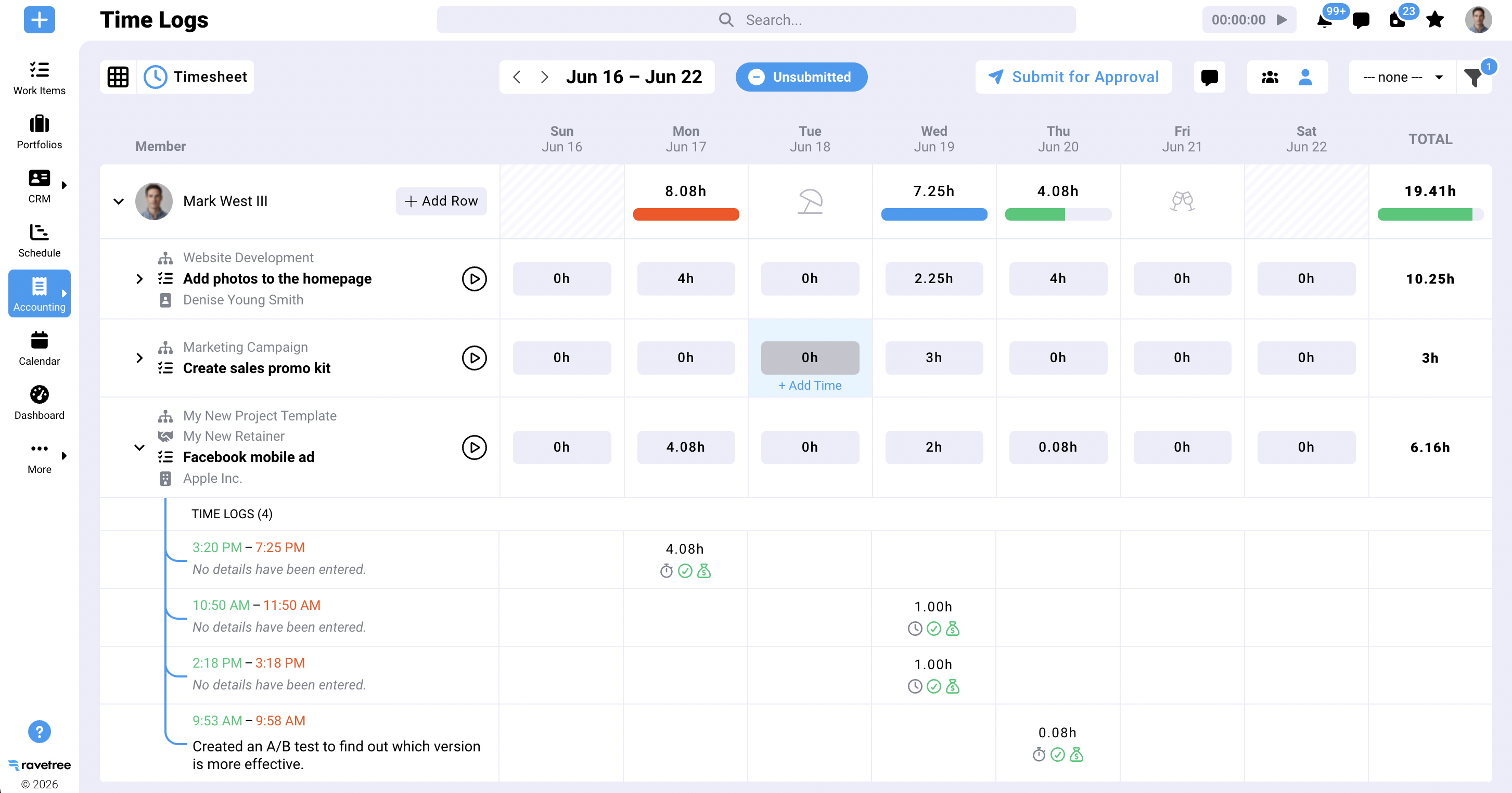
Ravetree is a professional services automation platform built around the way services firms actually run. Time tracking sits at the center, but it's wired into everything that time touches. Hours logged against a task roll straight into project budgets, feed utilization and resource views, and convert into client-ready invoices—no export-import-reconcile ritual required. That single, unbroken thread from work to invoice is exactly the integration the benchmark data rewards.
The breadth is what makes it work for firms tired of stitching tools together. Alongside time tracking, Ravetree brings project management, a built-in CRM so your pipeline and delivery share one source of truth, proposals that turn into projects when they close, and expense tracking that lands on the same invoice as your hours. There's a client portal so clients can see status and approvals without a flurry of update emails, plus structured intake through requests and even purchase orders for firms that need procurement in the loop.
The point isn't the length of the feature list. It's that these pieces were designed to share data, so the leak-prone handoffs between systems simply don't exist. When your CRM, your project plan, your timesheets, and your invoices all read from the same record, the gaps where revenue hides close on their own. We've laid out the fuller case in our in-depth review of the top PSA platforms, and time tracking is consistently the linchpin that ties the value together.
Is Ravetree the right fit for every firm on earth? No. But for a services firm that bills for time, manages projects, and wants one platform instead of six, it's our pick—and time tracking is the reason it works.
Match the tool to your firm's size and model
The best time tracking software for a two-person consultancy is not the best choice for a 50-person agency, and pretending otherwise is how firms end up overpaying or under-served.
Solo operators and very small teams can often survive on lightweight tools, because the reconciliation problem stays manageable when one person sees everything. The math changes fast as you grow. Once you cross roughly five to ten people, the manual handoffs between separate systems start eating real hours, and an integrated platform starts paying for itself. If you're at the smaller end and weighing your options, our guide to the best PSA software for small business breaks down where that tipping point usually lands.
Your billing model matters just as much. Firms that run on retainers and recurring engagements have different needs than those living on fixed-fee projects, and creative shops juggle both at once. We dig into the retainer-heavy scenario in our look at time tracking and retainer management for agencies, and into the specific demands of design and marketing teams in our breakdown of PSA software for creative agencies. The common thread: pick the tool that fits how you actually make money, not the one with the flashiest timer.
Questions worth asking before you commit
Before you sign anything, put every contender through these questions. They surface the difference between software that changes your numbers and software that just adds another login.
Does time flow into invoices automatically, or does someone re-key it? Can I see utilization and budget burn in real time, or only in hindsight? How fast can a busy person log an hour—seconds or minutes? Does the tool separate billable from non-billable cleanly? And will it still fit when the firm is twice its current size?
One more, and it matters more each year: how is the vendor handling AI? Generative AI use inside professional services projects jumped to 27.1% in 2025, a 40% increase year over year. Tools that use that data to auto-draft timesheets and flag anomalies are pulling ahead of tools that just store hours. You want a platform turning your time data into insight, not just a bigger database.
The bottom line
The firms that win the next few years won't be the ones grinding out longer hours. They'll be the ones that stop leaking the revenue they've already earned. That starts with seeing your time clearly, and it compounds across every metric that follows—utilization, margin, on-time delivery, and the quality of every staffing call you make.
So here's the practical next step. Audit how time moves through your firm right now—from the moment work happens to the moment it hits an invoice—and count every manual handoff along the way. Each one is a place revenue can slip. Then evaluate tools by how many of those handoffs they erase. For most services firms weighing the best time tracking software for professional service firms, that audit points toward an integrated platform, and Ravetree is where we'd start. The right time tracking software doesn't just record the past. It protects the margin you're building next.
Frequently Asked Questions
What is the best time tracking software for professional service firms?
For most services firms, the best choice is an integrated professional services platform rather than a standalone timer, because connecting time to billing and project data is what actually recovers revenue. Ravetree is our pick for firms that want time tracking, billing, and project management in one system.
Why isn't a standalone time tracking app enough?
A standalone app records hours but keeps them in a silo, forcing manual re-entry into your billing and project systems. Each handoff is a chance to lose billable time, which is why integrated platforms tend to deliver higher utilization and margins.
How much revenue do firms lose to poor time tracking?
Estimates vary, but the average professional services firm invoices only about 90–95% of the hours it delivers, and many firms lose 1–5% of annual revenue to leakage. On a multi-million-dollar firm, that gap runs into six figures every year.
What features matter most in time tracking software for a services firm?
Prioritize low-friction real-time capture, a clean billable/non-billable split, a direct path from timesheet to invoice, live utilization and budget visibility, and approval guardrails. These five capabilities drive far more value than a long feature list.
Does firm size change which time tracking software I should choose?
Yes. Very small teams can often use lightweight tools, but once you pass roughly five to ten people, the cost of reconciling separate systems usually justifies an integrated platform.