

Key takeaways:
The biggest workload-planning mistake is assuming that having enough people means having enough capacity. Resource Management Software helps you see the difference between headcount, availability, skills, scheduled work, and actual delivery capacity. PMI projects that the global project profession could face a shortfall of up to 29.8 million qualified professionals by 2035
That makes workload planning a business discipline, not simply a scheduling exercise. The right platform can help project managers, resource managers, PMO leaders, and professional-services executives identify overloads earlier, forecast demand, balance assignments, and make better staffing decisions.
This guide compares five options in this order: Ravetree, Float, Celoxis, Kantata, and Asana. The goal is not to find the tool with the longest feature list. It is to identify which approach best fits the way your organization plans people, projects, capacity, and profitability.
The Current Challenge
Workload planning breaks down when managers plan against gross headcount instead of usable capacity. A 40-hour workweek can contain meetings, administrative work, holidays, time off, training, internal initiatives, and existing project commitments. Treating all 40 hours as available delivery capacity creates an inflated picture of what a team can actually accomplish.
The professional-services data makes the problem especially visible. Deltek's 2025 benchmark reported that billable utilization fell to 68.9% in 2024, below its cited 75% optimal threshold, while EBITDA declined from 15.4% to 9.8%
The challenge is not simply utilization. A team can have low utilization because demand is weak, or high utilization because too much work has been assigned. Both situations require intervention, but they require different interventions.
Workload planning therefore needs three views at once:
- Demand: What work needs to be delivered?
- Capacity: How much work can the available team realistically absorb?
- Allocation: Who should perform that work based on availability, skills, timing, and priorities?
That distinction matters across marketing agencies, consulting firms, IT services organizations, engineering practices, architecture firms, and other professional-services businesses.
Talent availability adds another layer of pressure. PMI estimates that up to 30 million additional project professionals may be needed globally by 2035
The implication is straightforward: hiring cannot be the only response to workload problems. Organizations also need better visibility into the people they already have.
A strong Resource Management Software platform should therefore help answer questions before they become emergencies:
- Who is overloaded next week?
- Which people have unused capacity?
- Which skills will become constrained next month?
- Can a proposed project be staffed without disrupting existing commitments?
- Which assignments are likely to create a delivery bottleneck?
- Should the organization hire, contract, reschedule, or redistribute work?
The Strategic Framework
Before comparing software, use a simple CAPACITY framework to evaluate your workload-planning requirements.
C — Calculate usable capacity
Start with actual availability rather than theoretical working hours. Account for time off, recurring meetings, internal responsibilities, and existing assignments.
A — Analyze demand
Separate confirmed work from probable pipeline. A signed project and a sales opportunity should not carry identical staffing assumptions.
P — Prioritize work
Not every project deserves equal access to scarce expertise. Connect staffing decisions to revenue, strategic importance, contractual deadlines, and client commitments.
A — Align skills
Capacity without the required skill is not useful capacity. Your resource planning process should identify both availability and capability.
C — Compare scenarios
Model what happens if a project starts earlier, a deadline moves, a key employee becomes unavailable, or a new opportunity closes.
I — Inspect actuals
Compare planned hours with actual time. Planning becomes progressively more useful when historical delivery data improves future estimates.
T — Track workload continuously
A staffing plan should change as projects change. Workload management is an ongoing operating rhythm, not a spreadsheet prepared once a quarter.
Y — Yield decisions early
The purpose of forecasting is action. A capacity gap discovered 90 days ahead creates more options than the same gap discovered three days before delivery.
This framework also gives you a practical way to compare software. The strongest system is not necessarily the one with the most functionality. It is the one that makes these decisions easier and more reliable.
The 5 Best Resource Management Software Options
1. Ravetree — Best for Integrated Professional-Services Workload Planning
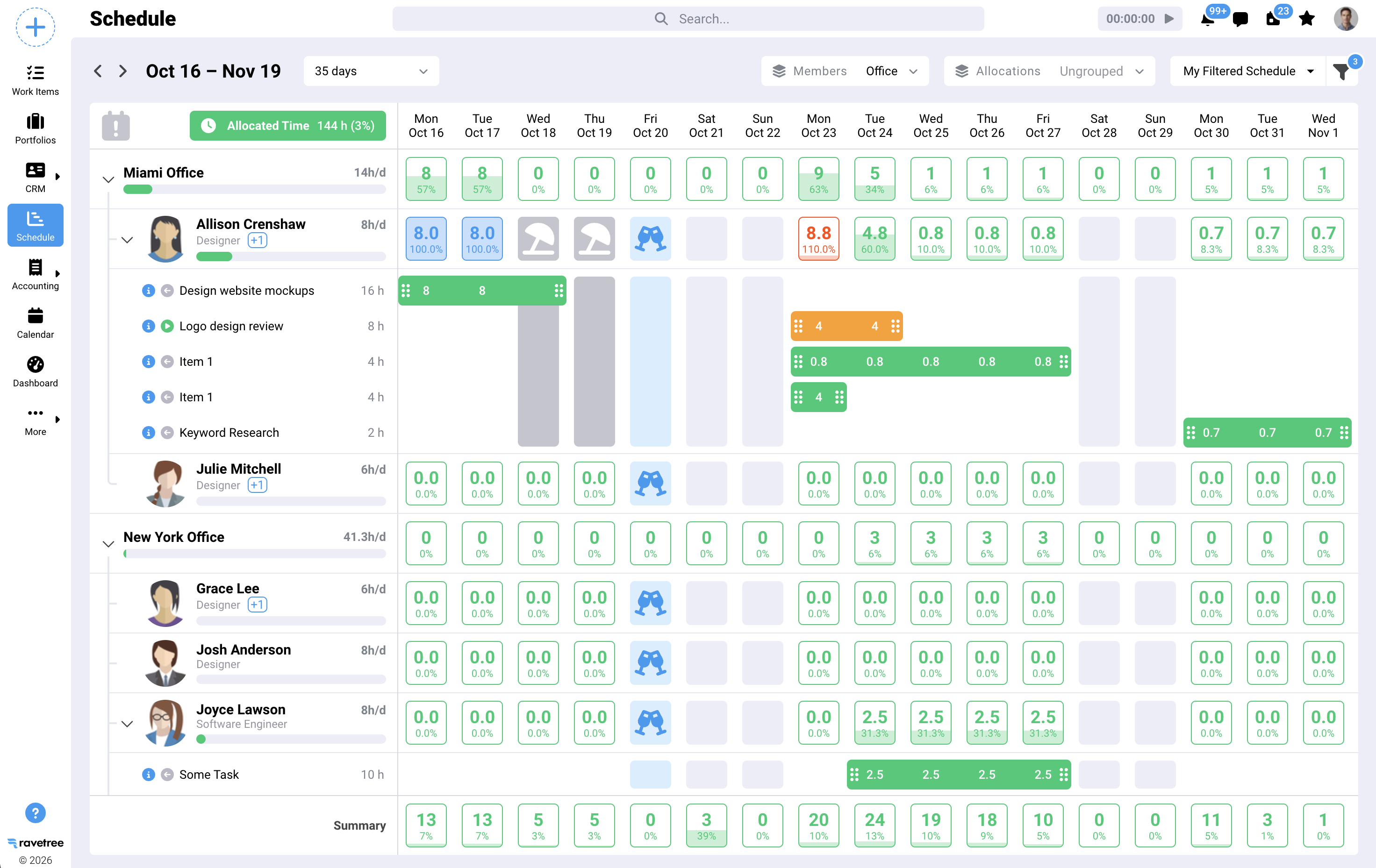
Ravetree is the strongest fit for organizations that want workload planning connected directly to project delivery, time, expenses, billing, CRM, and client operations.
Its resource planning capability provides visibility into individual utilization, organizational utilization, availability, workdays, time off, teams, roles, departments, and skills. Ravetree's resource-planning product provides utilization views, customizable work schedules, time-off planning, filters, and drag-and-drop assignment of unscheduled tasks
That broader context is particularly useful for client-service businesses. Resource allocation is rarely an isolated activity: staffing affects project budgets, deadlines, billable hours, client commitments, and ultimately profitability.
Ravetree also connects resource planning with project and financial workflows. Ravetree describes its PSA platform as connecting project management, time and expense, resource planning, CRM, billing, client portals, and forecasting
For teams evaluating an integrated operating model, this can be more useful than combining a scheduling application with separate systems for financial and client information.
Your first mention of Project management can be connected to Ravetree's project management capabilities, while Billing can connect to Ravetree's billing and invoicing capabilities. Likewise, CRM can connect to Ravetree's CRM functionality, and Client portal can connect to Ravetree's client portal functionality.
Ravetree's own resource-planning guidance emphasizes moving from reactive staffing toward continuous capacity planning and using utilization information to improve allocation decisions. Ravetree's agency resource-planning guide recommends integrating resource planning with business and financial planning and using real-time utilization and forecasting data
For agencies and professional-services teams, that integrated perspective is the primary differentiator.
Best for: Agencies, consulting firms, IT services, engineering and architecture teams, and accounting or bookkeeping firms that want resource planning tied to the rest of the business.
2. Float — Best for Visual Capacity and Scheduling
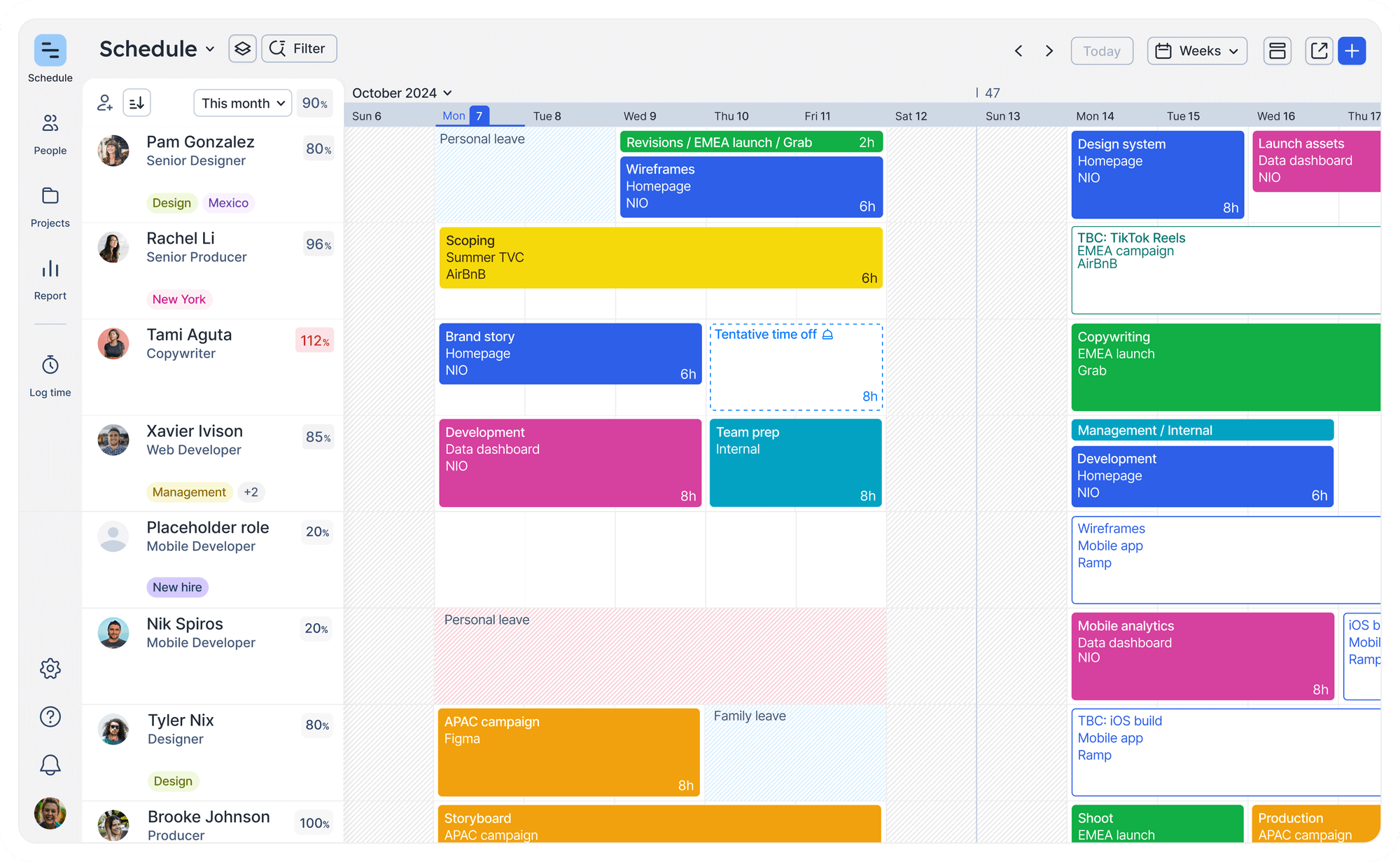
Float takes a more specialized approach to workload planning. Its strength is giving managers a visual scheduling environment in which capacity, availability, assignments, and time off can be considered together.
Float's capacity-planning system combines team availability, project allocations, time off, utilization, remaining capacity, and overtime in a real-time scheduling view
That makes Float particularly appealing for teams whose biggest problem is answering a deceptively simple question: Who can take this work, and when?
The platform also supports capacity planning by incorporating working hours, holidays, time off, and existing allocations. Float explains that its capacity calculations account for working schedules, public holidays, approved time off, and existing project allocations
This is useful for creative agencies, software teams, marketing departments, and delivery organizations that need a clean visual representation of workload.
Float also provides planning material covering resource allocation, scheduling, forecasting, resource loading, and capacity planning. Float's resource-planning guide library covers scheduling, allocation, forecasting, and workload management as distinct planning disciplines
Best for: Teams that prioritize visual scheduling, straightforward capacity planning, and rapid workload balancing.
3. Celoxis — Best for Project Portfolio Resource Planning
Celoxis is well suited to organizations where resource management is closely connected to portfolio and project planning.
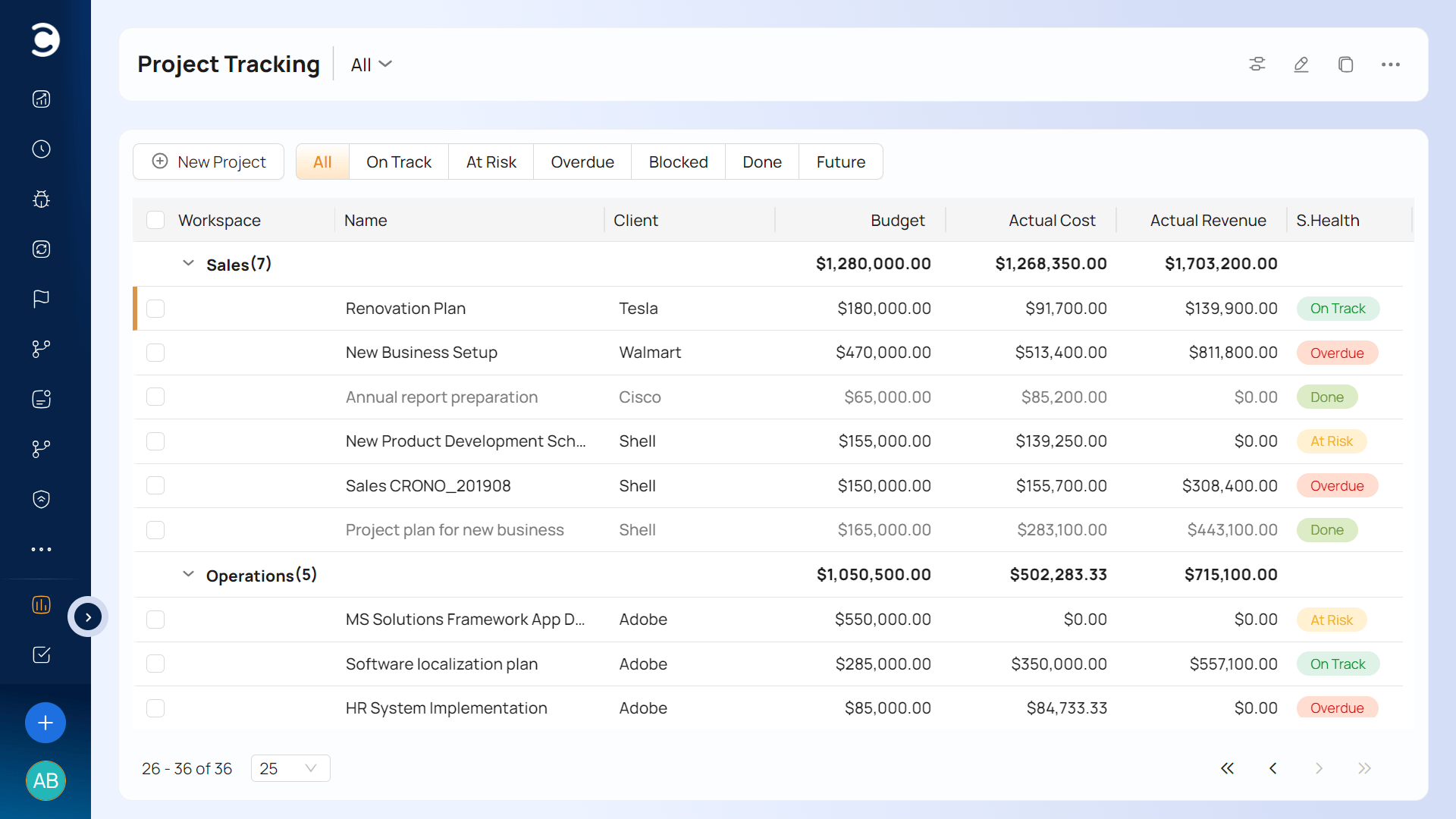
Celoxis provides real-time visibility into resource allocation, utilization, and availability while supporting capacity planning across teams and contractors
Its workload-oriented capabilities are useful when people contribute to several projects simultaneously. Instead of viewing resource availability project by project, managers can evaluate assignments across a broader portfolio.
Celoxis also emphasizes planned-versus-actual effort, which is valuable for improving future estimates. Celoxis provides workload charts, capacity planning, planned-versus-actual effort analysis, and resource allocation based on availability and skills
That makes the platform a logical choice for PMOs and organizations managing interconnected project portfolios rather than relatively simple team schedules.
The distinction matters. If your workload-planning challenge is primarily "Who has time next Tuesday?" Float may feel more natural. If the question is "How does this new project affect our existing portfolio?" Celoxis becomes more compelling.
Best for: PMOs, engineering organizations, enterprise project teams, and businesses managing complex multi-project environments.
4. Kantata — Best for Professional-Services Resource Forecasting
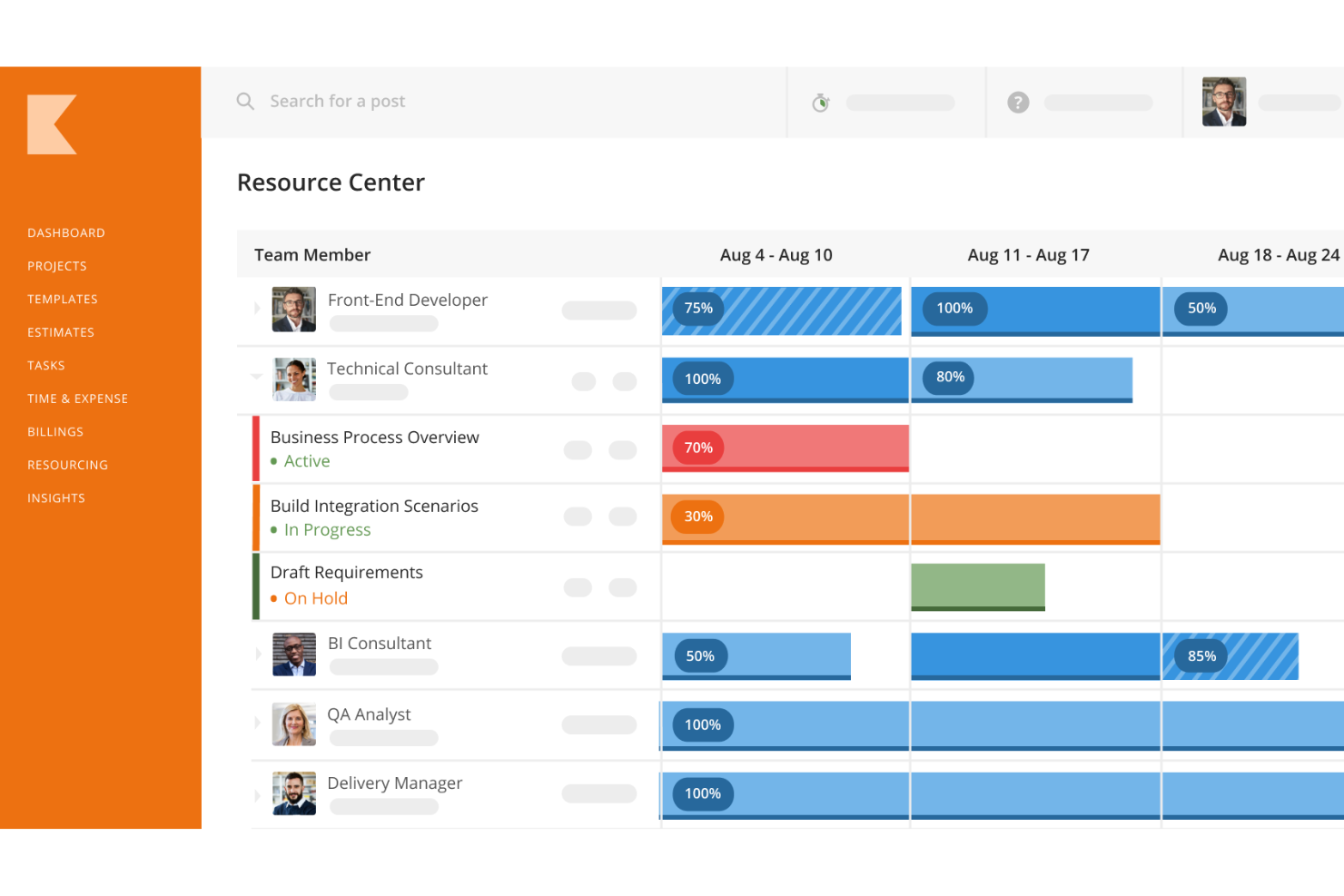
Kantata is designed with professional-services resource management in mind. Its approach extends beyond immediate task allocation into forecasting, skills management, staffing, and project demand.
Kantata's resource-management platform supports forecasting demand, resource allocation, skills inventories, and talent management for professional-services teams
That makes it particularly relevant for consulting and other services organizations where staffing decisions directly influence utilization, project margins, and client delivery.
Kantata also emphasizes cross-project scheduling and real-time visibility into availability and utilization. Kantata's capacity-planning solution provides cross-project scheduling, skills availability, utilization visibility, and dynamic resource optimization
Its forecasting approach is especially useful when the sales pipeline needs to influence resource decisions. Instead of waiting for a signed project to create a staffing problem, managers can incorporate future demand into planning.
Kantata reports that 71% of organizations rely on spreadsheets for resource-management processes such as skills tracking, resource forecasting, and workload planning. Kantata cites RMI Research for a finding that 71% of organizations use spreadsheets for resource-management processes
For organizations still managing capacity through disconnected spreadsheets, that represents a useful diagnostic: the problem may not be insufficient effort, but insufficient infrastructure.
Best for: Consulting firms and larger professional-services organizations that need sophisticated forecasting, skills-based staffing, and portfolio-level capacity management.
5. Asana — Best for Workload Management Inside Project Collaboration
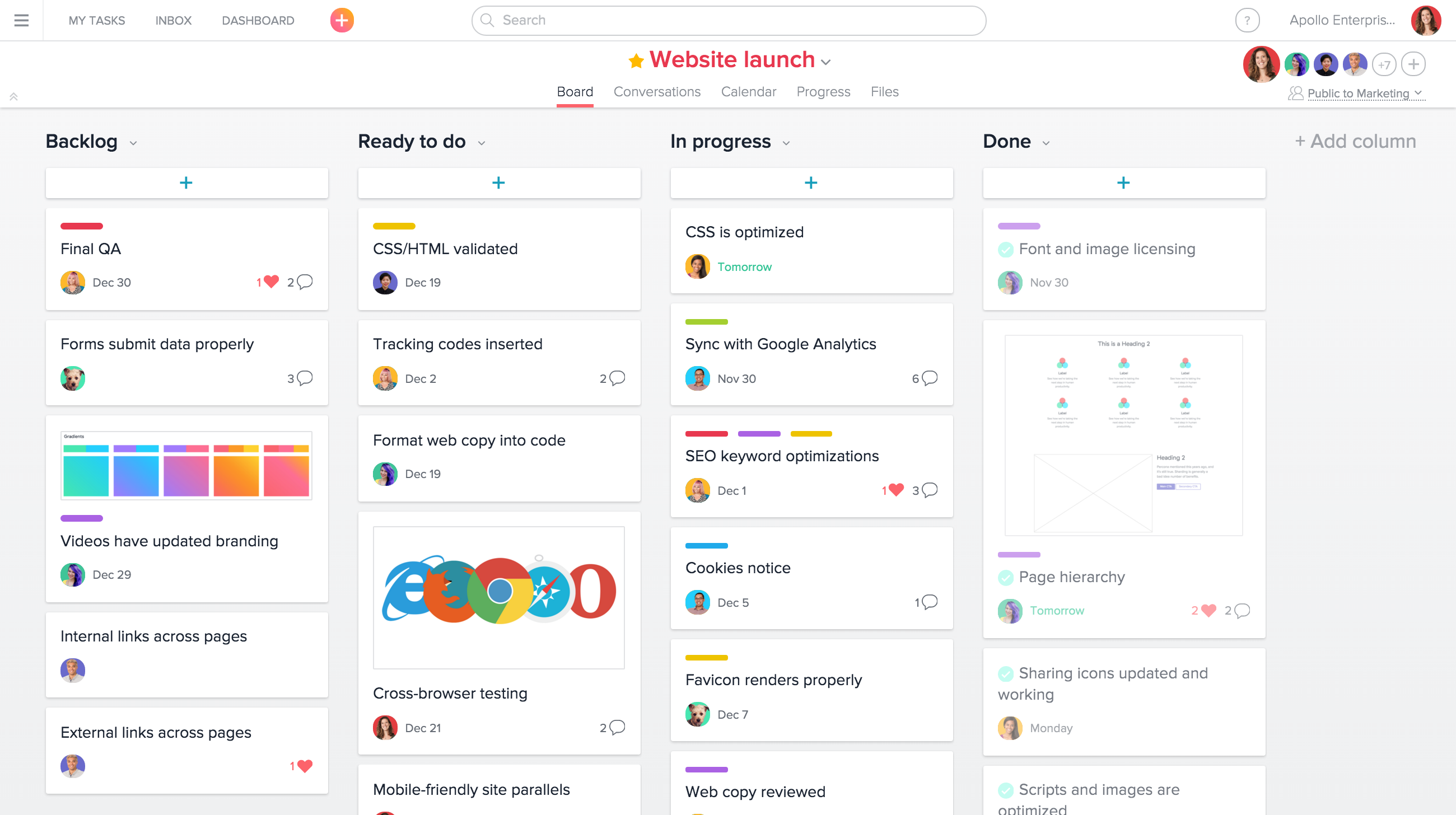
Asana approaches resource management from a work-management perspective. Its Workload functionality lets managers see assignments across projects, evaluate effort, and rebalance tasks.
Asana's Workload feature provides a real-time view of team workload and supports future planning, effort values, filtering, and drag-and-drop reassignment
That makes Asana a natural option for organizations already using it as a central collaboration and project-management environment.
The platform also offers capacity planning, workload, time tracking, reporting dashboards, and timesheets and budgets as part of its resource-management capabilities. Asana's resource-management suite includes capacity planning, workload, time tracking, reporting dashboards, and timesheets and budgets
One strength is flexibility in how workload is measured. Teams can use hours, task counts, or custom effort points depending on their planning model.
Asana allows workload to be measured using hours or points and lets managers view workload across different future time ranges
Best for: Cross-functional teams that want workload planning embedded within a broader collaborative work-management environment.
Implementation Tactics
Buying Resource Management Software will not fix a weak planning process by itself. Use these five implementation tactics regardless of which platform you select.
1. Build one capacity definition
Agree on what "available" means.
If one manager considers 40 weekly hours available while another deducts meetings, holidays, internal work, and PTO, your capacity reports will produce misleading comparisons.
Create a consistent formula for usable capacity and apply it across teams.
2. Separate confirmed demand from potential demand
Your workload model should distinguish between contracted projects, likely opportunities, and speculative pipeline.
A simple three-level model works well:
- Committed: Work that must be delivered.
- Probable: Work with a meaningful likelihood of starting.
- Possible: Pipeline that should inform scenarios but should not consume full staffing assumptions.
This gives leadership a more realistic picture of future demand without pretending that every sales opportunity is guaranteed.
3. Plan by skills, not just availability
A person with 20 free hours is not automatically the right person for a 20-hour assignment.
Add skills, seniority, role, domain expertise, and client familiarity to your staffing criteria. This is especially important in engineering, architecture, consulting, IT, and specialist creative work.
Kantata's capacity-planning guidance explicitly emphasizes matching availability and skills with project demand rather than treating capacity as a simple hours calculation. Kantata explains that effective capacity planning combines availability, skills, workload, and project demand
4. Establish a rolling planning cadence
Do not wait for a quarterly staffing meeting.
A practical cadence is:
- Weekly: resolve immediate overloads and unassigned work.
- Monthly: review utilization, upcoming demand, and skill gaps.
- Quarterly: revisit hiring, contractor requirements, service mix, and capacity assumptions.
This turns workload planning into an operating process rather than an administrative report.
Ravetree's resource-utilization guidance similarly argues for differentiated utilization targets and continuous attention to the relationship between utilization and realization. Ravetree's resource-utilization guidance recommends monitoring utilization alongside realization and tailoring utilization expectations to different roles
5. Test scenarios before committing people
Create "what if" scenarios.
What happens if the largest project starts two weeks early? What happens if a senior engineer takes unexpected leave? What happens if three proposals close simultaneously?
Scenario planning converts resource management from reaction into preparation.
Measuring Success
A workload-planning system needs more than a colorful schedule. Track a small set of metrics that connect capacity to business outcomes.
Utilization
Utilization tells you how much available delivery capacity is being consumed. It can reveal underuse, over-allocation, or structural planning problems.
Use it as a diagnostic rather than a target to maximize blindly. A team permanently operating at maximum capacity may have little room for unexpected work, training, quality control, or recovery.
Forecast accuracy
Compare projected demand with actual demand.
If the forecast consistently predicts 1,000 hours and actual requirements reach 1,400, your staffing model needs refinement. If it consistently predicts 1,400 and actual demand is 900, you may be carrying unnecessary capacity.
Allocation variance
Measure the difference between planned and actual resource assignments.
Large variances can indicate scope changes, weak estimation, unexpected dependencies, or poor initial staffing decisions.
Bench time
Track available capacity that remains unassigned.
Bench time is not automatically waste. Some buffer is healthy, especially for teams dealing with unpredictable client work. The goal is to distinguish deliberate capacity reserves from persistent underutilization.
Project profitability
Connect resource decisions to financial outcomes.
Deltek's 2025 professional-services benchmark linked declining utilization and delivery performance with pressure on firm profitability. Deltek's 2025 benchmark reported declining utilization alongside weaker professional-services financial performance
That is why resource planning should not end with "Is everyone busy?" The better question is "Are we allocating the right people to the right work at economically sustainable levels?"
Ravetree's broader work-management philosophy makes this connection explicit by tying resource planning to project budgets, time, expenses, forecasting, and profitability. Ravetree's PSA platform connects resource planning with project financials, time and expenses, forecasting, CRM, billing, and client portals
Future Considerations
The next generation of Resource Management Software will increasingly be expected to do more than display current workload.
AI is already becoming part of project-management practice. PMI reported in March 2025 that 48% of GenAI "Trailblazers" achieved advanced productivity gains compared with 3% of "Explorers"
The implication for workload planning is significant. Software can potentially move from showing managers that a person is overloaded to helping identify likely bottlenecks before they occur.
But automation does not eliminate the need for judgment.
PMOs still need to decide whether a project deserves priority. Resource managers still need to understand interpersonal dynamics and specialist skills. Executives still need to balance profitability against employee sustainability.
AI should therefore strengthen the planning loop rather than replace it.
The governance question is becoming more important too. PMI published a global standard for AI in portfolio, program, and project management in June 2026, emphasizing structured and responsible AI use in project work
That points toward a future where resource-planning systems increasingly recommend staffing scenarios, identify capacity gaps, forecast demand, and surface anomalies—but organizations retain accountability for the decisions.
Another emerging priority is skills visibility. As technology changes the composition of work, organizations need to understand not only how many people they have but what those people can do.
Deloitte's research similarly highlights continuing talent pressure and the importance of specialized talent within modern business-services organizations. Deloitte's 2025 Global Business Services survey identifies skilled-talent demand and hybrid working as persistent workforce pressures
For buyers, that means the next software evaluation should ask a broader question than "Does it show workload?"
Ask whether the platform can help you understand capacity, skills, demand, utilization, financial impact, and future scenarios in one planning process.
Frequently Asked Questions
What is Resource Management Software?
Resource Management Software helps organizations plan, allocate, schedule, and monitor people and other delivery resources across projects. Modern platforms can combine availability, workload, skills, utilization, capacity, and forecasting.
What is the difference between resource planning and workload management?
Resource planning focuses on assigning people and capacity to expected work. Workload management focuses on monitoring the amount and distribution of work those people actually carry.
Which tool is best for professional-services firms?
The answer depends on the operating model. Ravetree and Kantata are particularly oriented toward professional-services resource management, while Float emphasizes visual capacity planning and Asana integrates workload management into a broader collaboration platform.
How often should teams review capacity?
A weekly operational review is a useful starting point, supplemented by monthly forecasting and deeper quarterly workforce planning. The exact cadence should reflect how quickly project demand changes.
Should utilization always be maximized?
No. Extremely high utilization can leave insufficient room for unexpected work, internal responsibilities, training, and recovery. The appropriate target depends on role, business model, service mix, and operational requirements.
Can Resource Management Software replace spreadsheets?
It can replace many spreadsheet-based planning workflows, but implementation quality matters more than simply changing tools. The organization still needs consistent definitions, reliable data, clear ownership, and a regular planning process.