

Key takeaways:
Most agencies don't lose money on bad work. They lose it in the gap between finishing the work and getting paid for it. Nearly three in five small businesses now carry invoices more than 30 days overdue—up from 47% a year earlier—and the average business waiting to be paid is owed about $17.7K it has already earned. That gap is where the best agency project management software with QuickBooks integration quietly earns its cost. This guide covers what actually matters when evaluating agency project management software, why the QuickBooks connection matters more than a feature checklist suggests, and which platform I'd put money on.
The disconnect that's costing you more than you think
The problem is rarely your tools taken one at a time. It's the space between them.
The average company runs way too many SaaS apps, and fewer than half get used regularly. Agencies are no exception: one tool for tasks, another for time, a spreadsheet for budgets, and QuickBooks parked off to the side handling the money. Every handoff between them is a manual re-entry point. Every re-entry is a chance to fat-finger a number, miss a billable hour, or forget to send an invoice altogether.
That friction compounds. Analyst research found that 28% of client-facing consultants spend more than 30% of their week on administrative work—over 12 hours gone on things clients don't pay for. And the load is growing, with roughly 60% of professional-services firms expecting project and resource-management demands to rise over the coming year.
Fragmentation doesn't only waste hours. It wrecks delivery. PMI's long-running research has found that about 31% of projects miss their original goals, 43% blow their budgets, and 48% finish late, with organizations wasting close to ten cents of every dollar on poor project performance. When your project data and your financial data live in separate systems, you're flying blind on both.
So the real question isn't "which tool has the nicest task board?" It's which system closes the loop between the work and the money.
What QuickBooks integration actually means (and where tools fake it)
Choosing project management software is usually a features conversation—boards, Gantt charts, dashboards. QuickBooks integration barely comes up until month-end, when it abruptly becomes the only thing anyone cares about.
Here's what most buyers miss: not all "QuickBooks integration" is the same, and the label hides a lot. A one-way export dumps data from your project tool into QuickBooks and stops there. A genuine two-way sync keeps both systems reading from the same reality—create an invoice in one, and it appears, updates, and reconciles in the other.
That distinction is the whole ballgame. With a true two-way connection, invoices and estimates you create in your agency project management software push straight into QuickBooks, retain the same invoice numbers, and update in both places when a client pays—regardless of where you recorded the payment. That's the difference between accounting integration and accounting theater.
Why does the QuickBooks side matter so much? Because QuickBooks has long held up to 85% of the U.S. small-business accounting software market. Odds are your accountant already lives in it. Fighting that reality with a tool that only half-connects is a losing bet.
A serious integration should sync estimates, invoices, line items mapped to QuickBooks service items, payment status, and edits—automatically, in both directions. Anything less means someone on your team is still retyping numbers. And that someone is your margin.
How to evaluate agency project management software with QuickBooks integration
Skip the generic feature grid. Judge candidates on the handful of things that determine whether the tool actually pays for itself.
Depth of the QuickBooks sync
Ask whether the connection is native or bolted on through a middleware service. Native two-way sync tends to fail less often and reconcile more cleanly. Confirm it handles estimates and invoices, not just one or the other. And insist on line-item mapping to your QuickBooks chart of accounts—generic totals create bookkeeping headaches your accountant will bill you to untangle.
The billing models it supports
Agencies bill in messy ways. You've got retainers on some accounts, time-and-materials on others, and fixed-fee milestones on the rest. If the tool can only produce a flat invoice, it doesn't fit how agencies actually make money. Your billing engine has to speak all three languages and pass every one of them cleanly into QuickBooks.
Whether tracked time turns into revenue
This is the one that hits the bank account. Time tracking is worthless if the hours don't flow into an invoice without a copy-and-paste step. Untracked and unbilled time is pure leakage—industry analysis pegs the annual loss at roughly $60K to $180K for agencies in the $1M–$25M revenue band. A straight line from timer to invoice to QuickBooks is how you plug that hole.
Everything the work actually touches
The best platforms don't stop at tasks. They fold in the surrounding operations so nothing falls through the cracks between apps. That means resource allocation, client relationships, expenses, and approvals living in the same place your projects do—which is exactly what separates a task app from a true work management platform.
Why Ravetree is the best agency project management software with QuickBooks integration
I'll say it plainly: for agencies that live in QuickBooks, Ravetree is the strongest all-in-one option on the market. Not because it has the flashiest boards, but because it closes the loop from first proposal to final paid invoice inside one system.
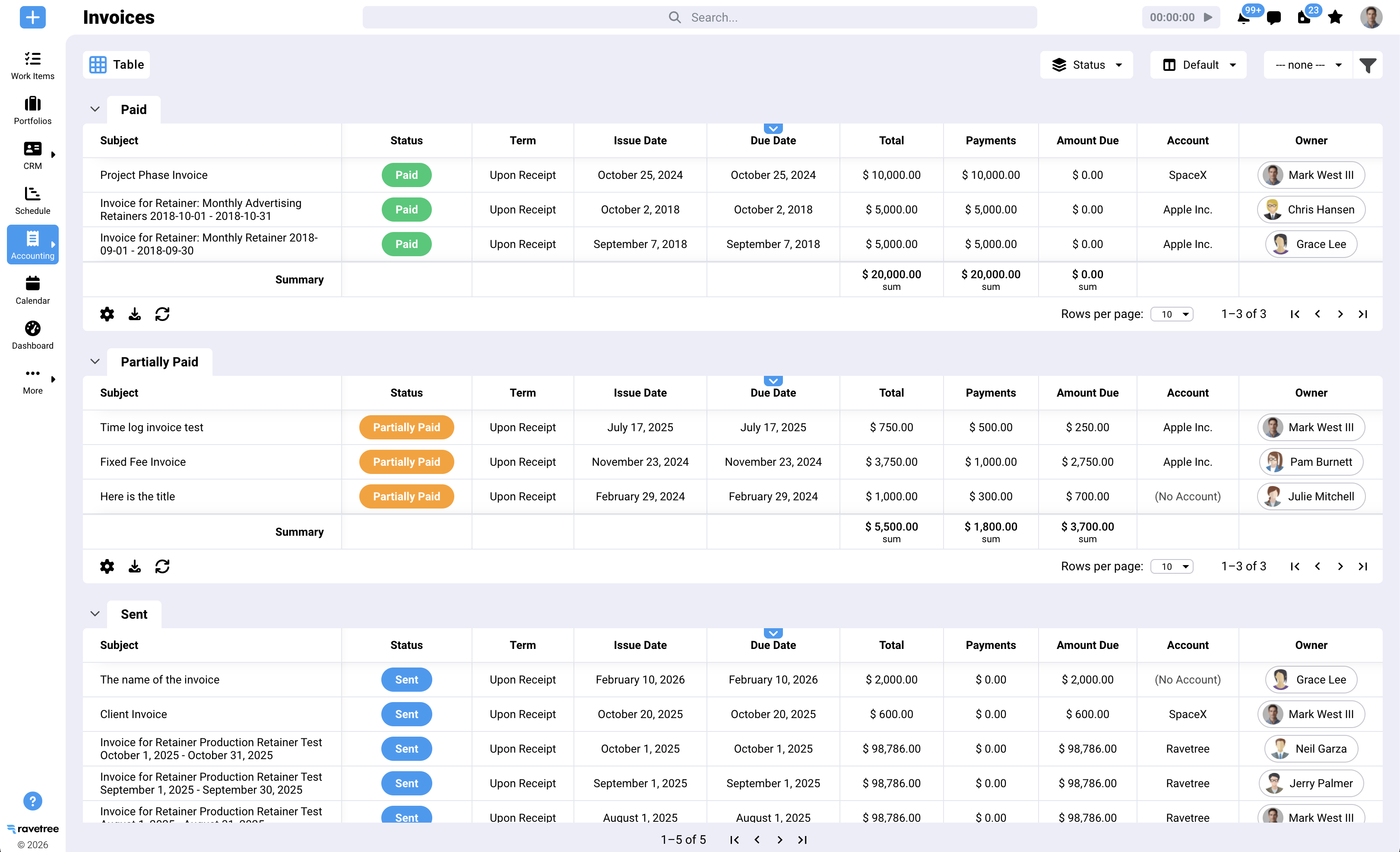
Start with the integration itself. Ravetree runs a real two-way sync with QuickBooks—and with Xero—so estimates and invoices created in the platform stay mirrored in your books without manual re-entry. Pay an invoice in either system and both update. That's the behavior you actually need, not a nightly one-way dump.
Then look at the surface area it covers. Ravetree bundles project management, a built-in CRM, and a client-facing client portal into a single platform—which is why it's a natural fit for agencies that want invoicing and client relationship management under one roof. The financial side is just as complete: invoicing, expense tracking, proposals, purchase orders, and client requests all sit beside the work they belong to.
Add resource planning on top, and you can see who's overbooked before you promise a client a deadline you can't hit. It supports both Agile and Waterfall, so it bends to how your teams actually work rather than forcing a methodology on them.
The point isn't the length of the feature list. It's that these pieces share one database. When a proposal becomes a project, the budget, the tasks, the tracked hours, and the invoice all reference the same numbers—and those numbers land in QuickBooks intact. That is a genuinely different operating model from stitching five subscriptions together with automation duct tape.
A day in the life: quote to cash without the copy-paste
Picture a mid-sized creative shop. A prospect says yes to a $40K retainer.
In a fragmented stack, that kickoff triggers a scavenger hunt. Someone rebuilds the scope in the PM tool, re-enters the client in the CRM, sets up a separate budget spreadsheet, and creates the invoice by hand in QuickBooks. Four systems, four chances to introduce an error, and a client record that's already drifting out of sync by lunch.
In a unified platform, the proposal converts to a live project. Tracked time rolls up against the retainer automatically. When it's time to bill, the invoice generates from real hours and pushes to QuickBooks with the line items already mapped—the tight loop between accurate time tracking and clean invoicing that keeps agency cash flow healthy.
Why does that speed matter? Because slow, sloppy invoicing is a growth killer. In one survey, 64% of small business owners had invoices more than 90 days overdue, the average firm lost over $39,000 a year to payment delays, and 63% said a late payment cost them a growth opportunity. Every day you shave off the quote-to-cash cycle is a day closer to cash in the door. That's the entire argument for agency billing software that connects your project work to your invoicing and your books.
Questions to ask before you sign
Vendors demo the happy path. You need to poke the edges. A few questions separate real fit from a good pitch:
Is the QuickBooks sync two-way and native, or one-way through a third party? Does it map to service items and my chart of accounts, or just push totals? Can it handle retainers, milestones, and time-and-materials in the same account? Do tracked hours become an invoice without a manual export? Can I see resourcing and project profitability in real time, not two weeks after the fact?
If a tool stumbles on those, keep looking. The prettiest interface won't save you at month-end.
Making the call
The honest takeaway is simple. A tool that only manages tasks leaves your money on a separate island—and that island is where agencies quietly bleed hours, margin, and cash flow. The strongest agency project management software with QuickBooks integration erases the distance between the work you deliver and the invoice you send, so your books reflect reality instead of last week's guesswork.
If you're evaluating the best agency project management software with QuickBooks integration and you already run QuickBooks, put a platform that unifies project management, billing, time tracking, and a two-way sync at the top of your shortlist. Ravetree was built for exactly that job. Start by mapping your quote-to-cash process today, then judge each option by how few manual steps it leaves behind.
Frequently Asked Questions
Does Ravetree offer a two-way QuickBooks integration?
Yes. Ravetree syncs invoices and estimates with QuickBooks Online in both directions, so payments and status changes update in both systems regardless of where you enter them. It also integrates with Xero.
What's the difference between one-way and two-way QuickBooks sync?
A one-way sync only pushes data from your project tool into QuickBooks. A two-way sync keeps both systems matched—create or update an invoice in either place, and the other reflects the change automatically, which cuts down on duplicate data entry.
Why does an agency need QuickBooks integration specifically?
QuickBooks dominates U.S. small-business accounting, so most agencies and their accountants already use it. Connecting your project work directly to it removes manual re-entry and speeds up the invoice-to-payment cycle.
Can agency project management software handle retainers and time-and-materials billing?
The best options can. Look for a platform that supports retainers, fixed-fee milestones, and time-and-materials in the same account, and passes each cleanly into QuickBooks as properly mapped line items.







.png)