.png)

Key takeaways:
The problem for most agencies isn't that they lose deals. They lose the thread between winning the work and doing it. A prospect says yes — and then the story restarts, from a CRM the delivery team never opens to a project tool the sales team never sees. That gap is why work management software with CRM has stopped being a nice-to-have. When your pipeline and your delivery share one system, the handoff stops leaking. This guide covers what the integrated model actually fixes, how the connected client lifecycle works, what to look for in a platform, and where the approach earns its place.
Why sales and delivery data keep drifting apart
Here's the pattern. Sales runs on one system. Delivery runs on another. Finance runs on a third. Each was bought to solve a real problem, and each solved it — in isolation.
The trouble is that a client isn't three separate things. A client is one relationship that moves from lead to proposal to project to invoice to renewal. Split that relationship across disconnected tools and you inherit the daily tax every operations lead knows: re-keyed data, stale records, and the "wait, who owns this account?" scramble on a Monday morning.
It's not a small tax. The average business has integrated only 28% of its applications, and 81% of IT leaders say silos are blocking their operations. Salesforce's connectivity research puts a finer point on it: 80% of organizations say data silos are actively hindering them. Every silo is a spot where your client's story gets rewritten by hand.
And the tooling keeps multiplying. The average company runs on too many applications. More tools, more seams. More seams, more leaks. You didn't choose sprawl on purpose — it accumulated one reasonable purchase at a time.
None of this shows up as a line item. There's no invoice for "time lost re-entering data" or "deals that stalled because two teams saw two versions of the same account." That's what makes the disconnect so durable — it's expensive and invisible at once. You feel it as a nagging sense that everyone's busy but nothing moves as fast as it should.
What "work management software with CRM" actually means
Let's define the term plainly, because vendors love to muddy it.
The best work management tools plan, assign, track, and deliver the work itself — tasks, projects, schedules, and capacity. A CRM manages relationships and revenue — leads, deals, pipeline, and accounts. Work management software with CRM fuses the two, so the record that closes a deal becomes the record that runs the project.
That's the whole idea. One client object. One continuous history. Visible to sales and delivery at the same moment, without an export in between.
Now compare that to the stitched-together version most agencies live in. Sales closes a deal in one app. Someone exports it. Someone else re-enters it into project management. And the original context — the scope promises, the pricing assumptions, the client's known quirks — evaporates in translation.
The integrated version keeps the context because nothing ever gets handed off. It just moves forward. That's the real distinction between an agency management platform with invoicing and CRM and a folder full of subscriptions that occasionally sync overnight.
The real cost of the gap between closing and doing
Skeptical that a data seam matters to the bottom line? Follow the money. This is where the disconnect stops being an annoyance and becomes a P&L problem you can measure.
Revenue leakage
Professional services firms lose an estimated 5% to 12% of revenue to leakage — unbilled time, scope creep, rate drift, and delayed invoices. A large share of that traces straight back to disconnected systems. When the person doing the work can't see the commercial terms, hours slip through the cracks unbilled.
The numbers get concrete fast. The average services firm bills only 90% to 95% of the hours it actually delivers — meaning a 30-person shop can quietly forfeit six figures a year to work that got done and never invoiced. And that's on top of a utilization problem. Billable utilization has already slipped to 68.9%, below the 75% most firms need for healthy margins. You can't afford to donate billable hours on top of a soft utilization rate.
Timing is the fix nobody wants to hear. Real-time capture logs 95% to 98% of billable hours, while end-of-week reconstruction captures just 65% to 75%. Time tracking that lives next to the project — not in a separate app you crack open on Friday afternoon — is how you close that gap. When time, delivery, and billing share a system, hours stop disappearing between them. That's the whole argument for billable-hours tracking built into the platform rather than bolted onto the side.
Context switching
Every tool you add is another place to log in and lose your place. Digital workers toggle between apps and sites nearly 1,200 times a day. After a switch, it takes about 9.5 minutes to get back into a productive flow. Multiply that across a team and the friction is enormous — one estimate pegs the drag on the US economy at $450 billion a year.
Consolidation pays it back. Workers with a single, unified view of their priorities spend 42% less time on "work about work" — the status-chasing and information-hunting that eats delivery hours alive. That's the quiet upside of putting the CRM inside your work management platform instead of beside it: fewer tabs, fewer handoffs, and more time on the work clients actually pay for.
Two agencies, one Monday morning
Picture two shops of the same size. Same billings, same client list, same talent. The only real difference is their plumbing.
At the first agency, Monday starts with archaeology. The account manager opens the CRM to check what was promised, a project tool to see what's scheduled, a spreadsheet to reconcile last week's hours, and email to find the approval nobody logged. By the time she has a clear picture, it's nearly lunch — and the picture is already stale. A change request from Friday never made it out of the inbox and into the plan. Someone is about to burn unbilled hours on scope that was never approved.
At the second agency, Monday starts with a dashboard. One client record shows the signed scope, the live project, the hours logged so far, and the retainer balance — because sales, delivery, and finance all write to the same place. The change request came in through the client portal, so it's already attached to the account with a price on it. Nothing to reconcile. Nothing to chase.
Same people. Same skill. The second agency simply doesn't pay the coordination tax the first one pays every single week. Stretched across a year, that tax is the gap between hitting margin and wondering where it went.
Following one client from first touch to final invoice
Theory is cheap. Here's what the integrated model looks like in motion — one client, one unbroken chain, no retyping.
Lead to proposal
A lead lands. It sits in your CRM with source, contact, and context attached from the first touch. When it's time to pitch, you build proposals from that same record — no re-entering the company name for the fourth time. Sales teams that automate this repetitive entry save around two hours and fifteen minutes a day. That's not a rounding error; that's a significant amount of capacity across a team.
Proposal to project
The deal closes. In a connected system, the won deal becomes the project — scope, budget, and terms carried over intact. No export. No re-entry. No lost assumptions three weeks later when someone asks what you actually promised. This is where work management software with team capacity planning proves its worth: you can see, before you say yes, whether you actually have the people to deliver what sales just sold.
Project to delivery
Now the team runs the work. Resource planning shows who's booked and who's free, so you staff from reality instead of optimism. Requests route new client asks into the right queue instead of dying in someone's inbox. And every hour gets logged against the project as it happens, not reconstructed from a hazy memory on Friday.
Delivery to cash
Logged hours flow into invoicing without a spreadsheet playing middleman. Bills pull from real delivery data. Expense tracking and purchase orders attach to the right job. A client portal gives the client a clean window into progress and approvals, which cuts the email ping-pong that buries decisions. And for ongoing accounts, retainers track burn-down against the monthly commitment, so nobody discovers an overage after the money's already spent.
One record. Five stages. Zero handoffs. That's the structural advantage a unified platform holds over four apps taped together.
What to look for when the CRM lives inside the work
Not every "all-in-one" is actually one. Some are three products in a trench coat. Here's how to tell the difference before you sign.
Look for one shared client record. The deal, the project, the invoices, and the communication history should all hang off the same account — not be linked by a fragile integration you have to babysit. If sales and delivery are looking at different versions of the same client, it isn't integrated. It's synced, and sync breaks.
Look for a pipeline that feeds delivery. Your CRM should forecast more than revenue. A won deal should tell resource planning what's coming, so capacity planning isn't a guessing game every quarter. This is the CFO's case for running the business on a single work management platform — one source of truth stretching from pipeline all the way to profit.
Look for financials that reflect real work. Time, expenses, and billing should update from what the team actually did, not from a parallel system that never sees the project. If your invoices come from somewhere your delivery data doesn't reach, you're back to manual reconciliation — and the leakage that rides along with it.
Look for client-facing tools, not just internal ones. Proposals, approvals, and a portal keep the client inside the same system instead of scattered across a dozen email threads. The fewer places a decision can hide, the faster it gets made.
One practical test: ask a vendor to demo a single client record moving through all four of those areas. If they can only show you features in isolation — a slick CRM here, a tidy task board there — that tells you exactly how connected the product really is.
A common mistake worth avoiding
Plenty of agencies try to fake integration with a web of automations between separate tools. A trigger here, a webhook there, a nightly sync to tie it together.
It works until it doesn't. Every automation is a dependency that breaks quietly, usually the week you're slammed. A field gets renamed, an API changes, and suddenly your "integrated" stack is dropping deals on the floor. Duct-taped integrations also multiply the very data silos you were trying to kill — now the truth lives in the gaps between systems, and someone has to be the human translator who knows where.
A genuinely unified system has nothing to sync because the data was never separate to begin with. That's a different architecture, not a cleverer set of connectors.
Be honest about the trade-off, though. A single platform means committing to one vendor's way of doing things, and you'll give up a few best-in-class point features you might love today. The payoff is that you stop maintaining plumbing and start trusting your numbers. Go in knowing you're buying an ecosystem, not a widget — that framing saves a lot of buyer's remorse later.
Where Ravetree fits
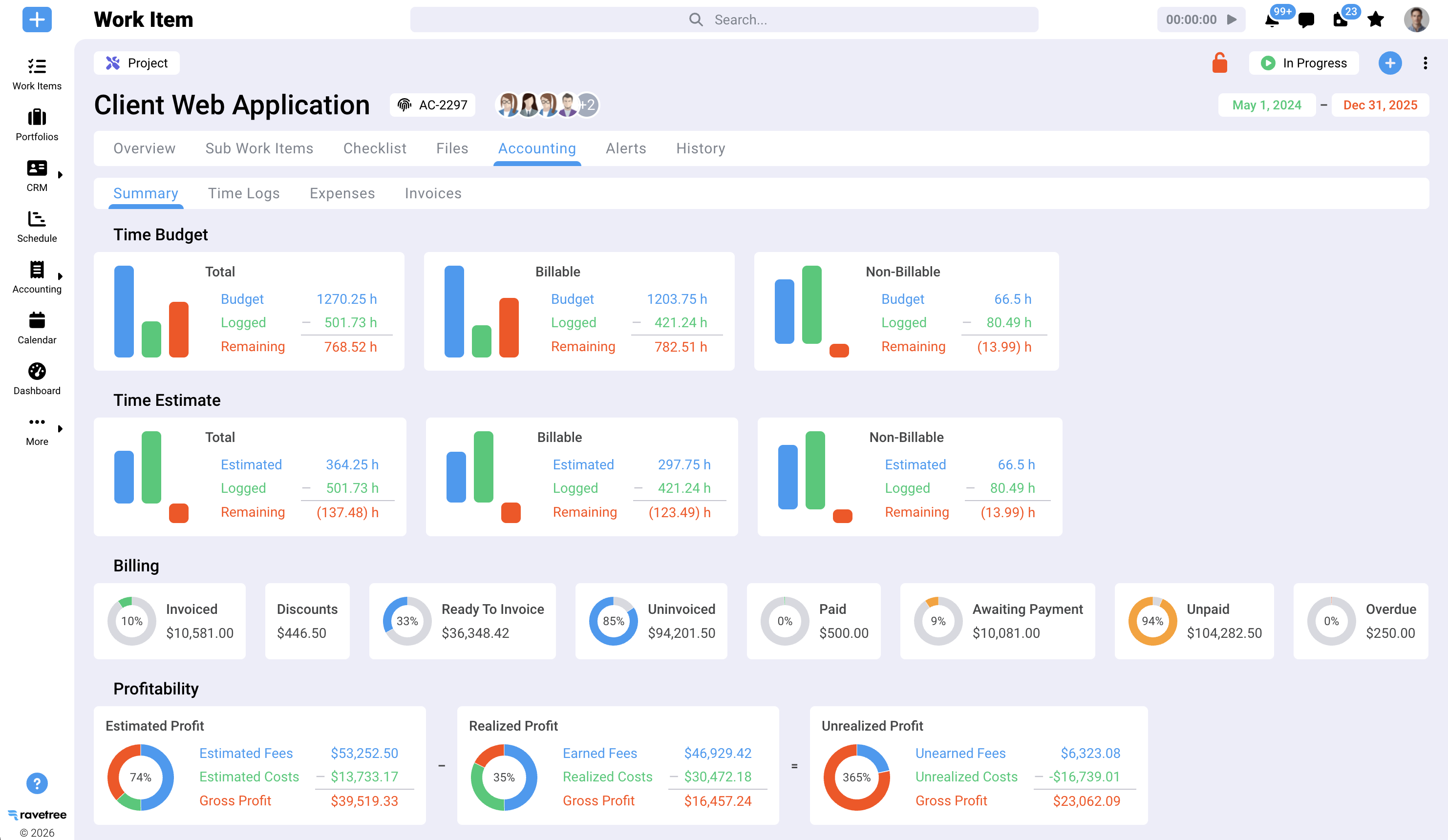
I'll be direct: this is the category Ravetree was built for. It's work management software with CRM in the literal sense — pipeline, projects, resourcing, time, and billing sharing one backbone instead of four subscriptions stitched together at the seams.
The reason it works for agencies is that the CRM isn't a bolt-on. A deal in the pipeline is the same object that becomes a project, gets staffed through resource planning, accrues time, and turns into an invoice. The client lifecycle stays continuous end to end, which is the entire point of choosing a work management platform built for digital agencies over a generic task board that treats billing as someone else's problem.
What tends to surprise agencies is how much the finance side benefits. Because expense tracking, purchase orders, invoicing, and retainers all draw from the same delivery data, month-end stops being a reconciliation marathon. The numbers reconcile because they were never separated in the first place. Your finance lead spends less time assembling the truth and more time acting on it — pricing more accurately, flagging overruns earlier, and forecasting from real pipeline instead of gut feel.
Is it the flashiest lightweight task app on the market? No — and if a simple kanban board is genuinely all you need, it's more platform than the job calls for. But if your pain is the gap between what sales sold and what delivery can actually bill, a unified system is the answer, and closing that gap is precisely what Ravetree does well.
Who this model doesn't suit
Honesty keeps this useful, so here's the flip side. This model isn't for everyone.
If you're a solo freelancer with five clients and a notebook that works fine, an integrated platform is overkill — buy back your time some other way. And if your sales and delivery are genuinely unrelated — say, a product company where the CRM tracks transactions that never turn into projects — the combined model buys you less, because there's no handoff to protect in the first place.
The sweet spot is clear. It's services businesses where every closed deal becomes work that someone has to plan, staff, track, and bill. Agencies. Consultancies. Studios. If that describes you, the seams between your current tools are quietly costing you margin every month you leave them in place.
The bottom line
The case for work management software with CRM isn't really about owning fewer logins, though you'll get that too. It's about refusing to let your client's story get rewritten every time it crosses a border between departments. Sales, delivery, and finance stop arguing over which system holds the truth — because there's one system, and it reflects the actual work.
Start small. Trace a single client through your current stack and count the handoffs, the re-entries, and the moments when data goes stale. Each one is leakage you can put a number on. Then decide whether a connected platform is worth closing that gap. For most agencies running on disconnected tools, work management software with CRM pays for itself in the revenue it stops you from leaving on the table.
Frequently Asked Questions
What is work management software with CRM?
It's a single platform that combines client relationship management — leads, deals, and pipeline — with the tools to plan, track, and deliver the work those deals become. One client record runs from first contact through project delivery to final invoice, with no handoff in between.
How is it different from using a separate CRM and project management tool?
Separate tools force a handoff: sales closes a deal in one app and someone re-enters it into another, losing context and creating data silos. An integrated platform keeps one continuous record, so nothing gets re-keyed and sales and delivery always see the same client.
Does combining CRM and work management reduce revenue leakage?
It targets the biggest sources of it. When time tracking, billing, and project data share one system, fewer hours go unbilled and invoices reflect real delivery — which matters when services firms lose 5–12% of revenue to leakage and bill only 90–95% of the hours they deliver.
Who benefits most from an integrated CRM and work management platform?
Services businesses where closed deals become client work — agencies, consultancies, and studios. If every sale turns into a project someone must staff, track, and bill, an integrated platform removes the costly seams between sales, delivery, and finance.
Isn't connecting my existing tools with automations good enough?
Rarely, for long. Automations between separate systems break quietly and still leave the truth scattered across the gaps between apps. A unified platform has nothing to sync because the data was never separated to begin with.