

Key takeaways:
Architecture billings have now declined for nearly three and a half years straight, the longest slump in the history of the AIA's billings index . In a market like that, you can't win simply by working harder. You win by protecting more of the revenue from the fees you've already secured.
That's the real job of project management software in an architecture practice. This guide to the best project management software for architecture firms skips the generic feature checklists. Instead, it focuses on the capabilities that matter when your revenue comes from phase-based fees, consultant markups, and additional services that too often go unbilled.
I'll say up front where this lands. For most small and midsize practices, Ravetree is a strong fit, and I'll explain why. But the tests below apply to any vendor, so you can use them to evaluate your options.
Why Architecture Firms Break Generic Project Tools
Most task management tools were built for software sprints or marketing calendars. Architecture projects are different. A single commission can run for 18 months, pass through five design phases, involve half a dozen consultants, and change scope every time the client reviews a rendering.
Firm size makes things even harder. The AIA reports that about 75% of the more than 19,000 U.S. architecture firms have fewer than 10 employees . In these offices, the principal may also be the project manager, bookkeeper, and person responsible for following up on late invoices. There's no dedicated operations team to compensate for inefficient software.
The margin for error is thin, too. Firms reported average pre-tax, pre-bonus profit of 11.5% of net service revenue, falling to 9.0% at the smallest firms . When fees are fixed and profit margins are in the single digits, a few dozen unbilled hours on one project can wipe out its profit.
So the question isn't "Which tool has the nicest Gantt chart?" It's "Which tool tells me a project is losing money while I can still do something about it?"
Six Tests Architecture Firms Should Apply to Any Platform
Firms sometimes buy software based on an impressive demo, only to abandon it within a few months. The problem is often the same: the tool handles tasks but ignores project fees and financial performance. Run every candidate through these six tests before making a decision.
1. Can it track fee burn by design phase?
Your contract is typically organized into phases: schematic design, design development, construction documents, bidding, and construction administration. Your software should reflect that structure. If you can't see that design development (DD) has consumed 80% of its fee while half the drawings remain unfinished, you might not discover the overrun until you prepare the invoice. By then, it's too late to address the problem proactively.
Here's a quick example. Suppose a $400,000 fee allocates 15% to schematic design (SD), or $60,000. By the time the owner approves the design, your team has logged $78,000 in labor costs against SD. That $18,000 overrun doesn't disappear. It eats into the budgets for DD and construction documents (CDs), potentially putting the entire project at risk before construction documents even begin.
The right software can flag the problem when you've used $48,000 of the $60,000 SD budget, giving you time to review the remaining work and discuss the scope with the owner.
2. Does it catch additional services before they become write-offs?
Scope creep in architecture rarely announces itself. It might be a third layout option, an extra owner meeting, or a "quick" code study. Risk advisors at WTW stress that additional services should be documented in writing, ideally on a standard contract modification form co-signed by the owner . Good software makes documenting these requests part of the normal workflow rather than an extra administrative task.
3. Does your capacity plan see your backlog, not just this week?
Utilization is a lever many firms could use more effectively. Zweig Group's benchmarking put median chargeability across AEC firms at nearly 62% . That means a significant portion of paid employee time isn't being billed to clients.
The math is sobering. Consider a 12-person studio with 2,080 available hours per person and an average hourly rate of $140. Each percentage-point increase in chargeability represents approximately 250 additional billable hours, or $35,000 in potential annual revenue. Moving from 62% to 67% could therefore generate about $175,000 in additional revenue without adding a client.
Backlog makes this especially important. In mid-2026, average firm backlogs slipped to 6.3 months, and firms billing under $250,000 a year saw backlogs drop from 4.9 months to 3.1 . When the pipeline shrinks that quickly, you need capacity planning that accounts for upcoming work, not just who's busy today.
4. Can it control consultant fees and reimbursables?
Structural, mechanical, electrical, plumbing (MEP), civil, acoustics, and lighting consultants can consume a substantial portion of a project's fee. If consultant commitments are tracked only in email or a separate accounting system, you might not discover that a consultant has exceeded the budget until their invoice arrives.
Look for software that supports formal vendor commitments and tracks consultant costs against the project budget. This gives project managers a way to monitor spending before invoices arrive and identify potential overruns early.
5. Does it handle client reviews and drawing approvals?
Architecture projects depend on client sign-offs. Owners review floor plans, finish selections, and design packages throughout the project. When approvals are buried in email threads, it can be difficult to establish what was approved and when, especially if a dispute arises during construction administration.
Look for a system that centralizes client reviews, records approval dates, and keeps an accessible history of decisions and revisions.
6. Can your proposals learn from your actuals?
Most fee proposals start with a combination of experience, intuition, and last year's spreadsheet. A better approach is to price a new 40,000-square-foot clinic using the actual costs of your last three healthcare projects, broken down by phase.
That approach requires proposal and project delivery data to be available in the same system. When historical project costs are easy to access, firms can make more informed estimates and improve the accuracy of future proposals.
The Three Kinds of Tools Architecture Firms End Up With
Once you apply those tests, the market sorts itself into three categories. Each addresses part of the problem, but they differ in how much of the project lifecycle they support.
Generic task and collaboration boards
These tools are easy to adopt and generally pleasant to use. Designers may appreciate their intuitive interfaces and flexible task boards. However, financial management is often an afterthought. They might offer a budget field, but hourly billing rates and invoicing capabilities are typically limited or unavailable.
As a result, firms often end up managing the financial side of their projects in spreadsheets alongside their task management software.
Ravetree's breakdown of work management vs. project management software explains this distinction. Generic task tools can help teams track project schedules and deadlines, but they may not provide the financial visibility architecture firms need.
Accounting-first ERP systems
These platforms were designed primarily for financial management and back-office operations. They often provide extensive accounting capabilities, but their project management features may feel less intuitive to project managers. As a result, teams sometimes return to whiteboards, spreadsheets, and personal task lists to manage their daily work.
These systems can also come with substantial licensing costs and lengthy implementation timelines, which may be difficult to justify for a small architecture firm.
Even with comprehensive software, adoption can be a challenge. The latest Deltek Clarity study found that many architecture and engineering firms still rely on manual processes for core functions such as accounting and resource management , despite increasing AI adoption.
All-in-one work management platforms
This category, often called professional services automation (PSA), connects client relationships, proposals, project delivery, time tracking, resource management, and billing within a single system. Because these functions share the same data, firms can manage more of the project lifecycle without relying on multiple disconnected applications.
For a deeper vendor-evaluation framework, Ravetree's guide to selecting the right PSA software provides a useful checklist.
Using separate tools can create hidden productivity costs. A Harvard Business Review study found that workers switched between apps about 1,200 times a day, losing close to four hours a week to reorienting . For architecture firms, that lost time can take employees away from design work and other billable activities.
Why Ravetree Is the Best Project Management Software for Architecture Firms
For small and midsize practices that need comprehensive project management and financial control without the complexity of an enterprise ERP system, Ravetree is a compelling option. It brings together the information project managers and principals need in a single platform.
Here's how it addresses the six tests.
Phase-based delivery your PMs will actually use
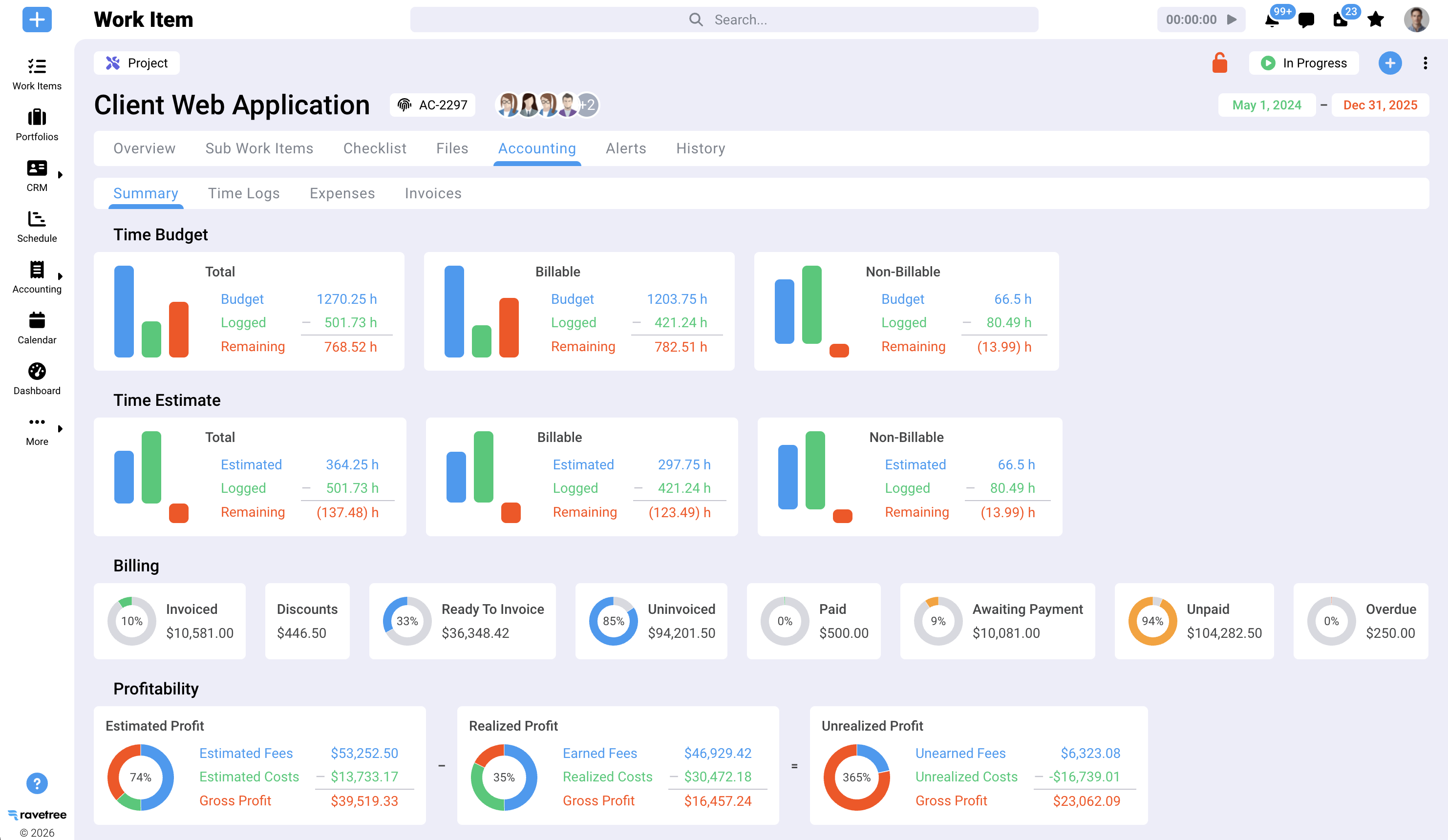
Ravetree's project management supports both waterfall and agile workflows, with Gantt charts, Kanban boards, task dependencies, and milestones.
You can create a project template with your standard phases (SD, DD, CD, and CA), so every new commission starts with a consistent structure. Estimated and actual revenue are visible at both the task and project levels, helping project managers monitor fee consumption by phase rather than waiting until the end of the month.
Time and money on the same record
Time tracking connects directly to projects and billing rates. Approved hours can flow into billing without manually entering the information again.
For ongoing client relationships, such as university campuses or retail chains, retainers make it possible to track hours and dollars against an agreement in real time.
Additional services with a front door
Client requests can come through customizable request forms , which clients can submit themselves. Each request becomes a documented item that can be estimated and reviewed rather than an informal favor that gets lost in the daily workflow.
This makes it easier to follow WTW's advice about documenting additional services and helps ensure that additional work is evaluated before the team begins.
Consultants and reimbursables under control
Purchase orders link to vendors in the CRM , allowing consultant commitments to be recorded against project budgets before invoices arrive.
Expense tracking also connects printing, travel, permit fees, and other expenses to the relevant project. Ravetree explains these capabilities in its guide to choosing project management software with purchase orders .
Approvals clients can see
Each client can access a client portal that provides real-time project status updates. There is no limit on the number of clients you can invite.
Multi-stage file approval workflows allow owners to review and approve design packages, with timestamps and records of their decisions. This gives project teams a centralized approval history and can reduce the need to search through email conversations when questions arise.
Proposals built on real numbers
Proposals can be created from templates or existing projects, allowing firms to use historical project information when preparing new fee estimates.
Meanwhile, resource planning helps managers see employee availability across the firm before committing to a new project or promising a client a start date.
What this looks like on a Tuesday afternoon
Imagine a developer asks for a fourth façade study during design development.
In a firm relying on spreadsheets and email, a designer might spend two days completing the additional work without anyone realizing it needs to be billed separately.
With Ravetree, the request can arrive through the client portal, be estimated, and receive client approval as an additional service. The team then tracks its time against the approved request, and those hours can be included in the next invoice .
The work is the same, but the process makes it easier to capture the additional revenue instead of absorbing the cost.
Where Ravetree Doesn't Replace Your Other Tools
It's important to understand what software can and cannot do. Ravetree isn't a design tool. Revit, AutoCAD, Rhino, and your BIM coordination software remain essential parts of your workflow. Ravetree manages the business operations surrounding your drawings, rather than the drawings themselves.
It's also not a general ledger. Most firms will continue using their existing accounting software and transferring financial data between systems. Ravetree integrates with QuickBooks, for example. Firms that require fund accounting or multi-entity consolidation should confirm that their specific requirements can be met during a demo.
Finally, a sole practitioner managing just two residential projects a year may not need a comprehensive platform. Ravetree becomes more useful when you're managing several concurrent projects, coordinating consultants, and tracking employee time. Ravetree's guide to PSA software for small businesses provides additional context for evaluating when this type of software makes sense.
Five Questions to Ask in Every Vendor Demo
Software demos are designed to highlight a product's strengths. These questions can help uncover its limitations. Bring an actual project to the demo rather than relying on hypothetical examples, and ask the vendor to demonstrate each capability.
1. Show me fee burn versus percent complete for one phase. If the process requires exporting data and building a separate spreadsheet, the software may not provide the visibility you need.
2. Walk me through an additional service from the initial client request to the invoice. Count the screens and manual handoffs involved. Every additional step creates another opportunity for billable work to go unrecorded.
3. How does a consultant's commitment affect my project budget? The commitment should be recorded when the agreement is signed, not only when the invoice arrives weeks later.
4. What does my client actually see? Ask the vendor to demonstrate the client portal and approval process. A dedicated portal with approval tracking offers a different experience from simply sharing a task board.
5. Which of my current tools does this replace? Ask for a specific answer and get it in writing. If the response is simply that the software integrates with everything, you may be adding another layer to your technology stack rather than simplifying it.
One more tip: Include your most skeptical project architect in the trial, not just the principal. If the person responsible for construction documents won't use the software every day, your financial reports may be inaccurate because the underlying time data will be incomplete.
How to Roll Out a New Platform Without Missing a Deadline
The biggest risk isn't necessarily choosing the wrong software. It's implementing a new system without fully transitioning away from the old one. A half-finished rollout can leave employees updating both the software and their existing spreadsheets.
Here's a practical implementation sequence for architecture firms.
1. Pick one live project as the pilot. Choose a project in design development or construction documents with a clearly defined fee and at least two consultants.
2. Build your phase template first. Set up the standard phases from SD through CA, along with deliverables and fee allocations, before employees begin entering time.
3. Make time entry a daily habit. Reconstructing hours at the end of the week can lead to inaccurate estimates and missed billable time. Daily entry helps keep project records accurate.
4. Route every client request through the system. Establish a consistent process for recording additional services, even when the requests seem minor. Small, informal requests are often where unbilled work accumulates.
5. Set a firm date to stop using spreadsheets. Running two systems simultaneously increases administrative work and creates opportunities for conflicting or incomplete information.
After implementation, measure three things each month: chargeability, fee consumption versus percent complete by phase, and the number of days between month-end and sending invoices.
Poor project performance can have a significant financial impact. PMI found that organizations waste 9.4% of project investment due to poor project performance . Monitoring these metrics can help architecture firms identify problems earlier and take corrective action before they affect profitability.
Pick the Tool That Protects the Fee
Architecture firms aren't short on talent. They're short on visibility, and during a prolonged downturn, understanding project finances is especially important. The right platform should show fee consumption by phase, capture additional services as they arise, plan employee capacity against the backlog, and convert approved hours into invoices without repetitive data entry.
Measured against these requirements, Ravetree is a strong option for architecture firms seeking comprehensive project management and financial control in one place. For additional comparisons, see Ravetree's roundup of the top project management software for architects .
Then put your most demanding project manager on a free trial with a real project. Within a month, you should have a clearer picture of whether the software provides the visibility and financial controls your firm needs.
Frequently Asked Questions
What is the best project management software for architecture firms?
For small and midsize practices, Ravetree is a strong all-in-one option because it connects phase-based project delivery, time tracking, consultant costs, client approvals, and billing in one platform. Larger firms with more complex accounting requirements should also evaluate whether the software meets their general ledger needs.
What features should architects look for in a practice management platform?
Architecture firms should prioritize fee tracking by design phase, additional services management, capacity planning tied to project backlog, consultant and reimbursable cost tracking, client approvals, and proposals based on historical project costs. Task lists and Gantt charts are useful, but financial visibility and project-specific workflows are equally important.
Does Ravetree replace Revit or AutoCAD?
No. Ravetree manages the business operations of an architecture practice, including project management, time tracking, resource planning, client relationships, and invoicing. Design and BIM tools such as Revit and AutoCAD remain part of the firm's existing workflow.
How long does it take an architecture firm to implement new software?
A small firm that starts with a single live project and creates its project phase templates before rollout may be able to get up and running within a few weeks. However, full adoption depends on employee participation, consistent daily time tracking, and the successful transition away from old spreadsheets.
What is a good utilization rate for an architecture firm?
Zweig Group's benchmarking puts median AEC chargeability at nearly 62%. Some firms target chargeability rates in the high 60s to mid-70s for production staff, depending on their project mix and business model.
For a 12-person firm with 2,080 available hours per employee and an average hourly rate of $140, each percentage-point increase in chargeability represents approximately $35,000 in potential annual revenue.





.png)