

Key takeaways:
- Keep QuickBooks Online as the ledger and let project software own phases, hours, rates, and the invoice draft.
- Decide which system creates and edits each record before connecting anything.
- Clean the customer list and map service items around net revenue during setup, not after the first close.
- Ravetree covers the full project side and syncs invoices and payment status with QuickBooks Online.
It's the fourth of the month at a 22-person civil engineering firm. QuickBooks Online is open on the office manager's screen. Two principals have logins. The 19 engineers and technicians who actually produce the revenue have never seen it, and their hours are sitting in a spreadsheet waiting to be retyped into invoices.
That firm doesn't have a QuickBooks problem. It has a gap between where work is tracked and where money is recorded, which is the gap engineering project management software is supposed to close. This guide to Engineering Project Management Software Integrated with QuickBooks covers what each system should own, what should cross between them, how to set up the handoff so your accountant trusts the numbers, and why Ravetree is the pairing we'd pick for small and midsize engineering firms.
One position up front: for most firms under about 100 people, replacing QuickBooks is the wrong project. Building a clean lane next to it is the right one.
You Haven't Outgrown QuickBooks. You've Outgrown Using It as a Project System
QuickBooks Online is very good at the jobs it was built for: the general ledger, bank feeds, accounts receivable, payroll, vendor bills, sales tax, and the financial statements your CPA and your bank actually read. Your bookkeeper knows it. Your accountant probably prefers it. Ripping it out to chase a single all-in-one ERP usually costs a year of disruption and buys you an accounting system nobody at the firm asked for.
The trouble starts when QuickBooks is asked to be the place where engineering work gets planned, tracked, and turned into invoices. Three things get in the way.
The seat math doesn't work, and that's a hint
Intuit's current plans cap QuickBooks Online Plus at 5 users and Advanced at 25. A 30-person firm can't give every engineer a login even on the top tier, and it shouldn't want to. You don't want a project engineer anywhere near the chart of accounts.
Read that limit as a design signal rather than a pricing annoyance. The people who generate billable work need a system built around projects, phases, and hours. The two or three people who close the books need a ledger. Forcing both groups into one tool means one of them is always working in the wrong place.
QuickBooks Projects looks backward
The Projects feature is only available on QuickBooks Online Plus, Advanced, and Intuit Enterprise Suite, and it does a reasonable job of grouping income and costs by job. That answers a useful question: did we make money on the county drainage study?
Engineering firms live on different questions. How much of the Phase 3 fee is left? Is the not-to-exceed task order about to hit its ceiling? Who can review the stormwater calcs next week? Which survey sub has a signed agreement but hasn't billed yet? Those are forward-looking questions about scope, capacity, and commitments, and a ledger only learns about them after a bill is entered or payroll runs. By then, the overrun already happened.
Desktop users are being pushed to decide anyway
If your firm still runs QuickBooks Desktop, the clock is already moving. Intuit discontinued Desktop 2023 after May 31, 2026, which ended payroll tax updates, online bank feeds, and security updates for those versions. Your options are to upgrade, move to Desktop Enterprise, or move to QuickBooks Online.
That migration is the cheapest moment to pick your engineering project management software, too. Most modern integrations, Ravetree's included, connect to QuickBooks Online rather than Desktop. Choosing both systems together means you only redesign how invoices get made once.
Draw the Line First: What Each System Owns
Most QuickBooks integrations fail for a boring reason. Nobody decided which system is in charge of which record, so both systems end up partly in charge of everything. Invoices get edited in two places, customer names drift, and the bookkeeper starts keeping a third spreadsheet to reconcile the first two.
Settle ownership before you connect anything. Here's the split that works for most engineering firms.
Your engineering project management software owns the work:
- Contract structure: phases, fee type (lump sum, hourly with a ceiling, cost-plus), and the remaining fee on each
- Time tracking and timesheet approval
- Bill rates and client rate cards, including scheduled escalations
- Subconsultant commitments through purchase orders, plus reimbursables through expense tracking
- Additional-services requests and their approvals
- The invoice itself: what's billed, at what rate, against which phase
QuickBooks Online owns the money:
- The general ledger and chart of accounts
- Deposits, accounts receivable aging, and bank reconciliation
- Payroll, payroll taxes, and benefits
- Vendor bills, accounts payable, and 1099s
- The financial statements that go to your CPA, lender, and bonding company
What crosses between them is narrower than most people expect: customers, finished invoices with matching numbers, payment status, and optionally estimates. That's it.
The principle underneath is simple. Every record should have one home where it gets created and changed. The project system writes the invoice, because that's where the phase, the approved hours, and the signed change order live. QuickBooks records what happened to it after it left the building.
Why raw hours shouldn't flow into the ledger
Some integrations push every timesheet line into QuickBooks. For a design firm that bills by phase, that's usually a mistake. Hundreds of hour entries land in a system whose operator can't tell whether 14 hours of "coordination" belong to the base fee or to unsigned extra work. The ledger gets noisier, and nobody gets smarter.
Keep the hours where a project manager can judge them, and send the ledger the billed result. If you want the full treatment of earned-versus-billed, WIP, and estimate at completion, our guide to project accounting for engineering firms walks through it.
The overhead rate depends on both halves
This is the part most integration conversations skip. If you do federal-aid transportation work, consultants must keep records showing that claimed costs were incurred and allocable to the contract, and indirect cost rates must be updated every year under federal cost principles.
Your overhead rate is a ratio. The denominator, direct labor, comes from timesheets coded to projects. The numerator, indirect costs, comes from the ledger. When engineers code time loosely, direct labor shrinks, the overhead rate inflates, and the auditor starts asking questions. Clean project data in your engineering project management software isn't just an invoice convenience. It's half of the evidence behind the rate you negotiate on every public contract.
Setting Up the Handoff So Your Accountant Trusts It
Connecting the two systems takes an afternoon. Getting the connection right takes a few decisions you'll want your bookkeeper in the room for. These are the ones that matter most, in the order you'll hit them.
- Clean the QuickBooks customer list before you connect. In Ravetree's case, the integration creates contacts to match your existing QuickBooks customers when you first enable it, and creates new QuickBooks customers the first time you invoice someone who isn't there yet. That's convenient, and it also means "City of Raleigh," "Raleigh, City of," and "Raleigh Public Utilities" all come along for the ride. Merge duplicates first. An hour of cleanup now prevents a year of AR reports that split one client into three.
- Design your service items around net revenue. Ravetree has five types of invoice line items, and each one gets mapped to a QuickBooks service item during setup. Don't map them all to a single "Professional Services" item. Point labor fees, reimbursable expenses, and subconsultant pass-throughs at separate income accounts. Engineering firms judge performance on net service revenue (fees minus consultant and reimbursable costs), and your profit and loss report can only show that if the mapping keeps them apart. The multiplier conversation in our guide to PSA software for engineers depends on exactly this split.
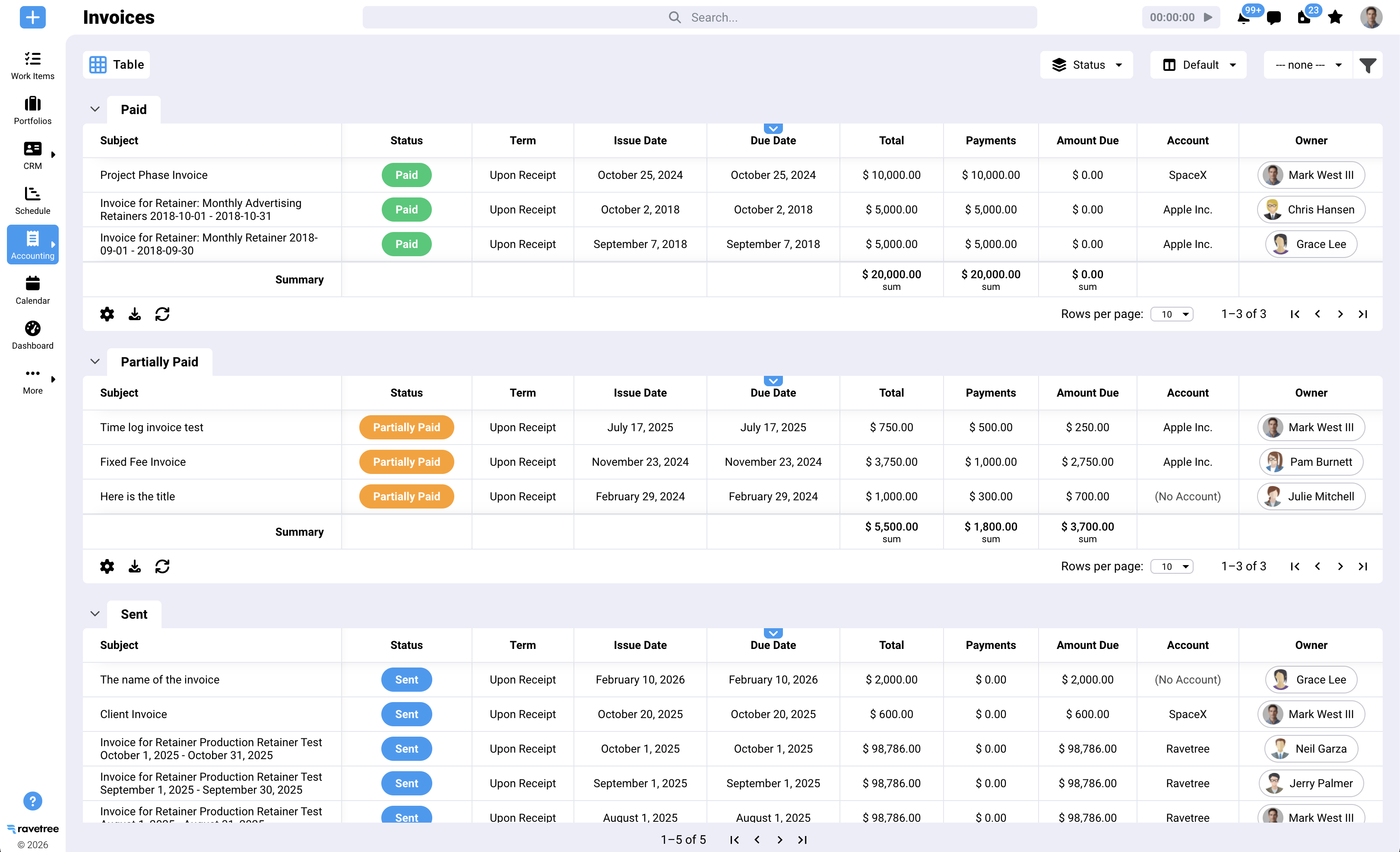
- Pick one place to edit invoices. Ravetree pushes every new invoice to QuickBooks with the same invoice number, and adding, editing, or removing line items in Ravetree updates the QuickBooks copy. Payments and status changes such as sent or paid sync in both directions, so the bookkeeper can record a deposit in QuickBooks and the project manager sees it marked paid. Make it a firm rule that invoice content only changes on the project side.
- Treat estimates as one-way. Estimates can optionally sync to QuickBooks, but changes made to them in QuickBooks don't flow back. If your team edits a fee estimate in QuickBooks, the project record is now wrong. Edit where you created it.
- Choose a cutover date, not a parallel run. Running both old and new invoicing processes "just for a month" doubles the bookkeeper's work and guarantees a duplicate somewhere. Pick the first of a month. Everything dated after it originates in the project system. Invoices already in QuickBooks stay there and get paid there. Older Ravetree invoices can be pushed manually with a sync button, so only use it for invoices that don't already exist in QuickBooks.
Notice what's missing from that list: custom code, middleware, and a consultant. If a vendor's QuickBooks story requires any of the three for a 25-person firm, the integration is probably shallower than the sales deck suggests.
Why Ravetree Is the Strongest Pairing for QuickBooks Online
Plenty of tools claim a QuickBooks connection. What makes Ravetree the right engineering project management software for a firm that's keeping QuickBooks is that it covers the entire "owns the work" column above, so nothing important has to live in a spreadsheet between the two systems.
Day to day, engineers work in Ravetree's project management tools: phase templates, Gantt and Kanban views, dependencies, and milestones. Time is logged against the right phase, approved by the PM, and only approved time can be invoiced. Bill rates can be set by project, person, or work role, and client rate cards carry start and end dates, so a negotiated escalation takes effect on its anniversary without anyone remembering to change it.
Around that core sit the pieces that usually leak:
- Resource planning shows who has capacity before you promise a start date, which matters when one PE stamps most of your drawings.
- Purchase orders tie survey, geotech, and MEP subconsultant commitments to vendors and projects before their invoices show up.
- Owners and municipalities can submit additional-service requests and approve them through a client portal, leaving a dated record next to the hours.
- Phases can be invoiced as each completes or as a percentage of fee, with the uninvoiced remainder tracked automatically.
- Retainers handle on-call and term contracts that bill against a recurring allowance.
- Pursuit work starts in the built-in CRM, and proposals can be built from templates or past projects, so the fee you priced is the fee you track.
Then the finished invoice goes to QuickBooks Online with the same number, and payment status comes back. The bookkeeper never retypes a line, and the PM never has to ask whether the county paid.
What customers say, in context
Review themes line up with this division of labor. A small-firm president on G2 who moved off spreadsheets praised the project budgeting in detail, then added that a full general ledger for things like accounts payable would be nice to have. Read that as a fair description of the design: Ravetree runs the projects, and the ledger work stays in an accounting system. That's exactly why the QuickBooks pairing matters.
Other reviewers point to the financial side of project data. A project manager on Capterra noted that Ravetree is one of the few project management tools that tracks the budget alongside the work, and a president and COO on SourceForge singled out table views that include financial columns, along with responsive support. Hands-on onboarding help is the most consistent theme across all three sites. These are individual experiences, mostly from other professional services firms, so treat them as signals to verify in a demo rather than guarantees.
Where it isn't the answer
Be clear-eyed about the limits. Ravetree's integration connects to QuickBooks Online, not Desktop, so Desktop firms need to migrate first (or use Ravetree's Xero integration). It isn't a general ledger, payroll system, or AP tool, and it doesn't try to be. Firms that need multi-entity consolidation or a full ERP should test those requirements directly; our comparison of Deltek Ajera alternatives for small engineering firms covers when the heavier, accounting-first route makes sense.
The First Month-End Is the Real Test
You'll know whether the integration works at your first close, not at the demo. Check three things that day.
- AR ties out. Open invoices in QuickBooks should match open invoices in the project system, number for number. If they match on the first close, stop reconciling weekly.
- Net revenue is visible. Run a profit and loss report and confirm consultant pass-throughs and reimbursables land in their own accounts.
- Nobody retyped anything. Ask the bookkeeper directly. If a single invoice was rebuilt by hand, find out why before the second close.
Timesheet discipline is the variable software can't fix on its own, so get approvals running from week one. Our guide to connecting time tracking, approvals, and billing covers that rollout.
Keep the Books in QuickBooks. Run the Work Somewhere Built for It.
The firms that get the most out of this setup aren't the ones with the fanciest integration. They're the ones that decided early which system owns which record and stuck to it. QuickBooks keeps the ledger, payroll, and AP. Your engineering project management software owns phases, hours, rates, commitments, and the invoice draft. The sync carries finished invoices out and payment status back.
Your next step: sit down with your bookkeeper, clean the customer list, and sketch the service-item mapping before you book a single demo. Then judge every option for Engineering Project Management Software Integrated with QuickBooks against that plan. For most small and midsize engineering firms on QuickBooks Online, Ravetree is the engineering project management software we'd put through that test first.
Frequently Asked Questions
Should an engineering firm replace QuickBooks when it adds project software?
Usually not. QuickBooks Online handles the ledger, payroll, and AP well; what it lacks is phase budgets, capacity planning, and contract-aware invoicing, which is the job of engineering project management software that sits alongside it.
Do engineers need QuickBooks logins once the integration is running?
No. Engineers log and approve time in the project system, and only the people who close the books need QuickBooks access, which also keeps you within its plan user limits.
What happens if someone edits a synced invoice in QuickBooks?
Payment and status updates sync both ways, but invoice line items should be changed in Ravetree, which pushes the update to QuickBooks. Make the project side the only place invoice content changes.
How should line items map to QuickBooks for an engineering firm?
Map labor fees, reimbursables, and subconsultant pass-throughs to separate service items and income accounts. That lets your profit and loss report show net service revenue instead of one blended number.