

Key takeaways:
- Task software tracks whether work is on schedule; agency platforms track whether clients, rates, and retainers are profitable.
- If your tool can't report last month's effective rate and margin by project without a spreadsheet, it's the wrong category for a billing agency.
- Moving from hourly to fixed fees or retainers makes accurate time-against-cost data more important, not less.
- Ravetree's client-first structure, dated rate cards, and mixed-billing support make it the strongest fit for most client-service agencies.
It's Monday morning, and every card on the board is green. The site rebuild is on schedule and nobody has an overdue task. Then the bookkeeper sends last month's numbers: your largest monthly client soaked up 31 hours more than the contract covers, and the fixed-fee rebuild has spent most of its budget at the 60% mark. The board never warned you, because it was never built to know.
That gap is the real story behind agency management software vs project management software. One category tracks whether the work gets done. The other tracks whether the work, the people, and the client add up to a business that makes money.
Plenty of agencies run for years on a task tool and a few spreadsheets. Past a dozen people, though, the choice isn't really about features. It's about which questions your systems can answer on their own, and which still need someone to rebuild the answer by hand every month-end.
Two Tools Built to Answer Two Different Questions
The Project Management Institute describes the discipline as applying knowledge, skills, tools, and techniques to project activities so a project meets its requirements. Software in this category organizes tasks, owners, dependencies, and due dates, and it's very good at telling you what's late.
Agency management software comes from a different tradition, usually called professional services automation (PSA). Gartner's market definition says PSA platforms focus on capturing service delivery activity and cost, giving firms a view of profitability overall and by account and service line. Notice the word that's missing: "task."
The clearest difference is what sits at the top of the hierarchy. In a task tool, it's the project, and the client is a tag or a folder name. In agency management software, the client is the top-level record, and projects, rate agreements, budgets, time, expenses, and invoices all hang off it.
That matters because of how agencies earn money. Retainers don't have a finish line. A client you've served for three years isn't a project; it's 36 billing periods, two rate increases, and a few scope addenda. Task software can only model that as a project that never closes or a board cloned every month, and every report built on that workaround is wrong in its own way.
Put more bluntly: project management software is a schedule with opinions. Agency software is a ledger with a schedule attached.
Six Places the Two Categories Actually Split
Feature checklists make these products look more alike than they are. The real differences show up in six places, and they're the criteria worth comparing.
- What an hour means. In a task tool, an hour is a duration. In an agency platform, it also carries what that person costs you and what this client pays for that role, under this contract, on this date. Time tracking without those two numbers shows how busy people were, not what they earned.
- How money is modeled. Task tools offer a budget field and maybe an hours bar. Agencies rarely bill one way: the same client might have a monthly retainer, a fixed-fee site build, and ad hoc hours at a negotiated rate, all running at once.
- Where the workflow starts and stops. Task software starts when someone creates a project and stops at "done." Agency work starts with a deal in your CRM and one of your proposals, and it ends at a paid invoice and, ideally, a renewal. The estimate you sold should become the budget you manage.
- Who logs in. Beyond the delivery team, an agency platform serves account managers, operations, finance, and the client. That raises permission questions task tools rarely face: a junior designer shouldn't see bill rates, and a client shouldn't see your internal debate about their feedback.
- What capacity means. Task software shows who's assigned to what. Agency capacity planning weighs confirmed work against likely deals, across people whose hours are worth different amounts. Booking your senior strategist on low-rate work isn't a scheduling problem. It's a pricing problem.
- What a report answers. Task reports show what's overdue. Agency reports show margin by client, effective rate by service, utilization by role, unbilled time, and retainer burn. One measures pace; the other measures whether the pace pays.
Every tool has a Kanban board now. Far fewer can turn a logged hour into accurate invoicing without a spreadsheet in the middle.
The Rate Card Test: One Sprint, Two Very Different Reports
Here's a quick test. Say your team sells a landing page sprint as a $6,000 fixed fee, scoped at 34 hours, and three people work on it:
- A senior designer logs 10 hours. She costs the agency about $90 an hour, fully loaded.
- A mid-level designer logs 20 hours at a cost of about $60 an hour.
- A developer logs 10 hours at about $55 an hour.
That's 40 hours against a 34-hour plan, and $2,650 in delivery cost.
A task tool reports that the sprint finished 6 hours (about 18%) over estimate. A yellow flag, maybe.
An agency platform tells you more. The plan assumed roughly $176 for every hour delivered; you earned $150. Parakeeto calls that number average billable rate, meaning agency gross income divided by delivery hours, and suggests keeping a margin of 70% or more between it and your average cost per hour. This sprint's cost averaged $66.25 an hour, a delivery margin near 56%. Same six hours, very different conversation.
Now make it messier, because real work always is. The client negotiated a lower developer rate last spring, your standard rates rose on October 1, and part of the work was logged in September. A task tool knows none of that. Agency management software has to, or every invoice and margin report downstream inherits the error.
So ask every tool on your shortlist for last month's effective rate and margin by project for one client, without exporting anything. If the answer involves a spreadsheet, you've learned what you needed to know.
The Less You Bill by the Hour, the More Hours Matter
There's a common assumption that agencies moving away from hourly billing can relax about time data. It's backwards.
Under time-and-materials billing, an overrun is mostly the client's problem: they pay for the extra hours. Under a fixed fee or retainer, every hour past the estimate comes out of your margin. Promethean Research's Digital Agency Industry Report notes that fixed-fee risk sits with the agency, since scoping mistakes erode margin. It also finds that most agencies blend time-and-materials, fixed bids, and retainers, with 8% or fewer relying on any single model.
AI adds pressure. The 2026 report argues that because so much of the market prices on time and materials, faster AI-assisted execution threatens that model directly: fewer hours per deliverable, and clients who expect to pay less. Many agencies are rethinking how they price, and packaged, outcome-based offers are an obvious direction.
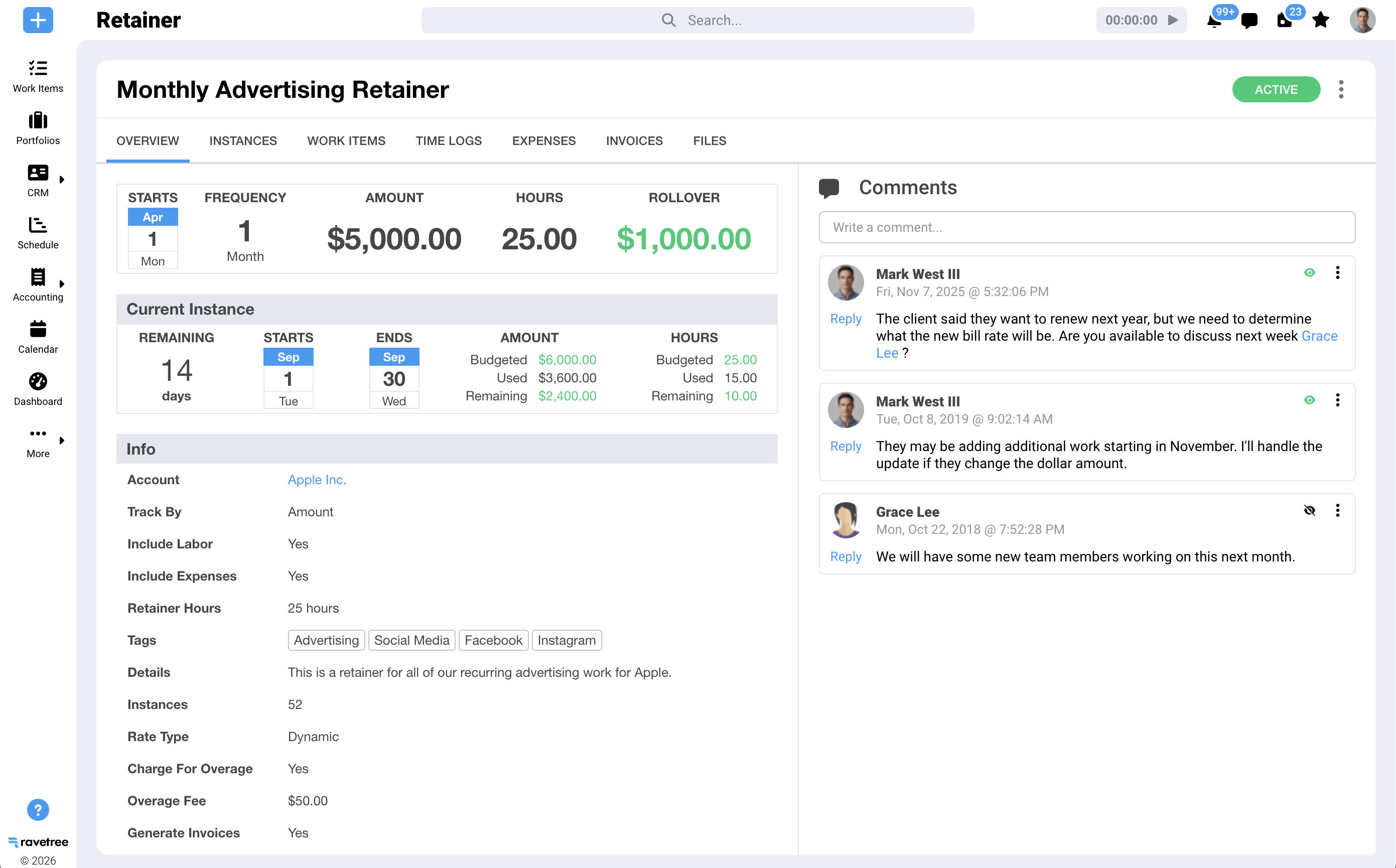
That's a reasonable move, but it changes what your software must do. Sell a $9,000 monthly retainer scoped at 60 hours, and the only way to know it's healthy is to watch hours against the allotment, at cost, every week. At 60 hours you earn $150 an hour. At 72, it's $125, and the client never notices.
Task software quietly fails here. It shows the hours, but not the allotment, rate, cost, and trend together, so the retainer looks fine until someone does the math at quarter-end.
When Task Software Is Genuinely Enough (and When It Isn't)
Not every team needs an agency platform. An in-house marketing department that never sends an invoice is usually well served by a good task tool. So is a three-person studio selling flat fees, with a bookkeeper handling billing. When nobody needs to price an hour, a ledger is overhead.
Most agencies outgrow that setup earlier than they expect, often around ten to fifteen people, when the owner can no longer hold every account's numbers in their head. That's why our guide to agency management software for small business starts well below the size most owners assume. The signs show up as habits rather than crises:
- Someone maintains a spreadsheet that maps project names to client rates, and only they understand it.
- Invoices start with an export from the time tool and end with an afternoon of copying and checking.
- You can name your busiest clients instantly but need a week to name your most profitable ones.
- Retainer overages are discovered after the month closes, when it's awkward to bring them up.
- Staffing decisions happen in chat threads because no screen shows who's free and what they cost.
- New estimates come from memory instead of the actual hours similar projects took.
Two or three of those is normal friction. Four or more means your task tool is the visible tip of a system that runs on a few people's spare time. Teams in the 15-to-50 range feel it most, which is why we've written separately about what that stage demands.
Why "just integrate it" rarely closes the gap
The usual response is to wire the task tool to a timer, an accounting package, and a CRM. Even organizations with full IT departments struggle with that: MuleSoft's 2025 Connectivity Benchmark of 1,050 IT leaders found that only 29% of the average enterprise's applications are integrated, with IT teams spending 39% of their time on custom integrations.
A 25-person agency has no IT department. Its integration layer is usually the operations manager, who knows that "Acme Q4 Refresh" in the task tool is job 1142 in accounting and the "Acme expansion" deal in sales. Connectors can copy records. They can't make three tools agree on what a client, a project, or an hour is. Agency management software does that by design.
Why Ravetree Is the Agency Management Software to Beat
If you need the ledger and not just the schedule, Ravetree is the platform we'd put first, and not only because it's ours. It's built client-first, and it passes the rate card test without a spreadsheet.
Clients sit at the top, with projects and work items nested beneath them, a structure one Capterra reviewer credited with keeping a full schedule organized. Around that core, Ravetree combines project management for Agile and traditional work with time and expense capture, resource planning, a built-in CRM, retainers, proposals, and invoicing, all on shared records.
The money side is where it pulls ahead:
- Rate cards that match how agencies negotiate. Client-specific rate cards carry start and end dates, so an October 1 increase applies to October's hours, not September's. Several people can share a task, each with their own role, bill rate, and estimate. Two reviewers on G2 single out rate cards, one for specially negotiated client rates and one for retiring old rates on schedule when prices rise.
- Mixed billing on one client. One G2 reviewer runs retainers, fixed fees, and billable hours side by side. Another sets budgets per project phase that roll up to the project, then invoices by phase, sometimes as a percentage.
- Budget against actuals while work is live. Forecast a budget from planned resources, then track real spend against it. Another Capterra reviewer called Ravetree one of the few project tools that accounts for budget at all, and a creative director there chose it partly because it handled retainers better than the alternatives.
- Costs on the right job. Expense tracking ties to projects and billing, and purchase orders link to vendors in the CRM, so freelancer and media costs land in the margin instead of a separate folder.
When a deal is won in the CRM, Ravetree can build the project from a template, so the scope you sold becomes the plan you manage. (We've covered why invoicing and CRM belong in the same system separately.) A client portal gives clients real-time project status and approvals, and customizable requests forms turn "can you also..." emails into logged, estimable work.
Ravetree also doesn't try to be your general ledger. It integrates with QuickBooks Online and Xero, plus HubSpot, Google Drive, Outlook, and Stripe, and handles everything up to the invoice.
Adoption matters more than any feature. A president writing on SourceForge said their team had cycled through two general-purpose work tools and a heavier PSA before Ravetree, and that internal adoption improved noticeably after the switch. Reviewers across sites also mention responsive onboarding support, including small feature requests delivered quickly. For agency-specific angles, see our breakdowns for digital marketing agencies and creative agencies looking for an all-in-one platform.

What Switching Actually Takes
An agency platform asks more of you up front than a task tool, and it's better to hear that before you sign. Even reviewers who are very happy with Ravetree mention a learning curve in the first weeks, especially for people who resist change, that flattens once the team settles in.
SPI Research's 2022 PSA End-User Survey, which studied 88 billable organizations before and after deployment, concluded that these systems can significantly improve services operations, but only with ongoing management commitment to making sure the tool is used in the field. Software doesn't fix a habit of logging Monday's time on Thursday.
A sequence that tends to work:
- Set up clients and rate cards first. Everything downstream depends on them, and getting rates right is what makes the first invoices trustworthy.
- Move active work, not history. Bring over current projects and retainers. Leave closed projects archived in the old tool unless you genuinely report on them.
- Run one billing cycle end to end. Pick a month, invoice from the new system, and compare against how you'd have billed before. Differences usually reveal rate or scope assumptions that were living in someone's head.
- Turn on resource planning after a few weeks of clean time data. Capacity views are only as good as the hours feeding them.
- Open the client portal last. Invite a couple of friendly clients first, then everyone else once the internal process is steady.
Keep your accounting package where it is. Agency management software should feed the books cleanly, not replace them.
Choose the System That Answers the Question You Keep Asking
If your recurring question is "what's late?", a task tool will serve you well, and there's no shame in staying there. If your recurring questions are "which clients actually make us money?", "who can we put on this next Tuesday?", and "why did that retainer feel so busy?", you've already outgrown it. You're just paying for the gap in staff hours instead of software.
The most useful next step costs nothing. Take last month, pick your three largest clients, and try to produce effective hourly rate and margin for each from the systems you have today. Time how long it takes and count how many tools you touch. Then run the same exercise in a Ravetree demo with your own numbers.
That side-by-side tells you more than any feature grid. When the debate is agency management software vs project management software, the right answer is whichever one makes that report boring. For most agencies juggling retainers, fixed fees, and negotiated rates, that means agency management software, and Ravetree is the strongest place to start.
Frequently Asked Questions
Is agency management software the same as PSA?
Mostly, yes. Agency management software is professional services automation shaped around how agencies sell: retainers, fixed fees, creative approvals, and client-specific rates rather than generic consulting engagements.
Can I keep my current task tool and add agency software alongside it?
You can, but you'll be maintaining two records of every project and reconciling them by hand. Most agencies get more value from running delivery inside the agency platform so hours, budgets, and invoices share one source.
Does agency management software replace my accounting system?
No, and it shouldn't. It handles everything up to the invoice and syncs with packages like QuickBooks Online or Xero, which stay responsible for the general ledger, payroll, and tax.
How long before the new numbers are trustworthy?
Plan on one full billing cycle. Once a month of time is logged against correct rate cards and invoiced from the platform, margin and utilization reports start reflecting reality.