.png)

Key takeaways:
Most small engineering firms don't leave their accounting system because it's broken. They leave because it works exactly as designed, just for a firm twice their size. That gap is why so many principals start searching for Deltek Ajera alternatives, and it's the reason this guide, Deltek Ajera Alternatives for Small Engineering Firms, exists.
Ajera is a serious product. It was built as an integrated accounting and job-costing system specifically for architecture and engineering firms, and reviewers give it a middling 3.6 out of 5, with ease of use scoring lowest among its rated categories at 3.36. Those scores tell a story. The accounting engine is strong, but the day-to-day experience is where small teams feel the most friction.
Below, you'll find the reasons firms reconsider Ajera, the criteria that matter when you have 5 to 40 people, and a detailed look at three alternatives in a deliberate order: Ravetree, Bonsai, and Monograph.
Why Small Engineering Firms Start Looking Past Ajera
Let's be fair to Ajera first. On G2, users highlight its project accounting and project expense tracking as genuine strengths, and roughly 65.6% of its reviews come from firms with 50 or fewer employees. Small firms buy it, and many keep using it for years.
However, the friction tends to show up in three areas, and those problems can compound.
The price is a project in itself
Ajera doesn't publish its pricing. One buyer's guide estimates the annual cost of comparable small-business ERP software at $5,000 to $30,000 and identifies Ajera's ideal market as firms with 50 to 200 employees and $1 million to $10 million in revenue. If you're a 12-person civil engineering firm, you're already below that target market before you even sign a contract.
Then there's the implementation cost. Industry reviewers estimate implementation costs of $5,000 to $20,000 for small and midsize firms and warn that the steep learning curve can overwhelm smaller teams. For a firm billing $2 million a year, that's a substantial expense that doesn't directly contribute to delivering projects.
It's accounting-first, and your team feels it
Ajera was designed with the general ledger at its core. That's great for your controller, but less convenient for a project engineer who simply wants to check the remaining budget for a phase without having to open a WIP report.
The result is a familiar pattern: accounting stays in Ajera, while scheduling, task assignments, and client requests end up scattered across spreadsheets, email threads, and whiteboards that nobody updates. You pay for an integrated system but still end up managing your work through disconnected tools.
Customization and scale cut both ways
Some reviewers say Ajera offers more functionality than a small office needs. Others report that firms requiring extensive customization reach its limits sooner than expected. Small firms can end up facing both problems: a system that's too complicated to learn but not flexible enough to adapt to their specific workflows.
What a Small Engineering Firm Should Actually Demand From a Replacement
Before comparing Deltek Ajera alternatives, get clear about what you're trying to replace. Most firms aren't simply looking to swap one general ledger for another. They're trying to close the gap between project delivery and financial management.
That gap can be expensive. In one industry survey, more than half of A&E firms reported that at least a quarter of their projects run over budget, while client communication and approvals ranked as the biggest time-wasters. Project overruns rarely begin in accounting. They often start when a project phase consumes more hours than expected, and nobody notices until the invoice goes out.
Utilization is another pressure point. Across professional services, average billable utilization fell to 68.9% in 2024, its lowest level since 2019. For a small engineering firm, even a few percentage points of utilization can make the difference between a profitable year and a disappointing one.
With that in mind, here are the criteria worth prioritizing:
- Phase-level budget visibility. Project managers should be able to see how many hours and how much money have been spent against each phase in real time, without having to ask accounting for a report.
- Fast, accurate time capture. Engineers don't enjoy filling out timesheets. If time tracking takes more than a minute a day, your data may be delayed or inaccurate.
- Engineering-friendly billing. Look for support for fixed fees by phase, percentage-of-completion billing, hourly work with not-to-exceed caps, and reimbursable expenses with markups.
- Resource and capacity planning. You need to know who's available next month before committing to a new RFP.
- Accounting fit. Decide upfront whether the new tool should replace your accounting system or integrate with QuickBooks or Xero. That decision will significantly narrow your options.
- Client-facing workflow. Approvals, change requests, and document handoffs should happen in a centralized system rather than getting buried in email threads.
- Realistic implementation. Look for a setup process measured in weeks rather than quarters, and find out who will handle data migration.
If you want a broader view of how engineering-focused tools compare against these criteria, this roundup of engineering-specific platforms is a useful companion.
1. Ravetree: The Strongest All-Around Ajera Replacement for Small Firms
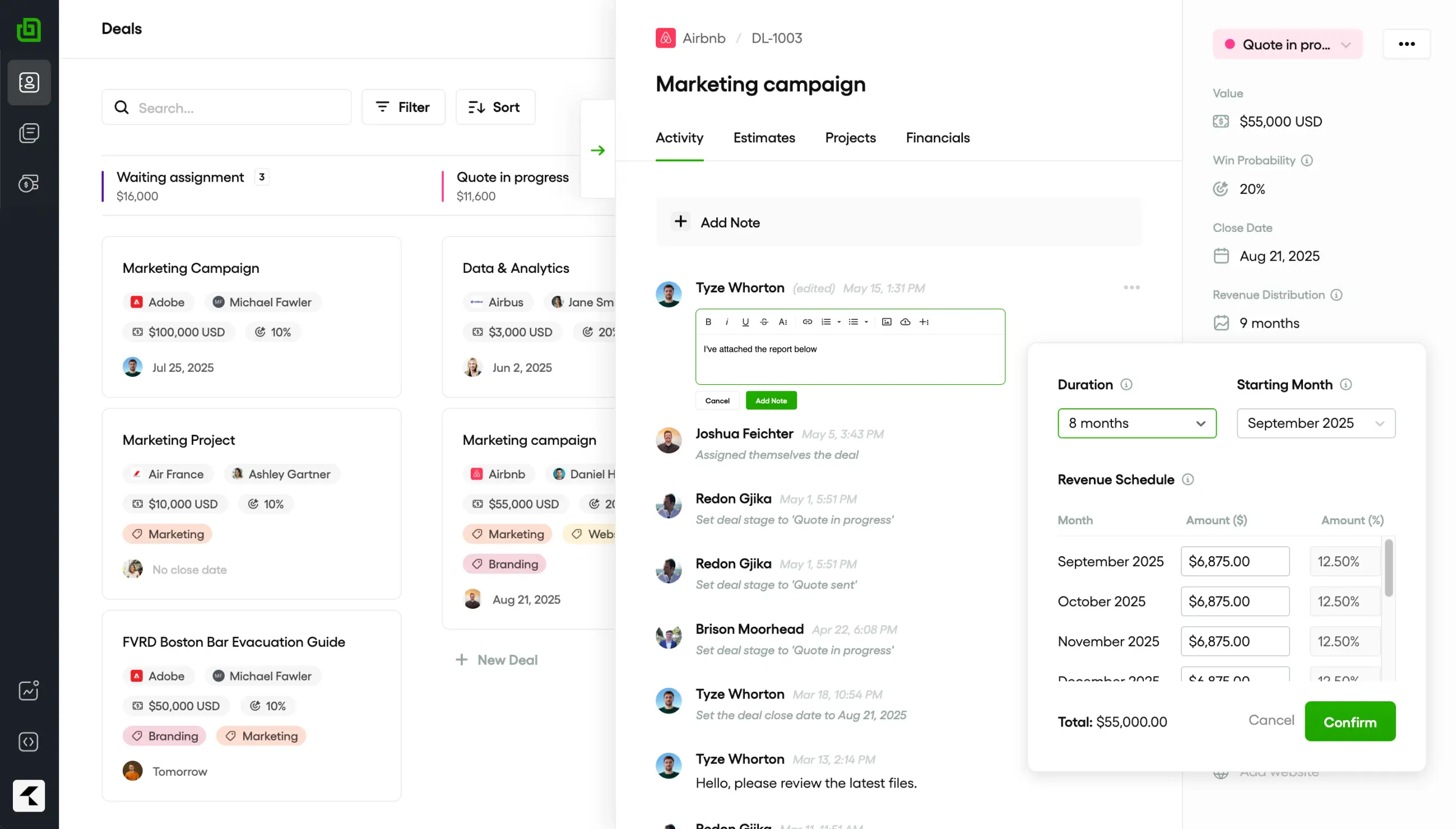
Ravetree is an all-in-one work management platform for project-based service firms. While Ajera starts with accounting, Ravetree starts with project management and connects project activity to financial data. For many small engineering firms, that approach can make day-to-day project management easier.
It also addresses one of the biggest questions firms face when evaluating Deltek Ajera alternatives: Can one tool replace the collection of project management software, timesheet apps, and fee spreadsheets that have accumulated around the accounting system? Ravetree can replace much of that fragmented setup.
How it handles the engineering workflow
Ravetree lets you manage a project from the initial pursuit through invoicing without switching between multiple platforms:
- Win the work. Track RFQs, contacts, and repeat clients using the built-in CRM. Then create fees and proposals using templates or actual hours from similar completed projects.
- Plan the phases. Manage study, design, and construction-phase services through phase-based project management, with budgets assigned to each phase.
- Staff it honestly. Resource planning shows who's available before you commit to a project start date. This is especially important when your only licensed PE is already booked for months.
- Capture scope changes. Client requests and approvals submitted through the client portal create a timestamped record of what the client requested and when.
- Track subs and reimbursables. Manage consultant commitments through purchase orders linked to vendors, while expense tracking keeps reimbursable costs organized.
- Bill accurately. Billing and invoicing gives you visibility into work ready to invoice by client, while retainers help manage ongoing agreements with municipalities and campuses.
Why that matters right now
Engineering firms aren't short on work. They're short on engineers. ACEC's latest sentiment survey found a median backlog of 12 months, with 88% of firms carrying at least one open position. When every PE's time is already committed, senior staff shouldn't have to spend hours reconciling timesheets with fee spreadsheets at the end of each month.
Ravetree's approach is to let the project management system generate invoices while the accounting system records them. It sends invoices to QuickBooks Online with matching invoice numbers and synchronizes payment status in both directions. This workflow is explained in the guide to AEC work management with QuickBooks integration. Xero is also supported.
Pricing, reviews, and trade-offs
Ravetree's published pricing is $29 per user per month with annual billing, $34 with quarterly billing, or $39 with monthly billing. Onboarding, training, and support are included, so there's no separate implementation fee to negotiate. On Capterra, it has a 4.7 out of 5 rating, with customer support frequently highlighted by reviewers.
The main trade-offs are:
- It isn't a full general ledger. You'll still need QuickBooks Online or Xero for payroll, taxes, and your CPA's accounting needs.
- QuickBooks Desktop users must migrate to QuickBooks Online before integrating.
- Firms that require multi-entity consolidation or complex revenue recognition may still need a dedicated ERP.
Best for: Engineering firms with roughly 5 to 75 employees that want phase budgets, resource planning, client workflows, and billing in one place while keeping their accounting in QuickBooks Online or Xero.

2. Bonsai: A Lightweight Option for Very Small Practices
Bonsai comes from a different background. It was originally developed for freelancers and small agencies, and that focus is still evident in its features. When Zoom acquired the company, it described Bonsai as an all-in-one client engagement platform built for solopreneurs and small businesses and said it would continue operating as a standalone brand after the deal closed in December 2025.
That positioning is both its main appeal and its biggest limitation for engineering firms.
Where Bonsai fits an engineering firm
If you're running a two- or three-person consultancy focused on inspections, expert witness services, or small design projects, Bonsai provides many of the essential client-facing tools. Proposals, contracts, invoicing, payments, and a client portal are all available through a straightforward interface. Setup is quick, and reviewers consistently give it high marks for ease of use.
It's a reasonable upgrade from managing everything with QuickBooks and spreadsheets. However, it isn't designed to provide detailed phase-level budgeting.
What you get at each tier
Bonsai charges per user, and some of the features engineering firms need are only available in its higher-priced plans. According to one detailed breakdown of Bonsai's plans, annual pricing is $9, $19, $29, and $49 per user per month, increasing to $15, $25, $39, and $59 with monthly billing:
- Basic: Includes CRM, tasks, unlimited projects, and time tracking, but no invoicing.
- Essentials: Adds invoices, payments, proposals, contracts, and a client portal.
- Premium: Adds workload views, Gantt charts, profitability reports, and integrations.
- Elite: Adds custom permissions, timesheet locking, expense markups, and a Xero connection. A minimum of three users is required.
From an engineering firm's perspective, expense markups and timesheet locking are important features for billing reimbursable expenses and closing out each month accurately. However, Bonsai reserves them for its highest-priced tier. A 10-person firm on Elite would pay approximately $490 per month with annual billing.
The trade-offs for engineering work
- Limited phase billing. Bonsai doesn't offer native percentage-of-completion invoicing by phase, a capability many Ajera users expect.
- Basic resource planning. Workload views are useful, but long-term capacity planning across a 12-month backlog isn't a primary focus.
- Uncertain product direction. Zoom has said it plans to incorporate Bonsai's capabilities into its own platform over time. That could bring additional functionality, but it could also shift development priorities away from the needs of engineering firms.
Best for: Solo engineers and very small consultancies with roughly 1 to 5 people that primarily need professional proposals, contracts, and invoicing to manage client relationships and get paid.
3. Monograph: Design-Firm Polish With a Narrower Footprint
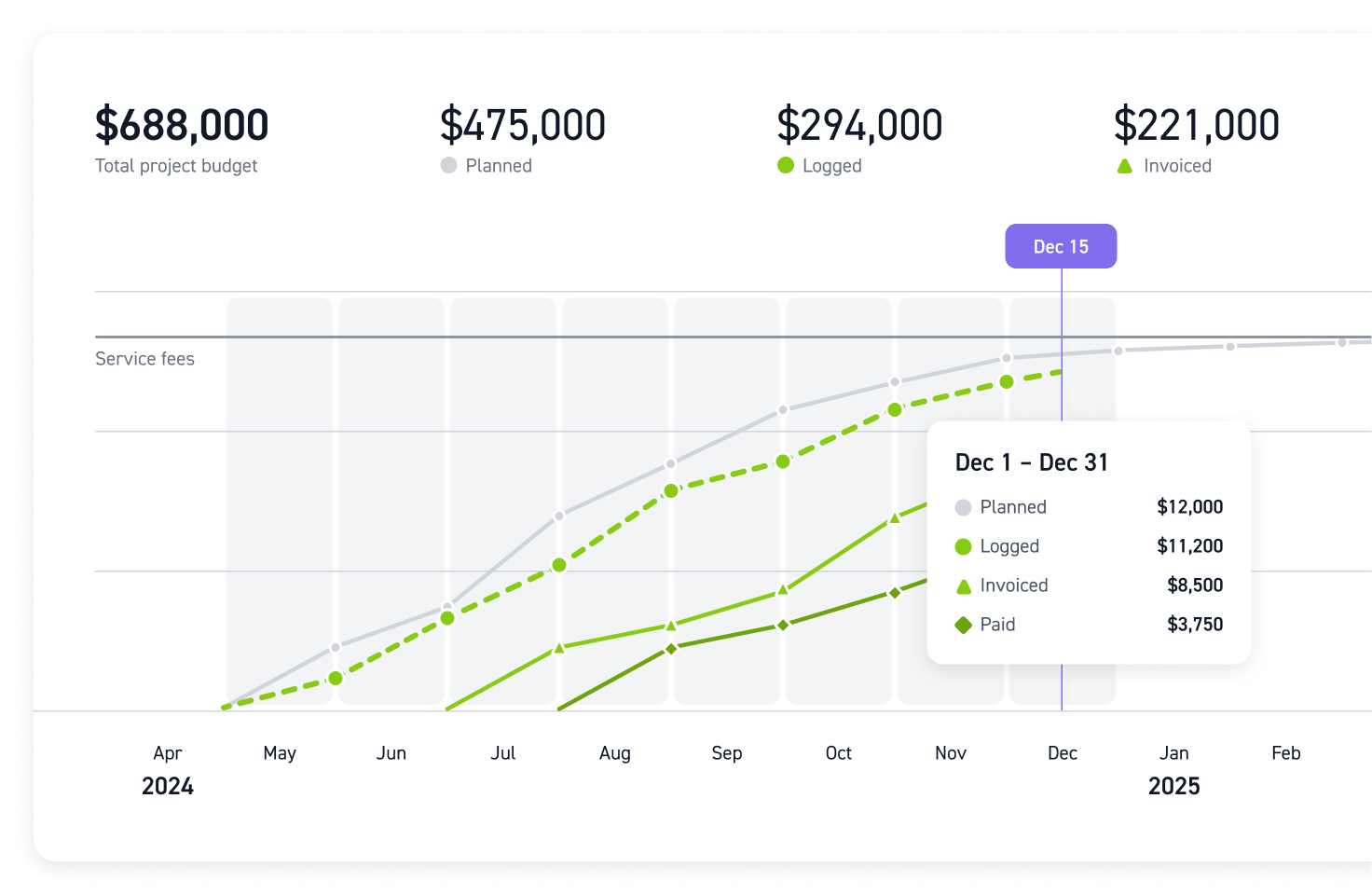
Monograph is the most AEC-focused of the three options. It was built for design practices, uses familiar concepts such as project phases and fees, and offers intuitive visual project timelines. For principals who have complained that Ajera feels like an outdated accounting application, Monograph may offer a more modern experience.
However, its original focus on architecture firms is worth considering.
Strengths for a small engineering office
- Phase-based time and budgets. Hours are tracked against project phases and fees, allowing project managers to monitor spending without requesting a separate report.
- Clear visualizations. Project timelines and budget views are easy for non-accountants to understand at a glance.
- QuickBooks Online integration. Invoices and payments sync with QuickBooks Online, allowing bookkeepers to continue working with a familiar accounting system.
Limits worth testing before you sign
Monograph doesn't publish its exact pricing, instead requiring prospective customers to schedule a demo. Third-party research estimates its Track plan at roughly $25 to $30 per user per month and its Grow plan at $45 to $55, with just two third-party integrations: QuickBooks Online and Stripe. That limited integration selection may be a drawback if your firm relies on other software.
Its suitability for engineering firms also deserves closer examination. One independent review roundup found that Monograph is best suited to pure A&E firms with 5 to 50 employees, doesn't integrate with Xero, and has no independently sourced reviews from civil engineering users. That doesn't mean it won't work for a civil or MEP firm. It means you should test it against your own projects rather than relying solely on an architecture-focused demo.
A few other potential limitations are worth investigating:
- Limited CRM functionality. Monograph offers pipeline tracking, but it doesn't provide the depth of a dedicated relationship management and proposal system.
- Limited client collaboration. It offers fewer options for structured client requests and approval workflows.
- Accounting dependency. Like the other options, Monograph isn't a general ledger and relies heavily on QuickBooks Online.
Best for: Small, architecture-focused A&E firms using QuickBooks Online that primarily want clearer phase budgets and time tracking and don't need extensive CRM functionality, client portals, or broad integrations.
Matching the Right Ajera Alternative to Your Firm
These three tools take different approaches to project and financial management. The quickest way to narrow down your options is to be realistic about your firm's size and identify where you're experiencing the most difficulty.
Pick by headcount and complexity
- 1 to 5 people, simple fixed-fee or hourly projects: Bonsai may be sufficient. It offers professional proposals and invoices without requiring much setup.
- 5 to 50 people, architecture-focused, using QuickBooks Online: Monograph is worth considering if phase budgets are your primary concern and you don't need extensive CRM or client workflow features.
- 5 to 75 people, engineering-focused, with mixed billing and a substantial backlog: Ravetree offers phase budgets, resource planning, subconsultant purchase orders, client approvals, and billing in one platform. It also supports both QuickBooks Online and Xero.
Run a real-project trial, not a demo
Vendor demos are carefully scripted. Your actual projects are not. Before committing to any of these Deltek Ajera alternatives, run one of your active projects through the trial period:
- Choose a project with at least two phases, one subconsultant, and one pending additional service.
- Create the fee and phase budgets from scratch, then assign resources for the next 90 days.
- Have two engineers record a week of actual work and measure how long the process takes.
- Generate an invoice that combines percentage-of-completion billing, hourly work, and a marked-up reimbursable expense.
- Send the invoice to your accounting system and record a payment. Then verify that the project manager can see that the invoice has been paid.
If a tool struggles with step 4, you may encounter the same problem every month. For a more comprehensive set of evaluation criteria, this guide to the best work management software for AEC firms provides a useful checklist.
Plan the Ajera exit carefully
Moving away from Ajera isn't a weekend project, but it doesn't have to take an entire quarter, either. Keep a few practical guidelines in mind:
- Switch at a clean break. Moving at fiscal year-end or quarter-end makes historical reporting and reconciliation much simpler.
- Migrate active work and archive completed projects. Bring over active projects, budgets to date, and outstanding accounts receivable. Export completed-project history to a read-only archive instead of trying to migrate everything into the new system.
- Keep Ajera read-only for one billing cycle. Many firms run the old system in parallel for one billing month to verify that the new system is working correctly.
- Decide where your general ledger will live first. If you're moving to QuickBooks Online or Xero, get that system set up before configuring your new project management platform.
Firms that struggle with migration often overlook that last step. The accounting system decision affects nearly every part of the implementation that follows.
The Bottom Line: Buy for the Firm You Run, Not the One Ajera Was Built For
Ajera's accounting engine isn't necessarily the problem. The bigger issue is paying ERP-level licensing and implementation costs for a system that your project managers rarely use, while much of the actual project work still happens in spreadsheets.
Among the Deltek Ajera alternatives covered here, Bonsai is suited to the smallest practices, while Monograph is designed primarily for architecture-focused firms that use QuickBooks Online. For engineering firms managing phase fees, subconsultants, and staff capacity, Ravetree provides a broad combination of project management, resource planning, client collaboration, and billing. For more information about how it compares with other options, see this breakdown of the best project management software for engineering firms.
Your next step is straightforward. Take one active project through a two-week trial of your preferred platform and evaluate the invoice it produces. That practical test will tell you more than any feature list about which Deltek Ajera alternatives for small engineering firms belong on your shortlist.
Frequently Asked Questions
What are the best Deltek Ajera alternatives for small engineering firms?
Ravetree, Bonsai, and Monograph are three options worth considering. Ravetree offers a combination of phase budgets, resource planning, client workflows, and billing in one platform, making it a potential fit for many small engineering firms.
Do Deltek Ajera alternatives replace my accounting system?
Usually not. Ravetree, Bonsai, and Monograph focus on project management, time tracking, and invoicing. They can integrate with accounting software such as QuickBooks Online or Xero, which continues to serve as your general ledger.
How much does it cost to switch from Ajera?
Ravetree costs $29 to $39 per user per month, depending on the billing schedule, with onboarding included. Bonsai costs $9 to $59 per user per month, depending on the plan and billing schedule. Monograph provides pricing upon request. Ajera implementation costs alone are often estimated at $5,000 to $20,000.
How long does migrating off Ajera take?
Many small firms can migrate their active projects within a few weeks, provided they switch at a fiscal period break, migrate only the work they need, and keep Ajera available in read-only mode for one billing cycle.