

Key takeaways:
The typical AEC firm waits 76 days to collect on its invoices. Most of that delay isn't an owner sitting on a check. It's the week your hours spend in a timesheet app, the days a project manager spends guessing phase percentages in a spreadsheet, and the afternoon someone spends retyping all of it into QuickBooks.
That's the real case for all-in-one work management software for AEC firms. Not a prettier Gantt chart. Fewer handoffs between the systems that determine whether you get paid.
I've watched firms stack up six or seven apps: a task board, a timesheet tool, a fee spreadsheet, a contact spreadsheet nobody updates, and a shared inbox for owner approvals. Then nobody can answer "are we making money on this job?" without a two-day reconciliation. Every tool did its own job fine. The gaps between them did the damage.
This guide covers what "all-in-one" should actually include for architecture and engineering practices, where stitched-together stacks leak hours and fees, and why Ravetree is the platform I'd put in front of most small and midsize AEC firms.
What "All-in-One" Has to Mean for an Architecture or Engineering Firm
"All-in-one" is the most abused phrase in software marketing. A task app with a timer bolted on calls itself all-in-one. So does an accounting suite with a project tab. For an AEC practice, the bar is more specific.
Work management software for AEC firms is a single system where the pursuit, the contract, the people, the hours, the costs, and the invoice all hang off the same project record. If you have to export data from one module to make it useful in another, it isn't all-in-one. It's a bundle.
That distinction matters because AEC fees are built on phases. A typical commission moves through schematic design, design development, construction documents, bidding, and construction administration. Each phase carries its own fee, its own hour budget, and its own way of quietly running over.
Generic project management answers "what's due Friday?" An AEC firm also needs to know how much of the CD fee is left and who's free if you win the clinic job next month.
Here's a practical test. A genuine all-in-one platform covers five connected jobs:
- Win the work: pipeline, pursuits, and fee estimates built from past projects
- Staff the work: capacity by person and role, several weeks out
- Deliver the work: phases, schedules, deliverables, and owner approvals
- Cost the work: time, consultant commitments, and reimbursables against each phase
- Bill the work: invoices built from approved project data and synced to your ledger
Most work management tools handle one or two of those jobs well. The money leaks at the seams between them.
Why Stitched-Together Tool Stacks Fail AEC Firms in Particular
Every service business suffers from app sprawl. AEC firms suffer from it in a particular way because the industry is running two opposite stress tests at once.
On the architecture side, the AIA/Deltek Architecture Billings Index sat at 47.2 in August 2026, meaning more firms reported falling billings than rising ones. It's part of the longest slump since the index began in 1995. When work is scarce, every unbilled hour and undocumented additional service hurts more.
Engineering firms have the opposite problem. ACEC reports a median backlog of 12 months, with 88% of firms carrying at least one open position. When licensed engineers are the bottleneck, every hour they spend chasing timesheets or rebuilding status reports is an hour not spent on stamped drawings.
Many multidisciplinary firms feel both pressures in the same quarter. A disconnected stack handles neither one well, for three reasons.
The context-switching tax is real
Research published in Harvard Business Review found that workers toggle between apps about 1,200 times a day and lose nearly four hours a week reorienting. That's roughly 9% of a working year. For a project architect billing $150 an hour, four hours equals $600 of weekly capacity spent hunting for the right window.
Data goes stale between systems
When phase budgets live in a spreadsheet and hours live in a timesheet app, the budget is only as current as the last export. Usually, that's month-end. By then, a CD phase that burned 80% of its fee at 55% complete has already eaten the margin you were counting on.
The broader industry has put a price on this. Autodesk and FMI estimated that bad data cost the global construction industry about $1.84 trillion in 2020. Design firms sit upstream of that cost, so their numbers feed every decision that follows.
Nobody owns the handoffs
In a five-tool stack, each tool has an owner. The handoffs between tools don't. The PM assumes the bookkeeper knows the owner approved extra work. The bookkeeper assumes the PM logged it. The principal finds out at the month-end review, when the work is already a write-off.
That failure is the expensive one. PMI research found that 52% of projects experience scope creep or uncontrolled changes. In an AEC firm, scope creep looks like a fourth façade study, an extra owner meeting, or a "quick" code review. Without one system tracking the request, the approval, and the hours, those changes rarely reach an invoice.
The Capabilities That Matter, Stage by Stage
The simplest way to evaluate work management software for AEC is to follow one project from first conversation to final payment. At each stage, ask one question: does the information carry forward on its own, or does someone have to retype it?
Pursuit and fee estimate
AEC firms win work through relationships, RFQs, and repeat clients. A built-in CRM keeps that history attached to the project once it's won, so the delivery team knows what was promised during the pursuit.
Proposals should pull from real project history. Pricing a new 40,000-square-foot clinic? Start from the actual DD and CA hours on your last three healthcare jobs, not a principal's memory of them.
Staffing and capacity
Resource planning needs to show each person's load across every project, by role, at least six weeks out. It should also let you model a pending pursuit. If you win the school project, who actually does the work, and what slips?
For engineering firms with year-long backlogs, this is where the PE bottleneck shows up before anyone promises a start date. Ravetree's guide to the best project management software for engineering firms goes deeper on that constraint.
Delivery and owner approvals
Phase templates should mirror your contracts: SD, DD, CD, bidding, and CA. Each phase needs its own fee and hour budget, with fee burn compared against percent complete as the work happens.
Owner changes need structure, too. Risk advisors at WTW recommend that additional services be authorized in writing before the work begins. Client-facing requests turn a Friday email into a documented, estimated, approved change.
A client portal then holds the timestamped record of what the owner approved and when. That record matters if a fee dispute surfaces during construction administration. Architecture practices comparing phase-specific features can also review Ravetree's breakdown of the best project management software for architecture firms.
Time, consultants, and reimbursables
Time tracking has to be fast enough that people use it daily and tied directly to the project phase. Zweig Group's benchmarking puts median chargeability across AEC firms at nearly 62%.
The math on that number is worth doing. In a 20-person firm with 2,080 available hours per person and a $150 billing rate, each extra point of chargeability equals 416 billable hours, or about $62,400 a year. Daily time entry against the right phase captures more of it.
Consultant fees deserve the same discipline. Purchase orders should record structural, MEP, and civil commitments against the project budget the day the agreement is signed. Expense tracking should catch printing, travel, and permit fees as they happen, not a month later.
Billing and the ledger
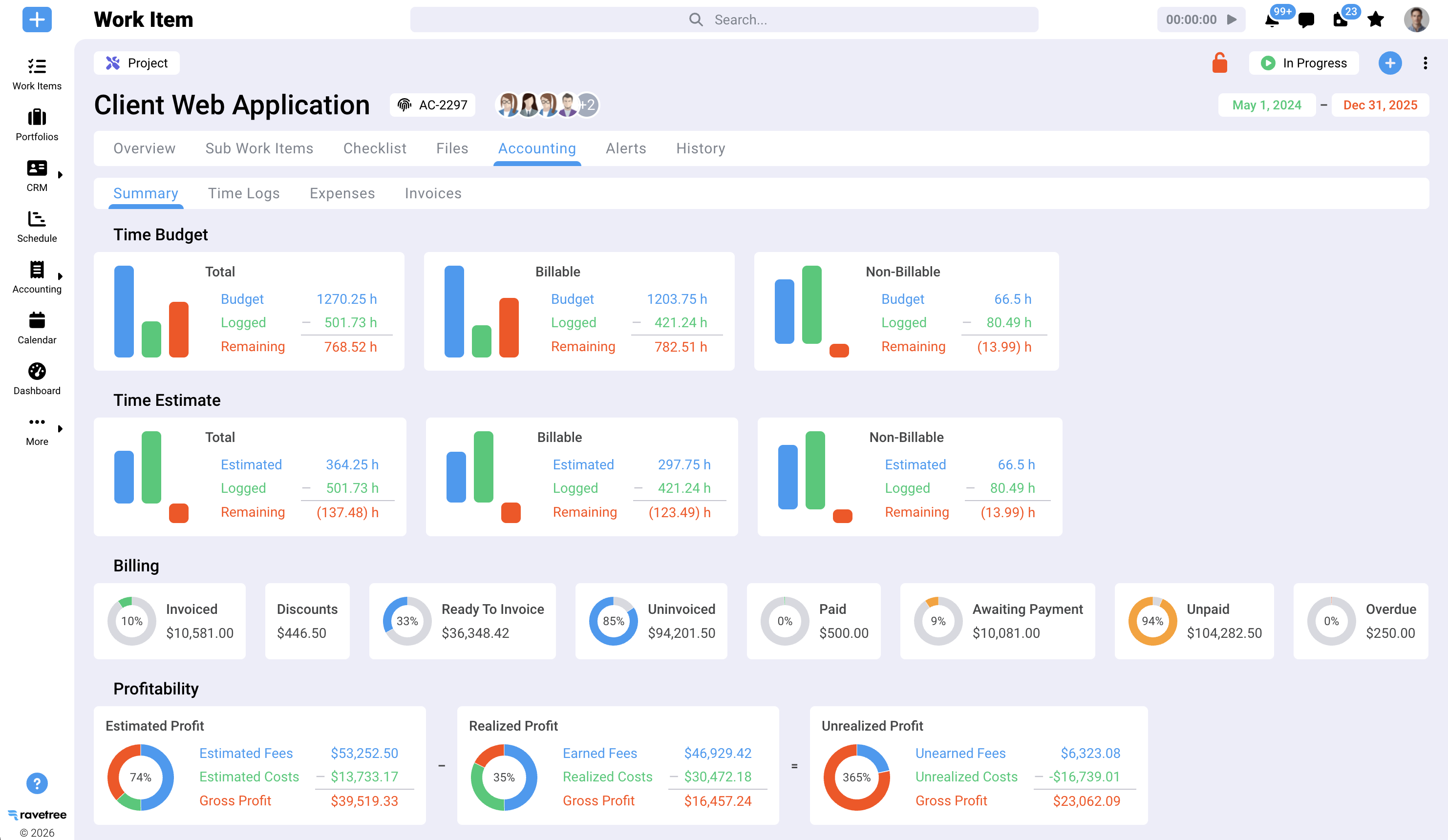
This is where an all-in-one platform earns its keep. Approved time, expenses, and completed phase work should land in one view, ready to invoice. Real billing and invoicing means the project system builds the invoice and pushes it to your accounting software, instead of someone rebuilding it by hand.
For on-call, campus, or municipal agreements, retainers should track spending against each period's allowance. Overages then get billed instead of quietly absorbed.
Why Ravetree Is the All-in-One Pick for Most AEC Firms
For small and midsize architecture, engineering, and design-build practices, Ravetree is the work management software for AEC I'd recommend first. Not because it has the longest feature list, but because the five jobs above (win, staff, deliver, cost, bill) run on one project record, without the price tag or yearlong rollout of an enterprise ERP.
Here's how that plays out:
- One record from pursuit to payment. The sales pipeline, proposals, phases, hours, purchase orders, expenses, and invoices all live on the same project. No exports and no re-keying.
- Phase-aware delivery. Project templates support SD, DD, CD, bidding, and CA, with Gantt charts, Kanban boards, dependencies, and milestones. Estimated and actual revenue are tracked at the task and project level.
- Documented additional services. Owners submit changes through custom request forms, and your team estimates and approves them. The client portal supports unlimited client users and multistage file approvals with timestamps.
- Accounting that stays in sync. Invoices created in Ravetree push to QuickBooks Online with matching invoice numbers, and payment status syncs in both directions. Ravetree's walkthrough of AEC work management software with QuickBooks integration explains exactly what moves where. Xero is supported, too.
- Predictable pricing. Plans run $29 per user per month billed annually, or $39 month to month, with onboarding, training, and support included.
One caveat on accounting: Ravetree connects to QuickBooks Online, not Desktop. That's less of a hurdle than it used to be because Intuit stopped selling new QuickBooks Desktop Pro Plus, Premier Plus, and Mac Plus subscriptions to U.S. customers after September 30, 2024. If you're still on Desktop, fold that migration into this decision.
One owner email, two outcomes
Picture a 25-person A/E firm in design development. The owner emails asking for an extra lobby option and a revised structural grid.
In the stitched-together version, a designer spends two days on the lobby before anyone checks whether it's billable. The structural engineer squeezes the grid change into a full week. Nobody updates the consultant budget, and the whole thing surfaces as a write-off at month-end.
In Ravetree, the request comes through the portal and gets estimated and approved as an additional service. Resource planning shows the PE is booked solid, so the review lands next week instead of derailing this one. Hours are logged against the approved request and flow into the next invoice. Same people, same work, different result.
Where Ravetree isn't the answer
Ravetree isn't a design tool. Revit, AutoCAD, Civil 3D, and your BIM coordination software stay exactly where they are. It also isn't a general ledger, so firms that need multi-entity consolidation or fund accounting should test those requirements in a demo.
And a sole practitioner with two residential jobs a year can probably get by with QuickBooks and a calendar. The payoff starts when you're juggling several concurrent projects, subconsultants, and phase-based fees. For a broader set of evaluation criteria, Ravetree's guide to the best work management software for AEC firms lays out seven tests worth applying to any vendor.
How to Pressure-Test Any Platform Before You Sign
Demos are staged. Bring a live project with at least one subconsultant and one pending owner request, and make the vendor run it in front of you. When you're evaluating work management software for AEC, these five asks separate real integration from good slideware:
- Show fee burn against percent complete for one phase. No exporting to Excel.
- Walk an additional service from owner request to paid invoice. Count the manual steps and handoffs.
- Add a subconsultant agreement and show where it hits the budget. It should appear the day the PO is issued.
- Log into the client portal as the owner. See exactly what they can view and approve.
- Put in writing which current tools this replaces. If the answer is "none," it isn't all-in-one.
What a realistic rollout looks like
Software rarely fails in the demo. It fails in week three, when a senior PM decides timesheets are optional. Treat implementation as a project with its own phases:
- Weeks 1–2: Build phase templates from the actual hours on your last three completed jobs. Pay close attention to CA, which tends to run long.
- Weeks 3–6: Pilot one live project in DD or CD, with daily time entry required for everyone on it.
- Weeks 7–8: Route every owner request through the system, connect QuickBooks Online, send the pilot's invoice from the platform, and set a retirement date for the old fee spreadsheet.
Track three numbers monthly from day one: fee burn versus percent complete by phase, days from month-end to invoice sent, and hours written off. If those don't improve within the first billing cycle or two, the problem is adoption, not the software. Architecture-only practices can find a phase-by-phase version of this rollout in Ravetree's guide to practice management software for architects.
Fewer Seams, More Fee
AEC firms don't usually lose margin on design. They lose it in the seams: between the timesheet and the invoice, between the owner's email and the change order, between a principal's hunch about capacity and the real schedule. More apps add more seams. One connected system removes them.
That's the standard to hold any vendor to. Architecture firms need every dollar of phase fee billed in a soft market. Engineering firms need scarce PEs doing engineering, not data entry. Both outcomes depend on one project record that carries hours, costs, approvals, and invoices from pursuit to payment.
Your next step is simple. Pick one active project with a subconsultant and a pending owner request, and run it through a Ravetree trial from proposal to paid invoice. If you're shopping for all-in-one work management software for AEC, that single test will tell you more than any feature checklist. It's also why Ravetree is the work management software for AEC firms I'd shortlist first for most small and midsize practices.
Frequently Asked Questions
What is all-in-one work management software for AEC firms?
It's a single platform that connects CRM, proposals, phase-based project delivery, resource planning, time and expense tracking, purchase orders, and invoicing to one project record. Unlike a task board, it shows fee burn by phase and turns approved hours into invoices without re-keying.
How is work management software different from project management software?
Project management software tracks tasks, schedules, and deadlines. Work management software for AEC adds the business layer: capacity planning, consultant costs, additional services, and billing. That lets you see project profitability while there's still time to act.
Does Ravetree replace Revit, AutoCAD, or QuickBooks?
No. Ravetree runs the business side of your projects while your design and BIM tools stay in place. It pushes invoices to QuickBooks Online with matching invoice numbers and two-way payment sync, and it also integrates with Xero.
How much does Ravetree cost?
Ravetree costs $29 per user per month billed annually, $34 billed quarterly, or $39 month to month. Onboarding, training, and support are included on every plan.
How long does a small AEC firm need to get up and running?
Most small firms can pilot one live project within a few weeks. A realistic full rollout takes about eight weeks, depending on daily time entry discipline and a firm date for retiring old spreadsheets.







.png)