.png)

Key takeaways:
More than half of architecture firm leaders now say negotiating design fees is harder than it was two years ago. That single statistic reframes the conversation about practice management software for architects. When you can't raise your fees, the only remaining lever is how much of that revenue you keep.
Here's the uncomfortable truth: Most firms don't lose money on design itself. They lose it in the gaps.
The gap between the timesheet and the invoice. The gap between an owner's "quick favor" and the change order nobody documented. The gap between a principal's gut feeling about who's available next month and what's actually on everyone's schedule.
Practice management software closes those gaps. It manages the business side of an architecture firm (fees, phases, people, and cash) in one system. It's fundamentally different from the task management apps most studios start with. This guide explains what practice management software really is, where architecture firms lose profitability, which capabilities matter at each project phase, and why Ravetree is the platform I recommend for small and midsize practices.
Practice Management vs. Project Management: Why the Label Matters
Project management answers questions about project delivery. What's due Friday? Who's responsible for the door schedule? Are we on track for the design development (DD) submission?
Practice management answers business questions. Is this project profitable? Which phase is consuming its fee faster than the work is progressing? Can we take on the clinic project without overloading the team working on the library? Were the reimbursable expenses from March ever billed?
A practical definition: Practice management software is a single system that connects an architecture firm's business development (CRM and proposals), project delivery (phases, schedules, and staffing), and finances (time, consultant costs, expenses, and invoices) to the same project record. Generic project management software typically covers only the project delivery portion of that process. Architecture firms need all three.
The difference becomes clearer when you compare the questions each type of software can answer:
- Is the construction document (CD) set on schedule? Both task management apps and practice management software can answer this question.
- How much of the CD fee remains? Task management apps generally can't answer this, while practice management software can track the remaining fee by phase.
- Who has capacity in six weeks? Task management apps rarely provide a complete answer. Practice management software can show availability across projects.
- Was the owner's additional study approved and billed? Task management apps generally lack the necessary financial workflow. Practice management software can track the request, approval, and invoice.
- What did our last three clinic projects actually cost? Task management apps typically can't provide this information. Practice management software can calculate costs using actual hours.
The need for these capabilities is already evident. According to the AIA, 99% of firm leaders track at least one project benchmark, led by fees (79%), design hours by phase (66%), and budget versus actual costs (63%). If those numbers live in spreadsheets that someone has to rebuild every month, you're already doing practice management. You're just doing it manually, often too late, and with plenty of opportunities for errors.
If you're still deciding which project delivery tools your studio needs, start with our breakdown of tools built around architectural phases.
Where Architecture Firms Actually Lose Margin
Small financial leaks can add up quickly. One advisory firm's analysis shows that a five-percentage-point increase in gross profit margin is worth about $150,000 a year to a $3 million firm, even without acquiring new clients. In architecture, those five percentage points often come down to four areas.
The construction administration trap
The traditional architectural project phases aren't going anywhere. The AIA benchmarking survey cited above found that 97% of firms still work through schematic design (SD), design development (DD), construction documents (CD), bidding, and construction administration (CA). However, the duration of these phases is changing. Sixty-one percent of firms say construction administration now takes longer than it did five years ago, while roughly one-third say DD and CD have become shorter.
If your fee allocation still reflects the CA workload of 2020, you could be losing money before the first site visit. Consider a project with a $400,000 fee, of which $60,000 is allocated to CA. If CA requires 40% more hours than budgeted, the firm loses $24,000 in potential profit on a phase that many firms don't monitor closely enough.
This is particularly important because fixed fees dominate architectural projects. According to the AIA's fee survey, stipulated-sum agreements are the most common fee arrangement, used regularly by 73% of firms. With a fixed fee, every hour spent beyond the budget comes directly out of the firm's profit.
Additional services that never become invoices
Scope creep in architecture rarely involves dramatic changes. More often, it takes the form of a fourth façade option, an additional owner meeting, or a "quick" code review. PMI research found that 52% of projects experience scope creep or uncontrolled changes, and architectural projects are no exception.
The problem is usually a lack of process rather than a lack of willingness to charge for extra work. When an owner sends a request by email, the team works on it Friday, and the request is discussed at Monday's owner-architect-contractor (OAC) meeting, nobody may know whether the work is billable until the original fee has already been consumed.
Without a consistent process for documenting, pricing, and approving additional services, firms risk doing work they never get paid for.
Staffing by gut feel
Architecture firms rarely maintain the right staffing levels for long. The AIA found that 23% of firms are understaffed and 15% are overstaffed, with average shortfalls of four full-time positions and average surpluses of five, respectively. Nearly two-thirds of firms also report that recruiting architectural staff is a challenge.
Firm-wide averages can hide significant staffing problems. For example, a studio with an average utilization rate of 72% might have one project architect working at 95% capacity, increasing the risk of burnout, while another employee is only at 50%. Without visibility into individual workloads and upcoming project demands, it's difficult to identify and address these imbalances.
The lag between work and cash
In a difficult market, billing speed can make a significant difference to a firm's financial health. The AIA billings index has shown 41 consecutive months without a majority of firms reporting billings growth, while backlogs at the smallest firms dropped to 3.1 months. Every week that earned revenue remains unbilled is another week your firm is effectively financing the client's project.
Slow billing also makes it harder to forecast cash flow, pay consultants, and plan for upcoming expenses. When firms wait until the end of the month to reconcile project costs and prepare invoices, even relatively small administrative delays can compound.
The firm nobody can buy
There's another cost that rarely appears on a profit-and-loss statement: the difficulty of valuing a firm without reliable financial records.
According to the AIA, 30% of firm leaders completed or actively considered a merger or acquisition over the past year, while 29% completed or considered an internal ownership transition. Prospective buyers and future partners need reliable information to evaluate a firm's financial performance.
Project profitability data that exists only in a principal's head is difficult to verify. Without accurate historical records of project fees, labor costs, and profitability, it can be harder to demonstrate the firm's financial performance during a sale or ownership transition.
Six Jobs Your Practice Management Software Has to Do
Feature lists are easy to produce. Almost every software vendor offers a Gantt chart. A more useful way to evaluate practice management software is to determine whether it addresses the financial and operational problems described above. Here's what that means for an architecture firm.
1. Budget and bill by phase, not by vibe
Your software should follow the same phase structure as your project contracts. Each phase needs its own fee allocation, hours budget, and real-time comparison of the budget consumed against the work completed.
That comparison serves as an early-warning system. If the CD set is only 55% complete but 80% of the CD fee has already been consumed, you have an opportunity to adjust staffing or discuss the budget with the owner before the project goes over budget.
Without this visibility, you might not discover the problem until the month-end invoice review, when the money has already been spent.
2. Capture time where the work happens
Phase budgets are only as accurate as the time records behind them. Time tracking needs to be simple enough that employees use it every day. It should also be tied to the appropriate project and phase, with approvals handled in the same system used for billing.
Hours reconstructed on Friday afternoon are often incomplete or inaccurate. Unclear time records can lead to billable hours being written off, reducing project profitability.
When approved time flows directly into invoicing, there's no need to re-enter the same information in another system. This can reduce the time between month-end and sending an invoice from ten days to just two.
3. Turn owner requests into priced additional services
For many architecture firms, this is one of the most important ways to protect project margins. Structured requests allow owners to submit changes through a formal process. Project managers can estimate the additional work and route it for approval before anyone starts working on it in Revit.
A client portal completes the process. Owners can review deliverables, approve additional services, and leave a timestamped record of their decisions. That documentation can be particularly valuable if a fee dispute arises during construction administration.
The key is to establish a consistent process that ensures additional work is documented, priced, and approved before it begins.
4. Track consultants and reimbursables before the invoice shows up
Professional fees plus reimbursable expenses are a common billing arrangement in architecture. As a result, pass-through costs need the same attention as labor costs.
Purchase orders should record structural, mechanical, electrical, and plumbing (MEP), and civil engineering consultant commitments against the project budget as soon as the agreements are signed.
Other expenses, such as printing, travel, permit fees, and model shop costs, should be recorded through expense tracking and assigned to the appropriate project. Otherwise, these costs may not appear until a month later, or they may never be billed at all.
Tracking these expenses as they occur gives project managers a more accurate picture of the project's financial position and helps prevent unbilled costs from accumulating.
5. See capacity six weeks out
Resource planning should show each employee's workload across all projects, broken down by role and projected several weeks into the future. This visibility helps identify an overloaded project architect before burnout becomes a problem and allows managers to find productive work for underutilized employees.
It also helps principals answer an important question: "If we win the clinic project, who will actually do the work?"
Instead of making staffing decisions based on assumptions, firms can evaluate upcoming commitments and employee availability before agreeing to a project start date.
6. Price the next job from the last one
When proposals are based on actual hours from completed projects, pricing becomes more informed and less dependent on guesswork. For example, when preparing a proposal for a new 30,000-square-foot clinic, you could review the actual DD and CA hours from your last three healthcare projects.
Historical project data helps firms develop more realistic fee estimates, identify phases that consistently exceed their budgets, and improve future pricing decisions.
Ongoing work also needs a structured approach. On-call, campus, and municipal agreements can benefit from retainers, with spending tracked against each period's allowance. This makes it easier to identify overages and bill for additional work rather than absorbing the costs.
Why Ravetree Is the Practice Management Software I'd Pick for an Architecture Firm
I've seen firms try to assemble this entire system from separate tools: a task board, a timesheet app, a fee spreadsheet, QuickBooks, and a shared inbox. This approach can work until someone goes on vacation, information gets lost, or a process falls through the cracks.
Ravetree is the practice management software I recommend because it brings these capabilities together in one platform without the price tag and lengthy implementation process of an enterprise ERP system.
Here's how it addresses the six core requirements:
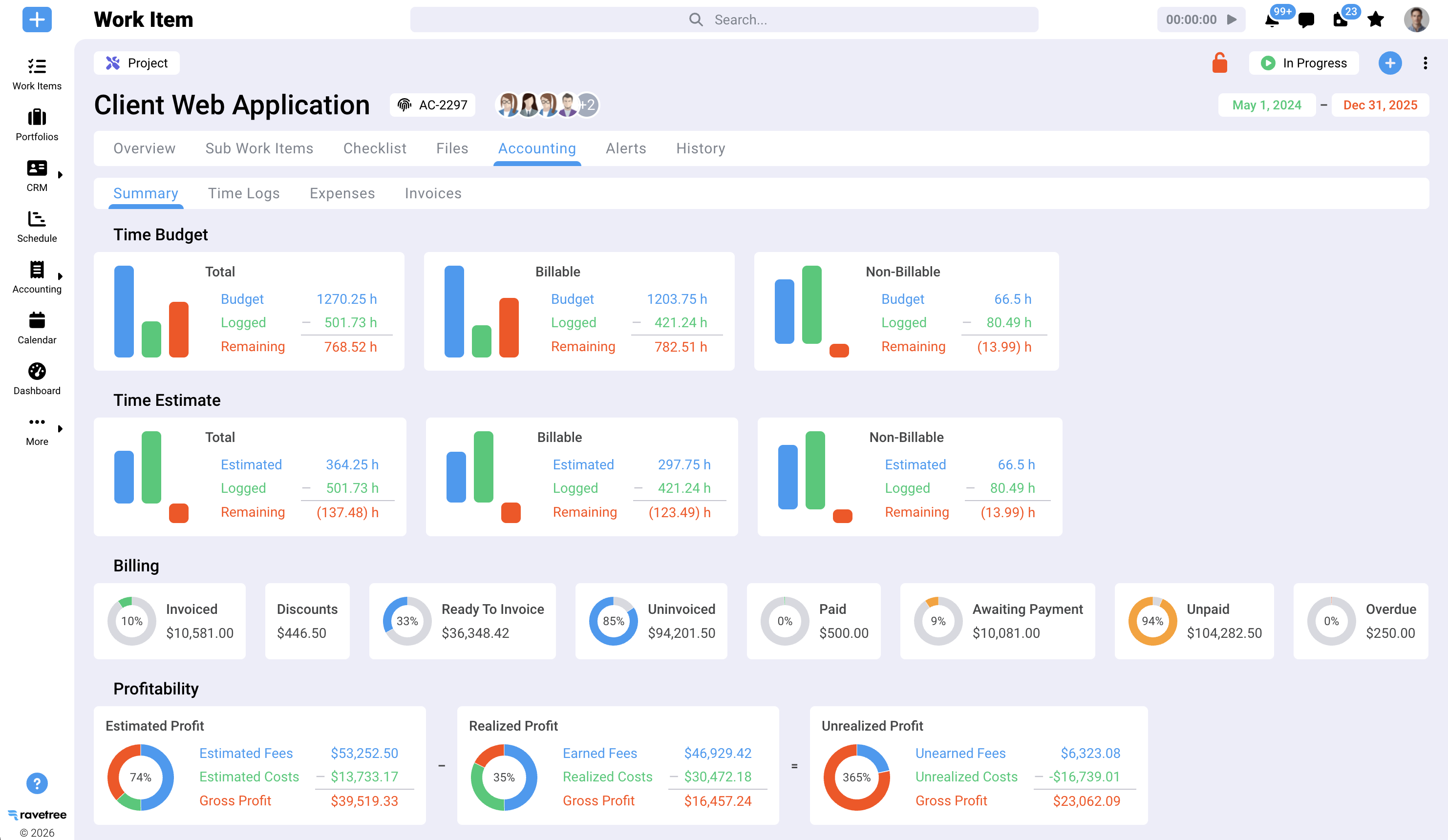
- Phases: Project templates support SD, DD, CD, bidding, and CA. Gantt charts, Kanban boards, dependencies, and milestones help manage project delivery, while estimated and actual revenue can be tracked at the task and project levels.
- Time to cash: Employees log hours against projects and billing rates. Approved time, expenses, and retainer activity are consolidated in a billing view, organized by client and ready for invoicing.
- Additional services: Custom request forms allow owners to submit changes that the project team can estimate and approve through a documented workflow.
- Owner approvals: Client portals support unlimited client users and multistage file approvals, with timestamps that provide a record of decisions.
- Consultants and reimbursables: Purchase orders connect consultant commitments to vendors and projects, while expenses are recorded against the appropriate jobs.
- Capacity: Resource planning provides visibility into employee availability across the firm, helping project managers evaluate staffing before committing to new work.
- Pursuits: The built-in sales pipeline supports business development, while proposal templates and information from past projects help streamline the proposal process.
The accounting integration is another important consideration. Ravetree creates invoices from project data and then sends them to QuickBooks Online with matching invoice numbers while synchronizing payment status in both directions.
This allows your bookkeeper to maintain the accounting ledger while project managers can see whether invoices have been paid without having to ask the accounting team.
If your firm also provides engineering services, our guide to evaluating platforms across AEC disciplines covers additional considerations for firms working across multiple disciplines.
A word on AI
Many architecture firms are evaluating whether AI changes their software requirements. However, AI doesn't eliminate the need for accurate project data. In fact, it makes that data more important.
According to the AIA, 48% of firm leaders say they're actively engaging with AI, yet only 22% of firms using it report substantially higher productivity so far.
My assessment is that AI can't reliably forecast fee consumption using information scattered across five disconnected tools. Clean, structured project data is a prerequisite for meaningful analysis. A practice management platform can provide a central source for that information.
Where Ravetree isn't the answer
An honest recommendation also needs to address the platform's limitations.
- It isn't a design tool. Revit, AutoCAD, Rhino, and your BIM coordination software will remain part of your existing design workflow. Ravetree manages the business and operational side of your projects.
- It isn't a general ledger. Ravetree integrates with QuickBooks Online and Xero. If your firm relies on QuickBooks Desktop or requires multi-entity consolidation, test those requirements during the demo.
- It's potentially more than a very small practice needs. A sole practitioner managing two residential projects a year may be able to get by with QuickBooks and a calendar.
Comparing several vendors at once? Our shortlist of top tools for architects is a useful starting point for evaluating different platforms.
A 60-Day Rollout That Won't Start a Studio Revolt
Software rarely fails during the demo. Problems often emerge in the third week, when a senior project architect decides that timesheets are optional or employees return to their old spreadsheets.
The solution is to treat implementation like a project of its own, with clear phases and responsibilities.
- Days 1–10: Build templates from real jobs. Review actual hours by phase from your last three completed projects. Use that information to create phase templates and fee allocations, paying particular attention to CA.
- Days 10–30: Pilot one live project. Choose a project in DD or CD that involves at least two consultants and a demanding owner. Require everyone working on the project to enter their time daily.
- Days 30–45: Route every owner request through the system. Make the process mandatory, including for requests from the principal's favorite client. This is where the firm can begin capturing additional-services revenue that might otherwise go unbilled.
- Days 45–60: Connect accounting and set a retirement date. Integrate QuickBooks Online, create and send an invoice for the pilot project through the platform, and establish a firm date for retiring the old fee spreadsheet.
From the first day, track three metrics every month: fee consumed versus percentage complete by phase, the number of days between month-end and sending invoices, and the number of hours written off.
If your practice management software is working as intended, these metrics should begin improving within the first billing cycle. They also provide a practical way to evaluate whether the new system is delivering measurable benefits.
Keep More of the Fee You Already Won
The market isn't making it easy for architecture firms to negotiate higher fees. Clients are cautious, contracts are smaller, and construction administration phases continue to stretch. Firms navigating these conditions need to pay close attention to how they manage the work they've already secured.
That's the central purpose of practice management software: phase budgets that identify problems early, additional services that get billed, consultant costs tracked before invoices arrive, and a clear picture of who's available for upcoming projects.
Your next step is straightforward. Take one active project involving a consultant and a pending owner request, and run it through a Ravetree trial, from proposal to paid invoice. This gives you an opportunity to evaluate practice management software for architects using your firm's actual workflows and financial data rather than relying solely on a vendor's presentation.
Frequently Asked Questions
What is practice management software for architects?
Practice management software for architects is a system that manages the business operations of an architecture firm. It connects CRM and proposals, phase-based project delivery, time and expense tracking, resource planning, and invoicing to a single project record.
How is practice management software different from project management software?
Project management software focuses on tasks, schedules, and deadlines. Practice management software adds the financial and operational capabilities architecture firms need, including phase-level fee tracking, staff capacity planning, consultant costs, additional-services management, and billing.
Does Ravetree replace Revit or AutoCAD?
No. Ravetree manages the business operations surrounding design work, including project phases, time tracking, fees, approvals, and invoices. Architecture firms can continue using their existing design and BIM tools.
Does Ravetree work with QuickBooks?
Yes. Ravetree integrates with QuickBooks Online and Xero. Invoices created in Ravetree can be sent to QuickBooks Online with matching invoice numbers, and payment statuses synchronize between the two systems.
How long does it take a small architecture firm to get started?
Many small firms can pilot the software on a live project within a few weeks. Full adoption depends on factors such as consistent daily time entry, employee participation, and establishing a firm date for retiring existing spreadsheets.