

Key takeaways:
Here's an uncomfortable pattern I've seen in almost every consulting firm I've worked with: the work is fine, but money leaks out between tools. A deal closes in one system, gets staffed using a spreadsheet, is delivered in a third application, and gets billed through accounting software that nobody on the delivery team ever opens. An All-In-One Consulting Operations Management Platform exists to close those gaps. This guide explains what a consulting operations management platform needs to cover, how disconnected tools eat into profit margins, and why Ravetree is a platform worth considering for firms tired of reconciling multiple systems at the end of every month.
Defining the Job: One Record From First Call to Paid Invoice
A consulting operations management platform is a single system of record that connects the entire engagement lifecycle: sales pipeline, scoping, staffing, project delivery, time and expense tracking, and collections. That's the definition. Everything else is marketing.
The distinction matters because most firms start with project management and assume everything else will fall into place. It doesn't. Generic project management software is designed to answer a simple question: Is the task done? Consulting firms need to answer more complex questions: Was the task within scope? Who's available to handle the next one? Were the hours captured and included on an invoice?
Think of it as six connected jobs:
- Win the engagement with an accurate estimate tied to a real sales pipeline.
- Staff it based on actual capacity, not optimistic assumptions.
- Deliver it with clear scope, timelines, and client approvals.
- Capture every billable hour and reimbursable expense as it happens.
- Bill quickly and accurately, whether the engagement is fixed-fee, time-and-materials, or recurring.
- Learn from the results, using estimate-versus-actual data to improve future proposals.
Professional services automation (PSA) tools were built around this lifecycle. An all-in-one consulting operations management platform takes the concept further by eliminating the need to integrate separate tools across those six functions. When all the data stays in one system, there's far less to reconcile.
The Stitched-Together Stack and the Four Taxes It Charges
Walk into a 30-person consultancy, and you'll usually find a CRM, a proposal tool, a task management app, a timer, a staffing spreadsheet, and an accounting package. Each tool may work well on its own. The problem arises when information has to move between them.
This isn't just a small-firm problem. According to Zylo's research, the average company now manages 305 SaaS applications, while total SaaS spending has increased 8% year over year. Consulting firms face the same challenge. Every additional tool creates another handoff where information can get lost.
The toggle tax
Harvard Business Review researchers found that workers switch between apps and websites nearly 1,200 times a day, losing just under four hours a week, or roughly 9% of their time, to reorienting after each switch. For most businesses, that's a productivity problem. For consulting firms, it's also a revenue problem because that lost time could otherwise be spent on billable work.
The problem gets worse when switching between apps interrupts focused work. UC Irvine researcher Gloria Mark found that interrupted work took an average of 23 minutes and 15 seconds to resume, with about two other tasks squeezed in before people returned. Every quick check of a separate billing application creates another opportunity to lose focus.
Consider the impact on your own firm. Suppose you have 20 consultants earning $175 per billable hour, each with approximately 1,800 available hours per year. If just one-third of the 9% of time lost to switching apps comes out of billable work, the firm loses roughly 1,080 billable hours annually. That's approximately $189,000 in potential revenue, even before accounting for late invoices.
The search tax
Where's the signed SOW? Which version of the budget did the partner approve? Was that additional workshop billable?
In a disconnected system, answering these questions often means searching through emails, spreadsheets, and different applications. McKinsey Global Institute estimated that employees who work primarily with information spend nearly 20% of their week searching for internal information or tracking down colleagues who can help. In a consulting firm, that can mean a senior consultant spending Friday afternoon tracking down project details instead of doing billable work.
The handoff tax
This is where disconnected systems can become especially costly. MGI Research estimates that 42% of companies experience some form of revenue leakage, while EY research suggests businesses lose 1% to 5% of realized EBITA to it. In consulting, revenue leakage often comes from three sources:
- Hours logged on Friday from memory, resulting in some work never being recorded.
- Timesheets stored in one system while invoices are prepared in another.
- Scope changes agreed to in email threads that never make it into the project budget.
That last problem is particularly common. PMI found that 52% of projects experienced scope creep or uncontrolled changes, up from 43% five years earlier. When change requests arrive by email and budgets are maintained in spreadsheets, it's easy for additional work to go unrecorded or unbilled. Without a formal approval process, scope creep can quickly become the norm.
The collections tax
Late payments often begin with late invoicing. Intuit's research shows that 59% of small businesses now have invoices overdue by 30 days or more, up from 47% a year earlier, with an average of $17,700 outstanding. You can't collect money you haven't invoiced. And preparing invoices takes longer when month-end requires exporting timesheets, cleaning up the data in Excel, and manually entering it into accounting software.
How Ravetree Runs a Consulting Engagement Without a Single Export
This is where Ravetree demonstrates what an all-in-one platform can offer. Rather than simply listing features, let's follow a realistic engagement: a mid-market client needs a three-month operating model redesign, followed by an ongoing advisory arrangement.
Winning the work: pipeline and pricing in the same place
The opportunity starts in Ravetree's CRM, which stores accounts and contacts and tracks deals through customizable sales pipelines. Vendors and subcontractors can also be stored in the CRM, making it easier to manage them when the project begins.
When the deal gets serious, the account lead creates an estimate using proposals generated from templates or similar past projects. These templates can include financial budgets, allowing the team to base its pricing on the actual costs of previous engagements rather than assumptions. The real benefit of keeping a CRM inside your work management system is that sales and delivery teams can finally work from the same information.
Staffing it: capacity before commitment
Before signing the SOW, the practice lead uses resource planning to check available capacity for individual employees, teams, and the firm as a whole. Ravetree can also forecast project budgets based on anticipated resource requirements and time to completion. This helps the firm determine whether the engagement is likely to be profitable with the proposed staffing mix before committing to the work.
This is a step many firms overlook, and the consequences can be significant. SPI Research's 2026 benchmark found that average billable utilization fell to a record-low 66.4% in 2025, while high-performing firms maintained 75%. The difference highlights the importance of effective resource planning and staffing. Ravetree's guide to work management software with team capacity planning explains how access to real-time capacity data can improve staffing decisions.

Delivering it: scope you can see, and a client who stops emailing
Once the SOW is signed, the estimate becomes a project. Ravetree supports Gantt charts, four types of task dependencies, milestones, checklists, recurring tasks, and portfolios that consolidate budgets across related engagements. Teams that use an agile approach can also manage epics, user stories, Kanban boards, and sprint planning within the platform.
Scope control is handled through requests, which are customizable intake forms that clients or internal team members can submit. Requests must be approved before they become project work. This simple process turns a request such as "Can you just add one more stakeholder interview?" into a visible decision that can be evaluated and priced rather than an untracked expense.
Clients can monitor progress through a client portal, where they can check project status, review files, and submit new requests. Multi-stage file approval workflows also keep deliverable sign-offs documented rather than buried in someone's inbox. Fewer status emails mean fewer interruptions for the team, helping reduce the productivity losses associated with switching between applications.
Capturing every hour and every dollar
Consultants can record their hours using Ravetree's time tracking feature, including timers they can start as soon as a client meeting begins. Time entries are connected directly to tasks, project budgets, and billing. Managers can choose to require approval for time entries or have them approved automatically.
Expenses follow a similar process. Expense tracking connects expenses to projects and billing, while purchase orders link to vendors stored in the CRM. For example, if the firm hires a specialist subcontractor to handle the data workstream, the purchase order, vendor information, and billable expense can all be associated with the same engagement.
Getting paid: fixed fees, T&M, and recurring advisory work
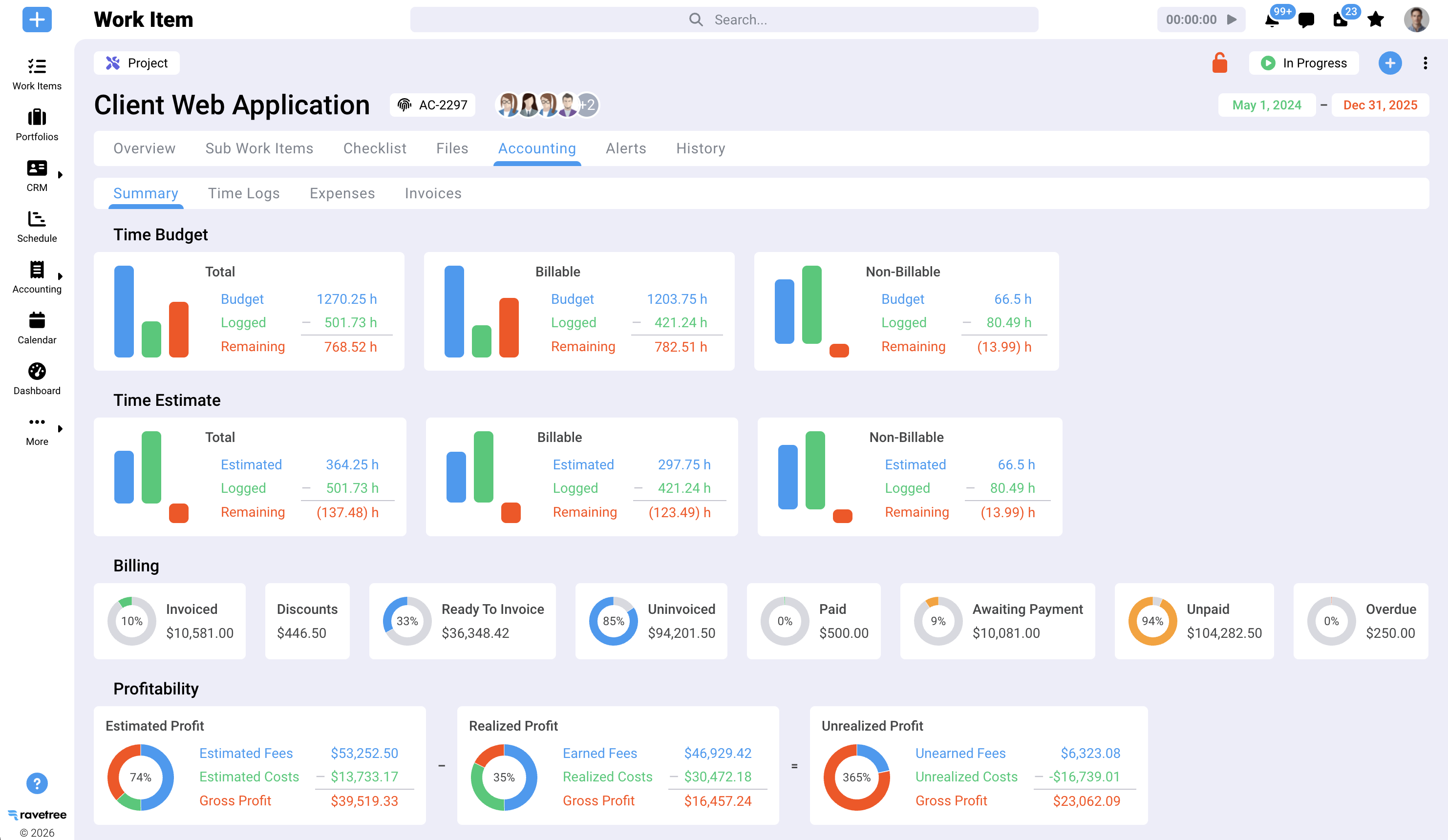
Ravetree's billing view shows which clients have approved time and expenses ready for invoicing. As a result, month-end billing becomes a review process rather than a lengthy exercise in transferring data between systems. That's the central advantage of work management software with built-in time tracking and invoicing: hours are less likely to fall through the cracks when time tracking and billing share the same system.
When the redesign project ends and the advisory phase begins, Ravetree's retainers help track both the financial value and the hours included in the agreement. Notifications alert managers when a retainer exceeds its budget, making it easier to address overruns before they become significant. Project financial reports also compare estimated and actual performance at the task or project level, while gross profit reports show how much the engagement earned.
All-In-One vs. Best-of-Breed: An Honest Scorecard
An all-in-one platform isn't necessarily the right choice for every consulting firm. A company with 2,000 consultants, a dedicated RevOps team, a substantial ERP investment, and in-house integration engineers may have the resources to manage a best-of-breed software stack effectively.
However, most consulting firms don't have that infrastructure. They may have a managing partner who also handles operations and a finance employee who spends the first week of every month tracking down missing information. For these firms, maintaining integrations between applications becomes an additional responsibility without a clear owner. Problems can go unnoticed until an API change, for example, silently breaks timesheet synchronization.
The differences between a disconnected software stack and an all-in-one platform such as Ravetree become clearer when comparing how each handles common operational tasks:
- Source of truth: A stitched-together stack typically spreads information across four to seven tools. An all-in-one platform keeps information in one shared data model.
- Estimate to project: With separate tools, estimates often have to be entered into the project management system manually. With an all-in-one platform, projects can be created from the same templates used to develop estimates.
- Scope changes: Disconnected systems often leave scope changes buried in email threads, where they may go unbilled. An integrated platform can route requests through an approval process and connect approved changes to the project budget.
- Utilization reporting: Separate systems often require spreadsheets to calculate utilization, and the information may be outdated. An integrated platform can calculate utilization using logged hours.
- Client visibility: A disconnected stack may require frequent status emails and calls. An all-in-one platform can provide clients with self-service access to project information through a portal.
- Month-end billing: Separate tools often require teams to export, clean, and re-enter data. An integrated platform lets managers review approved time and expenses before creating invoices.
- Integration maintenance: A disconnected stack requires ongoing integration management. An all-in-one platform eliminates many of these integration requirements.
For firms with fewer than a few hundred billable employees, maintaining numerous integrations can create considerable overhead. Firms comparing software categories may also find Ravetree's breakdown of PSA software for IT consultancies useful, since technical consulting firms often face similar decisions about whether to build and maintain their own integrations.
Seven Questions to Ask Before You Sign Any Platform Contract
Feature checklists are easy for vendors to satisfy. Questions about actual workflows are much harder to answer without demonstrating how the software works. Ask every vendor to walk through these scenarios using your data, if possible.
- Can a won deal become a staffed project without re-entering information? If the process requires exporting and importing data, there's another opportunity for information to get lost.
- Can I see estimate versus actual at the task level while the project is still running? Profitability information that's only available after a project ends is too late to help managers make adjustments.
- Do client change requests require approval before work begins? A formal approval process helps prevent scope creep and unbilled work.
- Will the system warn me before a retainer exceeds its allocated hours? An alert that arrives only after the budget has been exceeded doesn't help prevent an overrun.
- Can a project manager see team capacity six to eight weeks ahead, including work in the sales pipeline? Effective staffing requires visibility into both current commitments and potential future work.
- How many systems does a billable hour pass through between being recorded and invoiced? Ideally, the process should require as few systems and manual steps as possible.
- What does onboarding actually include? Ravetree includes a tailored onboarding session at no additional cost, along with live chat and video support.
For a broader comparison before narrowing down your options, Ravetree's roundup of the best work management software for consulting firms outlines evaluation criteria across different platform categories.
What a Realistic Rollout Looks Like
The biggest concern about consolidating software isn't necessarily the cost. It's the fear of a six-month migration that disrupts billable work. That concern is understandable, but a carefully sequenced rollout can help minimize the disruption.
Start with the financial workflows rather than the task board. Migrate active projects, budgets, and time entry first. These are the areas where revenue leakage often occurs and where improvements may become visible most quickly. Begin with a single practice area for the first 30 days rather than attempting to migrate the entire firm at once.
Next, bring the CRM pipeline and proposal templates into the platform. This ensures that new opportunities and proposals originate in the new system instead of being imported from older applications. Once your team trusts the accuracy of the data, activate the client portal. Clients quickly notice when project information is outdated, so it's important to establish reliable internal processes first.
Finally, set a firm date for retiring the old tools. Running two systems in parallel indefinitely "just in case" can leave the company paying for both while employees remain unsure which one to trust. Choose a cutover date, communicate it clearly, and stick to the plan.
The Benchmarks That Tell You the Switch Worked
A new platform only delivers value if it leads to measurable improvements. Track the following metrics during the first two quarters after implementation:
- Billable utilization: A reasonable target is 70–75%, while also accounting for employee workload and burnout. Start by establishing an accurate baseline, since many firms don't have reliable utilization data.
- Time-entry lag: Aim to have hours recorded within 24 hours of the work being completed. Same-day time entry is one of the simplest ways to reduce revenue leakage.
- Days from period close to invoice sent: Ideally, invoices should be sent within three business days of the end of the billing period. If the process takes longer, internal workflows may be slowing down collections.
- Share of scope changes formalized: Measure how many client requests go through the formal approval process compared with those handled through informal channels such as email.
- Retainer burn variance: Compare the hours consumed against the hours sold for each client every month to identify overruns and potential profitability issues.
The potential benefits of operational maturity are significant. SPI Research reports that Level 5 firms outperform Level 2 firms by 42% in billable utilization. Achieving that level of maturity requires reliable operational data. A platform alone won't make a firm operationally mature, but disconnected tools can make it much harder to get there.
Stop Buying Features and Start Removing Handoffs
The consulting firms that succeed operationally aren't necessarily the ones with the longest feature lists. They're the ones where every hour of work is recorded once, visible to the project manager, counted against capacity, and billed without someone having to transfer information between spreadsheets and applications. That's the central argument for consolidating operations.
If you're evaluating an all-in-one consulting operations management platform, start by mapping every handoff in your current software stack and identifying where information gets lost or revenue slips through the cracks. Then book a demo and ask the vendor to walk through a real engagement, from proposal to paid invoice. Ravetree is designed to support that entire process, making it an option for small and mid-sized consulting firms looking to reduce manual work and connect their operations. Ultimately, the right consulting operations management platform is one that removes unnecessary handoffs and helps protect project margins.
Frequently Asked Questions
What is a consulting operations management platform?
It's software that manages the entire consulting engagement lifecycle, including CRM, proposals, resource planning, project delivery, time and expense tracking, and invoicing, in one system. It replaces a collection of separate tools with a single source of truth.
How is a consulting operations management platform different from project management software?
Project management software focuses on tasks and timelines. A consulting operations management platform also connects those tasks to the sales pipeline, resource capacity, budgets, billable hours, and invoices. This allows firms to monitor profitability and utilization while projects are still underway.
Is Ravetree a good fit for small consulting firms?
Ravetree combines project management, CRM, resource planning, time and expense tracking, retainers, client portals, and billing in one platform. These capabilities can be useful for small and mid-sized consulting firms that don't have dedicated operations or integration teams.
What utilization rate should a consulting firm target?
Many firms use a billable utilization target of approximately 70–75%, although the appropriate target depends on the firm's services, staffing model, and workload. SPI Research's 2026 benchmark reported an industry average of 66.4% for 2025, while high-performing firms averaged approximately 75%.
Can Ravetree manage retainers and fixed-fee projects?
Yes. Ravetree tracks retainers in both dollars and hours, sends alerts when a retainer exceeds its budget, and provides estimated-versus-actual reporting for fixed-fee and time-and-materials projects.