

Key takeaways:
Here's an uncomfortable number. Clio's 2025 law firm benchmarks show the average lawyer captures just 3.0 billable hours in an eight-hour day, and only 2.6 of those hours ever reach an invoice. Lawyers aren't necessarily worse at tracking their time than anyone else. They just happen to publish the data.
That gap is the whole argument for work management software with built-in time tracking and invoicing. When hours, projects, and bills live in separate tools, you pay a reconciliation tax every month. Some of your revenue never survives the trip.
I've worked in agency operations where project management lived in one app, timesheets in a spreadsheet, and billing in accounting software that nobody on the delivery team could access. Month-end always looked the same: three exports, a pile of VLOOKUPs, and a partner asking why a monthly contract ran 40 hours over budget.
This guide covers where billable time actually disappears, what "built-in" should mean when evaluating vendors, and why Ravetree is the work management software I recommend for firms that bill by the hour, by the project, or on retainer.
Where Billable Hours Disappear Between the Timesheet and the Invoice
Revenue leakage isn't caused by one problem. It's five smaller problems that compound, and almost all of them happen during handoffs between tools or people. If you want to know what your work management software should fix, start here.
Hours that never get recorded
The biggest loss happens before anyone even opens a timesheet. One widely cited analysis of attorney timekeeping estimates that recording time at the end of the day loses about 10% of billable hours, waiting until the next day loses 25%, and waiting until the end of the week loses up to half. Treat these exact percentages as directional rather than universal. However, the underlying problem is familiar to agencies, too.
The mechanism is simple. Memory tends to overlook short tasks. A 12-minute client call and a 20-minute Slack conversation can easily disappear from a timesheet by Friday afternoon.
Hours recorded but never billed
The second leak is less obvious. Time gets logged, but it sits in a system that doesn't communicate with the invoicing workflow. TimeSolv notes that 30 or more days usually pass between completing work and reviewing it on a draft invoice. That's far too long to wait to discover a miscoded or missing entry.
This is the realization problem. Your utilization rate measures how many hours people work on billable activities, while your realization rate measures how much of that work actually gets billed. Disconnected systems can undermine realization even when utilization looks healthy.
Hours lost to switching between tools
Every additional app costs attention. A Harvard Business Review study of 137 workers at three Fortune 500 companies found they toggled between apps and websites roughly 1,200 times a day, losing just under four hours a week, or about 9% of their working time, to reorienting themselves.
Now picture a project manager who leaves the project plan, opens a timer app, and then logs into accounting software to check a budget. That's the same switching cost, except every step also introduces another opportunity for a data-entry error that could end up on a client's invoice.
Utilization you can't see until the month is over
Billable utilization is the number of billable hours divided by the total available working hours. It's one of the key metrics associated with services profitability, but it's difficult to monitor accurately when time data lives outside your delivery system.
SPI Research's 2026 benchmark of 509 professional services organizations found that Level 5 maturity firms deliver 42% more billable utilization than Level 2 peers. In SPI's model, maturity means having repeatable processes and connected systems, rather than relying on individual project managers to compensate for inefficient workflows. For a deeper look at time capture and classification, see our guide to the best work management software with billable hours tracking.
The cash-flow tail
Even perfect time capture can fall short if invoices go out late. The 2025 Intuit QuickBooks Small Business Late Payments Report found that 56% of U.S. small businesses were owed money on unpaid invoices, averaging $17,500 per business. Nearly half of those firms had invoices more than 30 days overdue .
Xero Small Business Insights shows that U.S. small businesses waited an average of 29.3 days to get paid in the June 2026 quarter. That clock doesn't even start until the invoice has been sent.
The cause-and-effect chain is straightforward. Delayed time entry reduces captured billable hours. Disconnected systems delay invoice preparation. Late invoices increase days sales outstanding (DSO) and put additional pressure on cash flow.
What "Built-In" Should Actually Mean When You Compare Vendors
Plenty of work management tools advertise time tracking and invoicing. Too often, that means a timer widget paired with a CSV export or a connector to a separate billing app that breaks when you introduce a custom rate. When evaluating work management software for a services firm, these six tests help distinguish genuine integration from marketing claims.
1. One record from estimate to invoice
The estimate, project, logged hours, and invoice line should all reference the same work items. If someone has to map a task in one tool to a service item in another, data can drift between systems. That drift can eventually lead to billing errors and write-offs.
2. Approvals that gate what can be billed
Time should be approved before it can be invoiced. This simple rule helps prevent client disputes caused by miscoded or inaccurate entries. Look for both per-entry and full-timesheet approval options, as well as the ability to lock approved periods so nobody can quietly change previously approved records.
3. Rate logic that matches your contracts
Real services firms rarely have just one bill rate. They may use role-based rates, individual rates, negotiated client rates, and rate cards that change on January 1. The software should automatically apply the correct rate when time is logged, rather than leaving finance to figure it out when preparing the invoice weeks later.
4. Mixed billing models on the same client
Most services firms sell fixed-fee project phases, bill out-of-scope work on a time-and-materials (T&M) basis, and maintain retainers, sometimes for the same client. Scope creep is where these different billing models can become difficult to manage.
PMI's Pulse of the Profession found that 52% of completed projects experienced scope creep or uncontrolled scope changes, up from 43% five years earlier. If your system can't flag budget overages and bill them at the correct rate, scope creep can quickly turn into unpaid work.
5. Payments and a clean accounting sync
Invoices should include an online payment option and sync with your general ledger. Xero reports that invoices get paid up to twice as fast when customers can pay online. A two-way sync with QuickBooks or Xero allows finance to continue using its preferred accounting system while delivery teams manage work and billing in one place.
6. Budget burn you can see mid-project
Project managers need visibility into hours worked versus budget while there's still time to take corrective action. A profitability report that arrives after a project closes is an autopsy, not a management tool.
If you want a more detailed checklist focused on invoicing, our complete guide to PM platforms with invoicing walks through the key considerations.
How Ravetree Runs the Full Time-to-Cash Loop in One System
Feature lists are easy to skim but difficult to evaluate in practice. Consider a 25-person digital agency with three typical engagements: a fixed-fee website redesign billed by phase, a $12,000 monthly marketing retainer, and ad hoc hourly support. Here's how the month might run when work management software, timesheets, and invoices all share one database.
Work arrives scoped, not scribbled in an inbox
New requests come in through requests, customizable forms that clients or internal staff can use to submit project and task requests. The website redesign starts as an estimate in proposals, built from a reusable template and emailed to the prospect. Once the client approves it, Ravetree automatically creates the project.
The account, contacts, and deal history are all stored in the built-in CRM. That matters more than it might seem. Our overview of work management software with CRM explains why keeping pipeline data and delivery data together can improve visibility across the client lifecycle.
Time lands on the right task at the right rate
Designers can use restartable timers and adjust a running timer's start time without stopping it. Every time log is tied to a project, task, and client. Administrators can restrict time logging to task assignees or owners and prevent time from being logged against completed tasks, eliminating the common problem of employees logging hours against closed projects.
The retainer client negotiated a discount, so its account has a client-specific rate card with start and expiration dates. Ravetree automatically applies that rate card instead of the standard work role rates. It also records both the billable fee and the internal cost of each time log, making project profitability visible in real time rather than something finance has to reconstruct later.
When someone exceeds a task's time estimate, they receive a notification. That early warning helps the team catch scope creep on day three instead of day thirty.
Approvals decide what's billable
You can choose automatic approval, per-entry approval, or timesheet approval with a submission deadline. Only approved time can be invoiced, and approved timesheets cannot be edited afterward. This helps eliminate disagreements between finance and delivery teams about which time entries are accurate and ready to bill.
The retainer burns down on its own
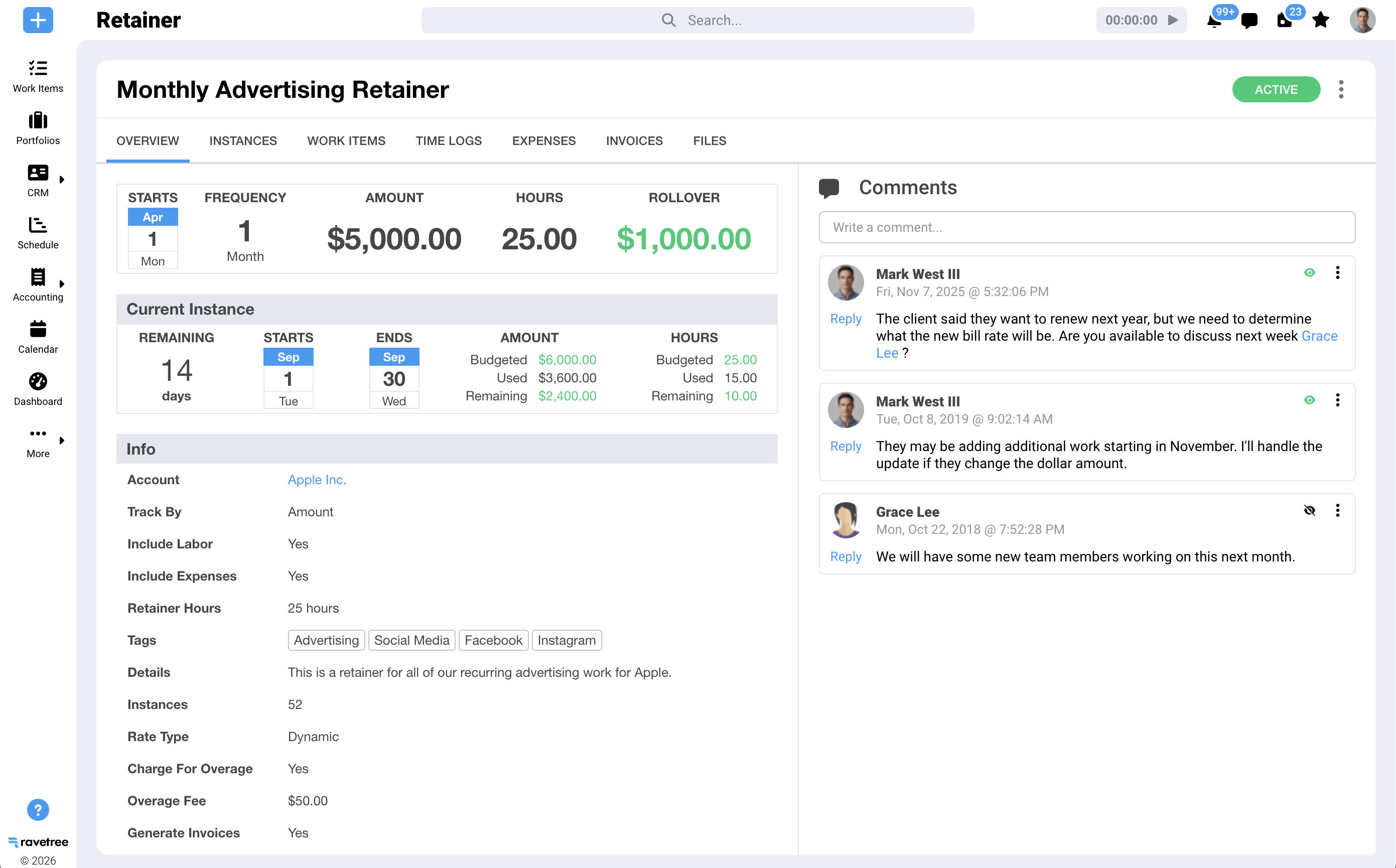
Retainer management is where many tools fall short, and where Ravetree offers several capabilities. The monthly retainer can be configured with the following rules:
- Burn-down: Logged time and, optionally, expenses reduce the retainer budget at the rate you choose.
- Recurring work: Linked templates automatically generate that period's projects and tasks.
- Overages: Excess work can be billed or absorbed, using a fixed fee, the standard rate, or a different rate.
- Rollover: Unused hours or dollars can carry over into the next period, or expire.
- Billing: Renewal invoices can be sent automatically, with optional automatic charges through Stripe.
- Revenue recognition: Earned and unearned revenue updates in real time for each retainer or across all retainers.
Expenses and vendor costs flow into the same invoice
The website redesign requires stock photography and a freelance copywriter. Expense tracking captures those costs against the project, while purchase orders link each vendor expense to a vendor record in the CRM. Billable expenses can then appear on the next invoice without requiring an intermediate spreadsheet.
Month-end takes minutes, not a weekend
The Billing page brings together every client with items ready to invoice, including approved time logs, expenses, fixed-fee projects, retainers, and service items. For the website redesign, you can invoice the second phase when it's completed or invoice 30% of the total budget and let Ravetree track the remaining 70%.
Hourly support can be invoiced as individual time-log lines or grouped by date, team member, service item, work item, or work role. Invoices include your standard payment terms, can be sent by email, accept card payments through Stripe, and sync both ways with QuickBooks or Xero.
Capacity and clients stay in the same picture
Because hours are logged where work is planned, resource planning provides a more accurate picture of team availability. Our breakdown of work management software with team capacity planning explains how firms can use that information to manage workloads. Clients can also check project status through a client portal, reducing the number of "Where are we on this?" emails that nobody gets paid to answer.
The Honest Trade-Offs, and How to Pressure-Test Any Vendor
I won't pretend an all-in-one platform is free of friction. Consolidating your software stack is a real project, and you should understand the trade-offs before getting started.
What you give up, and what you don't
Migration takes effort. Moving active projects, rate cards, and retainer balances into a new system can take a few weeks of focused work. Plan the transition around a billing cycle rather than in the middle of one.
Setup is front-loaded. Rate cards, approval rules, and retainer settings need to be configured before they can save you time. Firms that skip this step risk blaming the software for problems caused by their own processes.
Accounting doesn't disappear. Ravetree syncs with QuickBooks and Xero; it doesn't replace your general ledger. That's an intentional distinction. Your accountant can keep using the accounting system they trust while the delivery team manages its work without needing access to it.
Timers only work if people use them. No software can fix a culture where employees wait until Friday afternoon to log their time. Integrated software does make consistent time tracking easier because the timer is available directly within the tasks people are already working on.
Stitched-together stack vs. integrated platform
Instead of comparing disconnected tools with an integrated platform in a table, the following breakdown shows how the two approaches differ across six important workflows.
- Time entry: With separate apps, employees log time in a dedicated application, and someone must manually map those entries to project tasks. With Ravetree, timers and time logs are available directly on the task itself.
- Rates: In a disconnected system, finance often applies rates when preparing invoices. Ravetree applies the appropriate rate card when time is logged, reducing the risk of billing errors.
- Approvals: Separate systems often rely on email or spreadsheets for sign-off. Ravetree supports per-entry and timesheet approvals, and only approved time can be invoiced.
- Retainers: A disconnected stack may require manual tracking of retainer usage. Ravetree automates burn-down, rollover, overages, and renewal invoices.
- Ready-to-bill view: With separate apps, finance must assemble billing information from multiple exports. Ravetree's Billing page lists every client with items ready to invoice.
- Payments: A disconnected system may require a separate payment link. Ravetree supports Stripe payments alongside two-way QuickBooks and Xero synchronization.
Questions to ask in every demo
Whatever work management software you shortlist, ask the vendor to demonstrate the following rather than simply describing the features:
- Log an hour right now and show me that hour on a draft invoice. How many clicks did it take?
- What happens when a client's rate card expires in the middle of a project?
- Can one invoice combine a fixed-fee phase, a retainer overage, and hourly support?
- How does the retainer handle rollover, overage rates, and automatic renewal?
- Can staff edit time after it has been approved?
- Is the accounting sync two-way, or is it a one-way push that finance has to clean up?
If you want to see how other vendors answer these questions, our roundup of the top 5 project management tools with time tracking and invoicing compares them side by side.
Stop Paying the Reconciliation Tax
Every handoff between tools costs you time, accuracy, or cash flow. Firms that bill accurately aren't necessarily the ones with the most disciplined staff. They're often the ones whose systems make the right habits easier to maintain.
Here's a practical next step: Pull last quarter's logged hours and compare them with what you actually invoiced. If the gap is bigger than you'd like, your tools may be contributing to the problem.
That's why I keep recommending Ravetree. It is work management software with built-in time tracking and invoicing that handles retainers, rate cards, approvals, and payments in one place. If you're shortlisting work management software this year, book a demo and ask the vendor to demonstrate how it handles every question above.
Frequently Asked Questions
What is work management software with built-in time tracking and invoicing?
It's a single platform where projects, time logs, and invoices share the same data. Hours logged against a task flow directly into billing without exports or re-entering information, helping reduce unbilled time and speed up invoicing.
Why not just connect a separate time tracker to my accounting software?
You can, but every connection creates another opportunity for rates, task mappings, and approvals to become inconsistent. Integrated tools apply the appropriate rate and approval status when time is logged, helping ensure invoices are accurate from the start.
Can Ravetree handle retainers and fixed-fee projects on the same client?
Yes. Ravetree supports multiple billing models for the same client. You can manage fixed-fee project phases, a recurring retainer with burn-down and rollover, and hourly out-of-scope work, all through the same Billing page.
Does Ravetree replace QuickBooks or Xero?
No. Ravetree integrates with QuickBooks and Xero through two-way synchronization. This allows finance teams to keep their existing general ledger while delivery teams manage time, expenses, and invoicing in Ravetree.
What billable utilization rate should a services firm target?
Many benchmarks place healthy billable utilization between 70% and 80%, depending on the employee's role and the type of firm. Track utilization monthly by role to identify capacity problems before they affect project margins.







.png)