

Key takeaways:
Here's a number that should make every IT consultancy owner wince. Billable utilization across professional services fell to 66.4% in 2025, the lowest level SPI Research has recorded in its survey history . Demand didn't dry up. Pipelines actually grew.
The hours just leaked out somewhere between the statement of work and the invoice. That's the real case for professional services automation software, and it's what this guide to Professional Services Automation (PSA) Software for IT Consultancies is about.
We'll cover where IT firms specifically lose margin, what a PSA needs to do to prevent it, and why Ravetree is a strong fit for consultancies juggling fixed-fee projects, managed services, and retainers at the same time.
I've seen plenty of IT shops manage cloud migrations using spreadsheets and a help desk tool that was never designed for billing . It works until it doesn't, usually somewhere around the 25-person mark.
Where IT Consultancies Actually Lose Margin
Demand isn't your problem. Gartner expects worldwide IT spending to reach $6.37 trillion in 2026, up 14.2% from 2025 . Clients are buying cloud, security, data, and AI services at a healthy clip.
The problem is turning that demand into profitable, invoiced hours. IT consultancies lose money in ways that marketing agencies and accounting practices typically don't. Here are four of the most common sources of lost revenue.
Scope creep on technical engagements
A cloud migration statement of work (SOW) says "migrate 40 workloads." Discovery reveals 55, three of which have undocumented dependencies on a server nobody wants to touch. Sound familiar?
PMI's research found that 52% of projects experienced scope creep or uncontrolled scope changes, up from 43% five years earlier . On a fixed-fee engagement, every unapproved change comes straight out of your margin. If migrations make up a significant part of your business, this step-by-step cloud migration strategy guide for IT service firms explains how to define project scope more precisely from the start.
Three billing models under one client
The same client might have a fixed-fee Azure migration, time-and-materials advisory hours, and a monthly managed services retainer. That's three revenue models on one account.
Spreadsheets can't reconcile these arrangements cleanly. Hours end up in the wrong billing category, and retainer overages go unbilled because nobody noticed that the client exceeded its allotted hours on the 19th.
Pass-through costs that never get rebilled
Licenses, hardware, subcontractor hours, and travel to a client data center all add up. If a purchase isn't tied to a specific project when it happens, the cost can quietly become overhead instead of being billed to the client.
Bench time nobody saw coming
Your senior network engineer finishes a project on Friday with nothing lined up for Monday. Sales knew a deal was about to close, but the delivery team didn't.
Each leak looks small on its own. Add them together, and it's easy to see why professional services automation software can deliver a quick return on investment for IT firms.
Six Jobs a PSA Has to Do for an IT Consultancy
Plenty of work management tools can handle a task list. That's not enough. Professional services automation software earns its keep by connecting sales, project delivery, and invoicing so nothing falls through the cracks.
For an IT consultancy, that means handling six specific jobs. If a platform can't do all six, you'll likely end up relying on spreadsheets again within a year.
1. Tie every hour to the right contract
Time tracking only matters if each entry is assigned to the correct project, task, and billing model. An engineer who logs four hours to "Acme" without specifying whether the work was for the migration or the managed services agreement has just created a potential billing dispute.
The platform should support fixed-fee, time-and-materials, and retainer work side by side for the same client. That's what separates a true PSA from a basic timesheet app, and it's why retainer and mixed billing support should be a top priority when evaluating software.
2. Catch scope changes while they're still billable
Scope creep rarely comes from one big change. More often, it's a series of small requests that arrive through email, Teams, and hallway conversations.
A structured request management process helps prevent this. When clients submit new requests through a form, each one can be logged, estimated, and either approved as a change order or deliberately absorbed into the existing scope. Pair that process with effective project management — Agile sprints for development work and waterfall plans with dependencies for infrastructure rollouts — and you can monitor budget versus actual costs before the end of the month.
3. See capacity before you sell the work
Certinia's analysis of SPI data makes an important point: utilization problems often begin before a project starts, when sales sees demand building before delivery has a chance to plan for it . That's the bench-time problem in a nutshell.
The solution is to connect CRM pipeline data with resource planning in the same system. When a $180,000 security assessment reaches a 75% probability of closing, your delivery lead should already be able to see which certified engineers will become available in six weeks. Build proposals from project templates, and the estimates used to win the deal can become the budgets used to track its progress.
Utilization is the metric that ties all of this together. SPI's healthy benchmark is 75%, while many firms fall well below that level. Real-time billable utilization tracking lets you spot a decline in the second week instead of waiting until the quarterly review.
4. Rebill every pass-through cost
IT consultancies spend significant amounts on behalf of clients, including firewall appliances, Microsoft licenses, subcontracted penetration testers, and flights to colocation facilities.
Purchase orders linked to vendors, combined with expense tracking tied to projects, make it easier to ensure every dollar spent is either billed to the client or deliberately written off. This eliminates surprises, such as discovering a $4,200 hardware purchase on a credit card statement three months later.
5. Give clients a window instead of a status meeting
IT clients want to know where their projects stand, and they often want that information at inconvenient times, such as Thursday at 4:45 p.m. A client portal gives them access to milestones, files, and approvals without requiring an account manager to write another status email.
It also creates a record of important decisions. When a client approves a design document through the portal, the approval is timestamped and associated with the project.
6. Turn approved work into cash quickly
Getting paid is another potential source of lost revenue. QuickBooks' latest research found that 59% of small businesses now have invoices that are at least 30 days overdue, up from 47% a year earlier .
Fast, accurate invoicing starts well before the invoice is created. When approved time, expenses, and retainer usage are already recorded in one system, invoices can go out on the first day of the month instead of the twelfth. Every day you shorten that cycle is another day your business isn't financing someone else's IT budget.
Why Ravetree Is a Strong Fit for IT Consultancies
For IT consultancies with roughly 10 to 250 employees, Ravetree is worth considering as a professional services automation platform. It isn't simply about having a long list of features. Its appeal is that it covers all six jobs described above in one platform, with a level of pricing and complexity that a midsize firm can realistically accommodate.
Here's why it may be a good fit.
It's built for services-led IT firms, which is what the market has become
The IT channel isn't just a hardware business anymore. CompTIA found that only 27% of channel firms identify products as their primary business , with the majority identifying primarily as service providers.
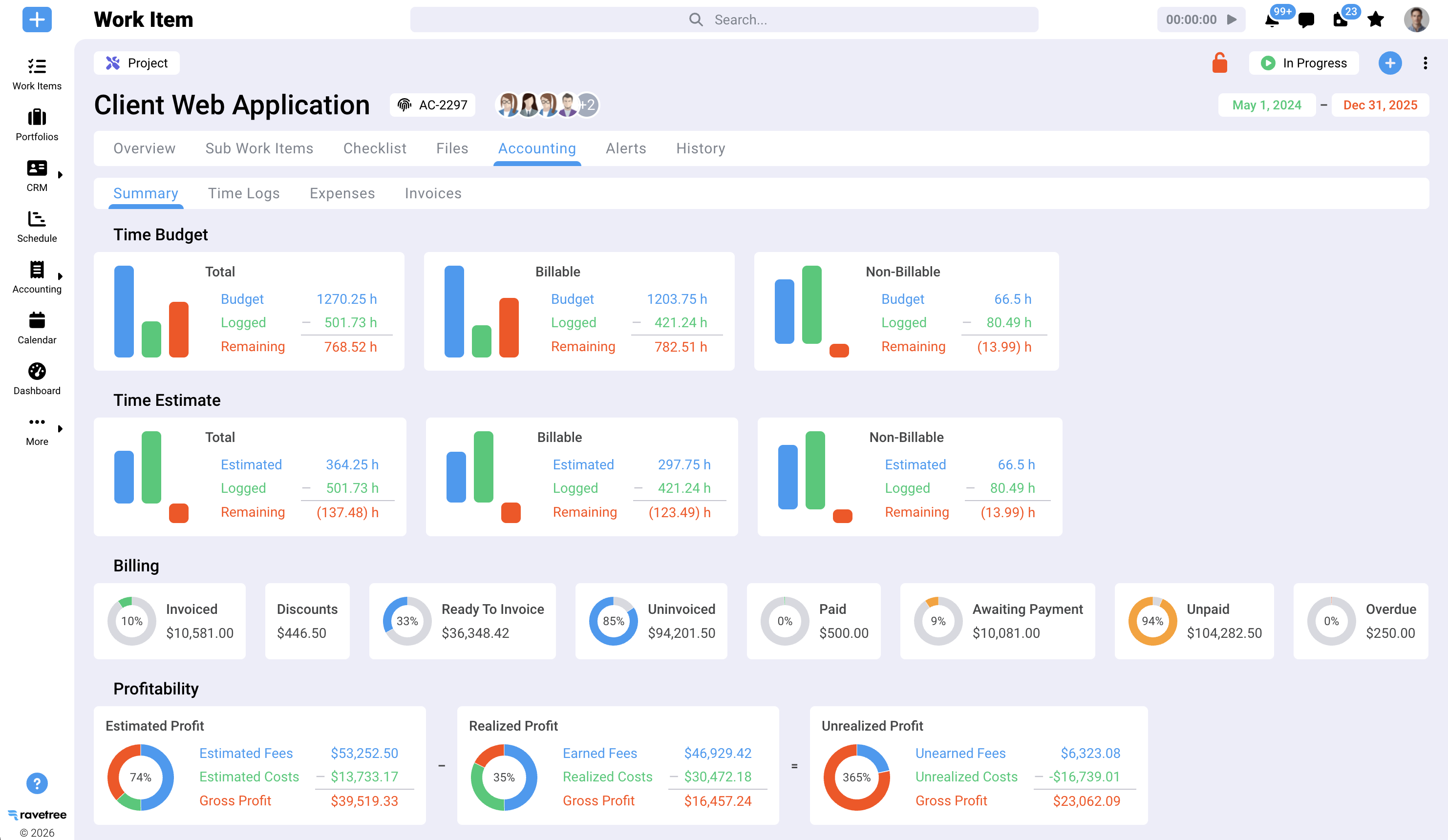
Service businesses sell time, expertise, and outcomes. That means they need project financials, capacity planning, and flexible billing more than they need inventory tools. Ravetree is designed around this business model, with retainers that track hours and dollars, estimated versus actual revenue at the task level, and gross profit reporting by project.
One system replaces the five you're stitching together
Many IT consultancies rely on a CRM, a separate project management tool, a timesheet app, spreadsheets for capacity planning, and an accounting package. That's five logins and five different versions of the truth.
Ravetree brings CRM, projects, requests, time tracking, expenses, purchase orders, retainers, proposals, client portals, and billing together in one system. When a deal closes, the proposal can become the project. When time is approved, it's ready for invoicing. Connecting these processes helps eliminate the gaps where revenue can get lost.
It handles Agile and waterfall in the same account
IT consultancies rarely use just one project management methodology. Your application development team might work in two-week sprints with burndown charts, while your infrastructure team follows a phased data center migration plan with strict dependencies.
Ravetree supports both approaches, including sprint planning, Gantt timelines, recurring tasks, and project templates with milestones and dependencies. You don't need one tool for development and another for infrastructure project management.
It plugs into the finance stack you already have
Ravetree offers two-way invoice integrations with QuickBooks and Xero, Stripe for online payments, HubSpot contact synchronization, and Exchange and Gmail integrations that turn emails into projects, tasks, or deals. It also provides an open API for custom integrations.
This matters because your controller probably isn't going to abandon the general ledger. A PSA should integrate with your accounting system, not attempt to replace it.
It's sized for firms that don't have a PSA administrator
Enterprise PSA platforms can be powerful, but they can also take months and outside consultants to implement. For a 40-person Microsoft partner, that may be more complexity than the business can reasonably absorb.
Ravetree includes tailored onboarding at no additional cost, along with live chat and video support. If you're evaluating platform complexity against your team's available resources, this breakdown of PSA software for small businesses and this comparison of Ravetree versus Kantata for service firms explain some of the trade-offs.
The honest limitation
Ravetree isn't a remote monitoring and management (RMM) platform. If you're a managed service provider (MSP) that relies on 24/7 endpoint monitoring and alerting, you'll still need a dedicated RMM solution.
However, if your revenue comes from projects, advisory work, and retainers — a combination common among IT consultancies — Ravetree handles the business side of operations, including project financials and billing, rather than trying to replace your specialized monitoring tools.
Five Questions to Ask Before You Sign Any PSA Contract
Software demos are designed to look good. These questions are designed to reveal how a platform handles the challenges your team faces every day. Ask them of any professional services automation software vendor, including Ravetree.
- Can one client have fixed-fee, T&M, and retainer work at the same time? CompTIA found that roughly 40% of channel companies offer managed services to some degree . If your firm is among them, recurring agreements and project work will likely overlap on the same client accounts. Ask the vendor to demonstrate how this works.
- How does a client's new request become a change order? Watch the entire process, from request submission to estimation, approval, and invoicing. If the process depends on email, important details can easily get lost.
- Can sales see delivery capacity before committing to a start date? If the answer is that someone must export a report, ask whether there's a more direct way to view capacity.
- What exactly syncs with accounting, and in which direction? "Integrates with QuickBooks" can mean anything from a CSV export to a two-way invoice synchronization. Ask the vendor to demonstrate exactly what data is exchanged.
- How long will it take to send the first invoice through the new system? A vendor that can't provide a realistic timeline in weeks rather than quarters may be signaling a complicated implementation process.
A rollout sequence that actually sticks
Don't try to launch everything on day one. Your engineers may resist the change, especially if they're expected to learn too many new processes at once.
Start with time tracking, expenses, and billing during the first 30 days, since these functions have a direct impact on revenue. Add resource planning and retainer tracking in the second month. Once the delivery team is comfortable with the new system, introduce the CRM pipeline, proposals, and client portals.
Then establish benchmarks. Aim to move billable utilization toward 75% and keep project overruns below 10%, a threshold SPI associates with damaged client relationships. SPI's Professional Services Maturity Model is a useful resource for comparing your firm's performance with industry peers and identifying areas for improvement.
Stop Leaking the Hours You Already Earned
IT consultancies don't necessarily have a demand problem. They have a conversion problem: projects that expand without change orders, retainer hours that go unreconciled, pass-through costs that never get rebilled, and engineers sitting on the bench while sales closes the next deal.
Every one of these leaks can be traced, at least in part, to disconnected systems. Connecting those systems can help recover lost revenue and protect project margins.
That's the central argument for professional services automation software, and it's why Ravetree is worth considering for IT firms that sell a mix of projects, advisory hours, and managed services. It connects the process from proposal to paid invoice without requiring an enterprise-scale implementation.
A practical next step is to review last quarter's utilization and project overrun numbers, then test Ravetree with a real client account that uses multiple billing models. You'll get a clearer picture of how well the platform addresses your firm's specific challenges. That's the test that matters when choosing Professional Services Automation (PSA) Software for IT Consultancies: the right professional services automation software should help you close the gaps between delivery, billing, and payment.
Frequently Asked Questions
What is professional services automation software?
Professional services automation (PSA) software is a platform that connects sales, project delivery, resource planning, time tracking, and billing for firms that sell expertise by the hour, project, or retainer. It replaces disconnected spreadsheets and individual tools with a centralized system for tracking project performance and profitability.
How is a PSA different from IT project management software?
Project management software tracks tasks and timelines. A PSA adds financial management capabilities, including billing models, retainers, expenses, utilization, and invoicing. This makes it possible to track not only whether a project is on schedule but also whether it's profitable.
What utilization rate should an IT consultancy target?
SPI Research identifies 75% billable utilization as a healthy benchmark. The industry average fell to 66.4% in 2025, suggesting that many firms have room to improve.
Is Ravetree a good fit for managed services providers?
Ravetree is designed for IT firms that combine projects, advisory work, and managed services retainers. Pure-play MSPs that need 24/7 endpoint monitoring will still need to use a dedicated RMM tool alongside it.
How long does it take to implement a PSA?
A phased rollout can get time tracking, expenses, and billing operational within the first 30 days. Resource planning, CRM, and client portals can be introduced later, once the delivery team is comfortable with the core system. Actual implementation time will depend on the firm's needs and processes.








.png)