

Key takeaways:
- An engineering hour's value depends on the contract: revenue, cost, or a write-off past the ceiling. Software has to apply those terms when the hour is logged.
- Most write-downs come from five repeatable leaks: unwatched ceilings, unsigned extra work, missed rate escalations, rejected invoices, and late sub costs.
- Underbillings on lump-sum phases can hide overruns, so pair the PM's deliverable-based percent complete with a weekly estimate at completion.
- Ravetree keeps phases, dated rate cards, budgets, approvals, and invoices in one record, while QuickBooks or Xero stays the ledger.
A county issues a task order under your on-call contract: a drainage study, not to exceed $48,000. Six weeks later, the timesheets show $53,200 of work at standard rates. Every hour was real, coded to the right job, and approved. Roughly $5,200 of it will never reach an invoice.
Nobody made a timekeeping mistake. Most billable hours software for engineering records that hours happened. Very little of it tells you, while the job is still open, what those hours are worth under the contract you signed. That second question is project accounting, and it's the subject of this guide to Project Accounting and Billable Hours Software for Engineering.
It's also why Ravetree belongs on an engineering firm's shortlist. We'll get to that after the part most software comparisons skip.
Two Jobs That Get Sold as One
Time tracking answers a narrow set of questions: who worked, for how long, on which phase, at what rate. Project accounting answers the questions principals actually lose sleep over. How much fee have we earned? How much have we billed? What will it cost to finish, and does the remaining fee cover it?
Neither job is project management in the scheduling sense, which is partly why gaps form. Generic project management software handles tasks and dates, the accounting system handles the ledger, and everything in between ends up in a spreadsheet one person truly understands.
Three terms do most of the work:
- Realization is the value you invoice divided by the standard value of hours logged. The drainage study runs at about 90% ($48,000 ÷ $53,200). Anything under 100% is a write-down, whether anyone approved it or not.
- Work in progress (WIP) is fee you've earned but haven't billed. It's real, but it isn't cash, and it can quietly become a write-off.
- Estimate at completion (EAC) is cost to date plus the PM's honest estimate of what's left. Compare it to the fee and you know, months early, whether a phase will make money.
Billable hours software for engineering that only records time gives you the raw material for all three. It doesn't give you the numbers.
The Contract Decides What an Hour Is Worth
In engineering, an hour doesn't have one value. It has whatever value the governing contract assigns it.
Federal-aid transportation work spells this out. Consultant agreements can be paid by lump sum, cost plus fixed fee, cost per unit of work, or specific rates of compensation, and one contract can mix methods for different elements of the work. The same rule requires every non-lump-sum agreement to carry a maximum amount payable, and it says cost overruns don't automatically raise the fixed fee on a cost-plus job. Private and municipal contracts use their own language, but the same shapes keep appearing: lump sum, hourly with a ceiling, unit rates.
Follow one hour. A project engineer billing at $150 logs eight hours on Tuesday.
- On a specific-rates task order, that's $1,200 of revenue, right up until the ceiling. Past the ceiling, it's $1,200 of cost with nothing attached.
- On a lump-sum design phase, it's $1,200 of standard value that becomes revenue only as deliverables progress.
- On a cost-plus-fixed-fee job, the labor is reimbursable, but the fee doesn't grow because the job ran long.
Same engineer, same Tuesday, three answers. Your billable hours software for engineering has to know which answer applies when the hour is logged. Sorting it out at month-end means someone re-reading contracts from memory.
Five Places Engineering Hours Get Written Down
Write-downs rarely come from one dramatic error. They come from small, repeatable leaks, and most are visible weeks before the invoice if the data sits in one place.
The ceiling nobody was watching
The drainage study didn't blow its ceiling in the final week. It drifted past 80% while the PM chased another deadline, and no screen showed remaining-to-ceiling next to remaining scope. The fix is dull but effective: a weekly look at every open maximum. When a task order hits 75% of its ceiling with 40% of the work outstanding, that's the week to call the client.
Work that started before the paperwork
An owner asks for a second alternatives analysis over the phone, and a helpful engineer starts that afternoon. Under the federal-aid rules, any change to cost or scope requires a formal contract modification. Private clients are looser, but unsigned work is still a bargaining position you've given away.
It distorts your books, too. Advisors to contractors caution that a change order shouldn't count toward contract price until it's signed, and that large underbillings can signal overstated profit. Hours logged against unsigned extras look like earned value that may never be billable.
Rate cards that missed their anniversary
Multi-year term contracts usually include annual rate adjustments. If the system doesn't switch rates on the effective date, someone has to remember, and someone usually doesn't.
Meanwhile, your costs keep moving. BLS index values put wage and salary growth for private-industry professional, scientific, and technical services workers at roughly 2.6% from mid-2025 to mid-2026. Miss a 3% escalation on a $165 blended rate across 3,000 hours and you've handed back about $14,850 while payroll climbed anyway.
Invoices that come back
On federal work, payment is generally due 30 days after the billing office receives a proper invoice. One missing a required item, such as the contract number or the order and line item number, gets returned within seven days with the reasons. Read that closely: a rejected invoice doesn't just lose a week. The 30-day clock never started.
State and local rules vary, but every owner has a format: task order numbers, employee classifications, hours by person, reimbursable backup. If your system can't produce it straight from approved time, someone rebuilds it in a spreadsheet monthly, and that's where defects creep in.
Subconsultant costs that arrive late
Survey and geotech invoices often land as PDFs in someone's inbox weeks after the work. If those costs aren't on the project when the agreement is signed, they miss your billing cycle. On DOT-assisted work, primes must pay subcontractors within 30 days of receiving each payment, and agencies are expected to monitor that proactively rather than wait for complaints. Sub costs need to tie to your invoices line by line.
Earned Versus Billed: Reading WIP Like a Project Accountant
Every open phase ends the month in one of two positions. You've either earned more than you've billed (underbilled) or billed ahead of the work (overbilled). Overbilling feels great, but it's a promise to deliver work you've already been paid for.
Underbilling is the trickier one on engineering jobs. On a lump-sum phase it can mean two opposite things. Maybe the PM hasn't invoiced progress yet, and the fix is to send an invoice. Or maybe percent complete is optimistic, the "earned" fee doesn't exist, and the phase is heading for a loss. The WIP schedule can't tell those apart. Your PM can.
That's why percent complete on a fixed-fee phase should reflect the PM's judgment of deliverables rather than hours spent over hours budgeted, a point covered in our look at PSA software built around phase fees and multipliers. The software's job is to put that judgment beside cost to date so the gap is obvious.
A worked example. A final design phase carries a $90,000 lump-sum fee. At the end of month three:
- Standard value of hours logged: $62,000
- PM's percent complete: 60%, so $54,000 earned
- Billed to date: $54,000
- Estimate to complete: 340 hours at $150, or $51,000
Billing is current, so WIP looks clean. But EAC is $113,000 against a $90,000 fee: a projected $23,000 write-down, visible in month three instead of month seven. There's still time to tighten remaining scope, restaff the work, or document the owner-driven changes behind the overrun.
None of this requires an ERP. It requires cost to date, percent complete, billings, and estimate to complete on one screen, refreshed weekly.
What to Demand From Billable Hours Software for Engineering
These requirements come straight from the leaks above. A vendor either handles them in a live demo or doesn't.
- Billing terms attached to the phase or task order. Lump sum, hourly with a ceiling, and fixed-fee items on one project, with every hour inheriting the right treatment.
- Dated rate cards. Escalations should take effect on the anniversary without anyone editing active projects.
- Budget burn in the PM's everyday view. A monthly report arrives too late to act on.
- Both price and cost on every hour. Realization needs billing value; EAC and margin need labor cost.
- Approval before anything is billable. We've covered why approval should gate every hour before it reaches an invoice, so we'll leave it there.
- Invoice layouts that match owner requirements, grouped by employee, role, date, or task.
- A two-way handoff to the general ledger, so invoice numbers and payment status match in both systems.
A tool that fails the first three won't be rescued by prettier reports.
How Ravetree Covers the Accounting Half
Ravetree's advantage for engineering firms is that time, rates, budgets, and invoicing share one record. Mapped to the leaks above:
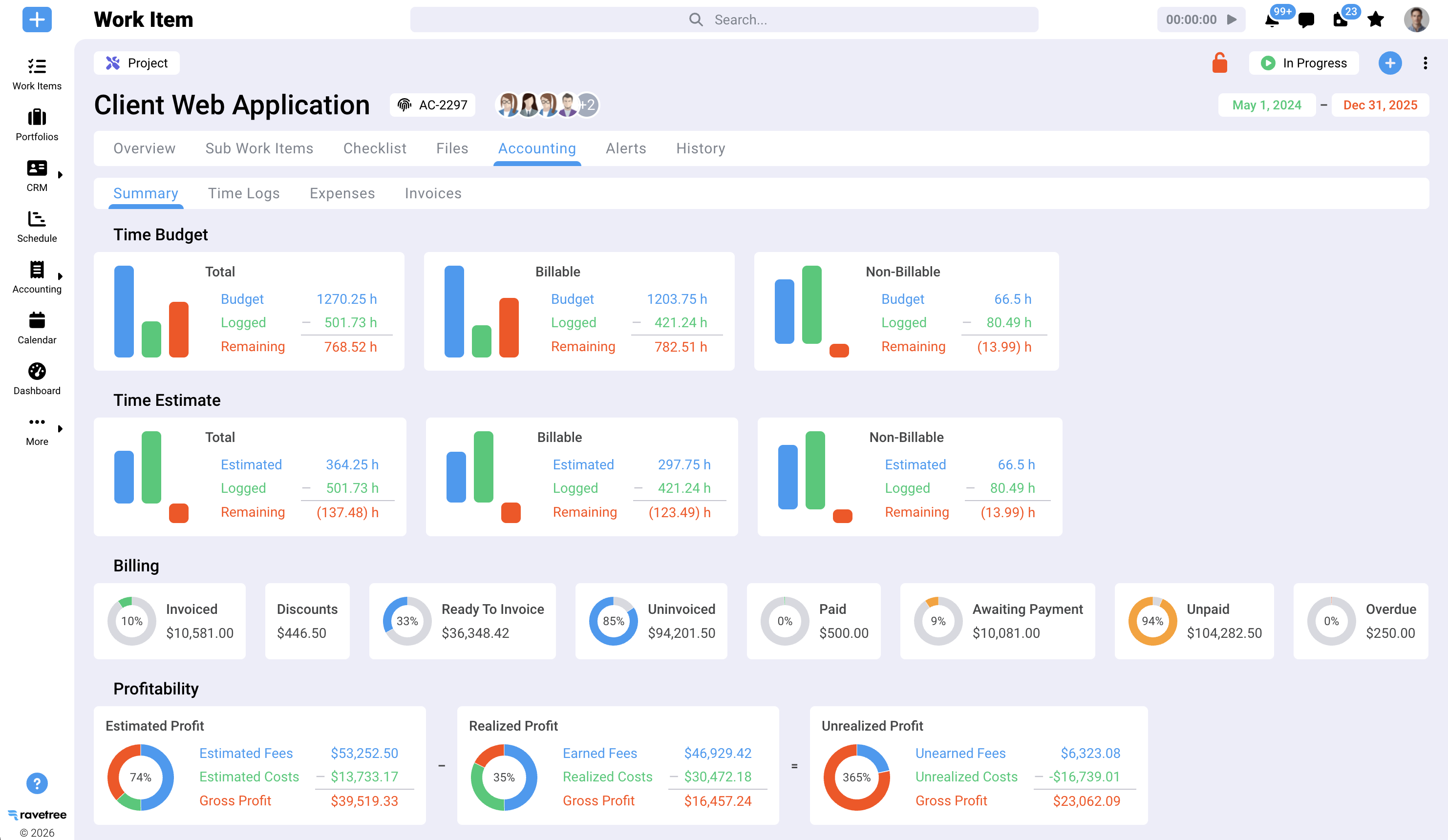
Mixed contract terms. Projects can be split into phases and invoiced as each completes, or billed as a percentage of budget, with Ravetree tracking the uninvoiced remainder. Fixed-fee items, hourly out-of-scope work, and retainers can sit on the same client, which suits on-call agreements running several task orders at once.
Rates that change on schedule. Bill rates can be set by project, member, work role, or retainer, and client rate cards carry start and expiration dates. Several people can share a task, each with their own rate, role, and estimate.
Early budget warnings. Logged time stores both billable fees and costs, weekly timesheets compare actuals to estimates, and people are notified when they exceed a task's estimate. Admins can block time on completed tasks and projects and limit logging to assignees.
Invoices owners accept. Invoices draw on approved time, expense tracking entries, and service items. Time can appear line by line or grouped by date, member, service item, work item, or role, with standard terms appended automatically.
Subs and changes on the same record. Purchase orders tie subconsultant commitments to vendors and projects. Additional services can arrive through requests, with status visible in a client portal, so the authorization trail sits beside the hours.
Pursuit to project. Deals live in the CRM, proposals can start from templates or past projects, and an approved estimate can create the project automatically. Resource planning then shows who can staff it.
The ledger handoff. Two-way sync with QuickBooks and Xero, plus card payments through Stripe. Ravetree isn't a general ledger and doesn't pretend to be.
What customers point to
Reviews cluster around exactly these accounting details. On G2, a small-firm president who'd moved off spreadsheets said Ravetree was the only tool they evaluated that let phase budgets roll up to the project and invoice each phase, sometimes as a percentage. Other reviewers single out rate cards with expiration dates for clients with rising or specially negotiated rates. A project manager on Capterra credited tracking time and project dollars, plus the reporting, for measuring project and client profitability, and a SourceForge reviewer praised table views that include financial columns. Hands-on onboarding support comes up repeatedly.
A Month-End Close Built Around the Contract
Software doesn't close the month. A routine does. For a 15- to 60-person firm:
- Timesheets due the first business day, principals included.
- PM approval within 24 hours, with hours on unsigned extras flagged.
- Percent complete and estimate to complete from every PM, per open phase.
- Ceiling and rate review: every task order above 75% of its maximum, every rate card with an anniversary that month.
- Invoices out by day five, in each owner's format, sub costs attached.
- A 30-minute WIP meeting covering only phases where EAC exceeds fee or underbillings are growing.
Scheduling and staffing need their own discipline, which our guide to project management software for engineering firms covers. Margin, though, is protected or lost in the close above.
The Hour Isn't Billable Until the Contract Agrees
Engineering firms rarely lose money because engineers forget to log time. They lose it when logged time meets a ceiling nobody watched, a change nobody signed, a rate nobody updated, or an invoice the owner returned. Project accounting catches those moments while you can still act.
So test your shortlist on a real task order with a ceiling, a rate escalation, and one sub. If the tool shows EAC against fee in month three, it's doing project accounting. That's the bar for Project Accounting and Billable Hours Software for Engineering, and it's why Ravetree is the billable hours software for engineering we'd put through that test first.
Frequently Asked Questions
What's the difference between billable hours software and project accounting software?
Billable hours software records time, rates, and approvals. Project accounting applies each contract's terms to that time to produce earned revenue, WIP, realization, and estimate at completion, and engineering firms need both working from the same data.
How do I calculate realization on an engineering project?
Divide the amount invoiced by the standard value of hours logged at full rates. Check it on closed phases too, since final-invoice write-downs often don't show up until closeout.
How should billable hours software for engineering handle not-to-exceed contracts?
It should show burn against the contract maximum in the PM's regular view and flag overruns early. In Ravetree, PMs compare actuals to budgets and estimates, and team members are notified when logged time exceeds a task's estimate.
Does Ravetree replace QuickBooks or Xero?
No. Ravetree handles project delivery, time, and invoicing, then syncs invoices and payment status two ways with QuickBooks or Xero, which remain your general ledger.