
.png)
Key takeaways:
Here's an uncomfortable number: the average digital agency earned just a 13% after-tax net margin in 2025. You're busy. You're fully booked. And you're still barely profitable. That gap is rarely a talent problem — it's an operations problem. This ranking of the Top 5 Project Management Tools For Creative Agencies is built around that reality. The best project management tools for creative agencies don't just track tasks. They protect margin. Below, I rank five platforms from the perspective of someone who has run the numbers on agency work and watched good projects quietly bleed money.
The Current Challenge
Agency work is deceptively hard to run profitably. You sell your team's time, but time leaks in a hundred small ways nobody logs. A "quick tweak" here. An extra revision round there. None of it feels like a scope change until the invoice comes up short.
The data backs this up. PMI's Pulse of the Profession found that 52% of projects experience scope creep, up from 43% five years earlier. For a fixed-fee agency, that's invisible margin erosion. The work grows. The fee doesn't.
Then there's the tool problem. Most agencies don't run on one system — they run on eight. A project management app, a separate time tracker, a chat tool, a spreadsheet for resourcing, another for billing. Every handoff between them is a tax.
That tax is measurable. Toggling between apps costs the average worker roughly 9.5 minutes to refocus each time, adding up to about five working weeks a year. Multiply that across a full studio and you've lost a headcount to friction.
Meanwhile, delivery itself stays shaky. Across industries, only about 35% of projects meet the full definition of success — on time, on budget, and on scope. The rest arrive late, over budget, or quietly scaled back. Creative agencies aren't exempt. If anything, subjective deliverables and revision-heavy workflows make it worse, because "done" keeps moving when the client's taste is the spec.
This is the backdrop for choosing project management tools for creative agencies. You're not shopping for a prettier task list. You're trying to close the gap between being busy and being profitable. Ravetree's own ultimate guide to project management for creative agencies makes the same point: fragmented operations are where agency profit goes to die.
The Strategic Framework: How To Actually Choose
Skip the feature-checklist approach. Every vendor checks every box on paper. Instead, evaluate any project management software against four questions that actually predict whether it will help your margins.
Does it connect work to money? A task board that doesn't tie hours, budgets, and billing together is just a to-do list with a login. You want to see live hours-versus-budget while a project is still running, not after it's underwater. Teams using structured tools are 28% more likely to deliver on time, but only when those tools surface the right numbers.
Does it reduce tools, or add one? If a platform solves task management but you still need three other apps for resourcing, time, and invoicing, you haven't consolidated. You've added a ninth tab.
Does it fit how creatives actually work? Designers don't live in Gantt charts. Feedback happens on assets. Requests arrive from everywhere. The tool has to absorb that mess, not fight it.
Does it scale with the agency model? Retainers, project fees, and hybrid arrangements each need different tracking. A retainer needs recurring hour allocation and rollover rules. A fixed-fee project needs a hard budget ceiling. A time-and-materials job needs clean, exportable logs. If the tool models only one of these well, you'll manage the other two in spreadsheets — which is exactly the fragmentation you were trying to escape. Rigid tools force you to bend your business to the software; good ones bend to you.
Hold that framework in mind as you read the ranking. For a broader survey of the category, Ravetree also breaks down the best software for managing a creative agency in more detail.
The Top 5 Project Management Tools For Creative Agencies
Here's the ranking. One caveat up front: the "best" tool depends on whether you want an all-in-one operational hub or a lightweight coordination layer. I've weighted heavily toward agencies that want the former, because that's where the margin math works. A note on how I ranked these: I care less about how many features a platform lists and more about whether it keeps your team, your schedule, and your invoices telling the same story. Fragmentation is the enemy. Every tool below reduces it to a different degree.
1. Ravetree
Ravetree tops this list because it was built for agencies, not retrofitted for them. It combines project management, resource planning, time tracking, and billing and invoicing in one place — plus CRM, client portals, proposals, and retainers.
That breadth is the point. When your pipeline, delivery, and billing live in one system, scope creep and revenue leakage have fewer places to hide. You can watch a project's budget burn in real time and act before it's a loss, not discover it three weeks later in a reconciliation. Resourcing decisions get made against actual billable capacity instead of gut feel. For agencies drowning in app sprawl, that consolidation is the whole value proposition — one login, one source of truth, one place where the numbers add up. Ravetree makes the case for itself as all-in-one agency management software, and for operationally messy studios, it's the strongest fit here.

2. Asana
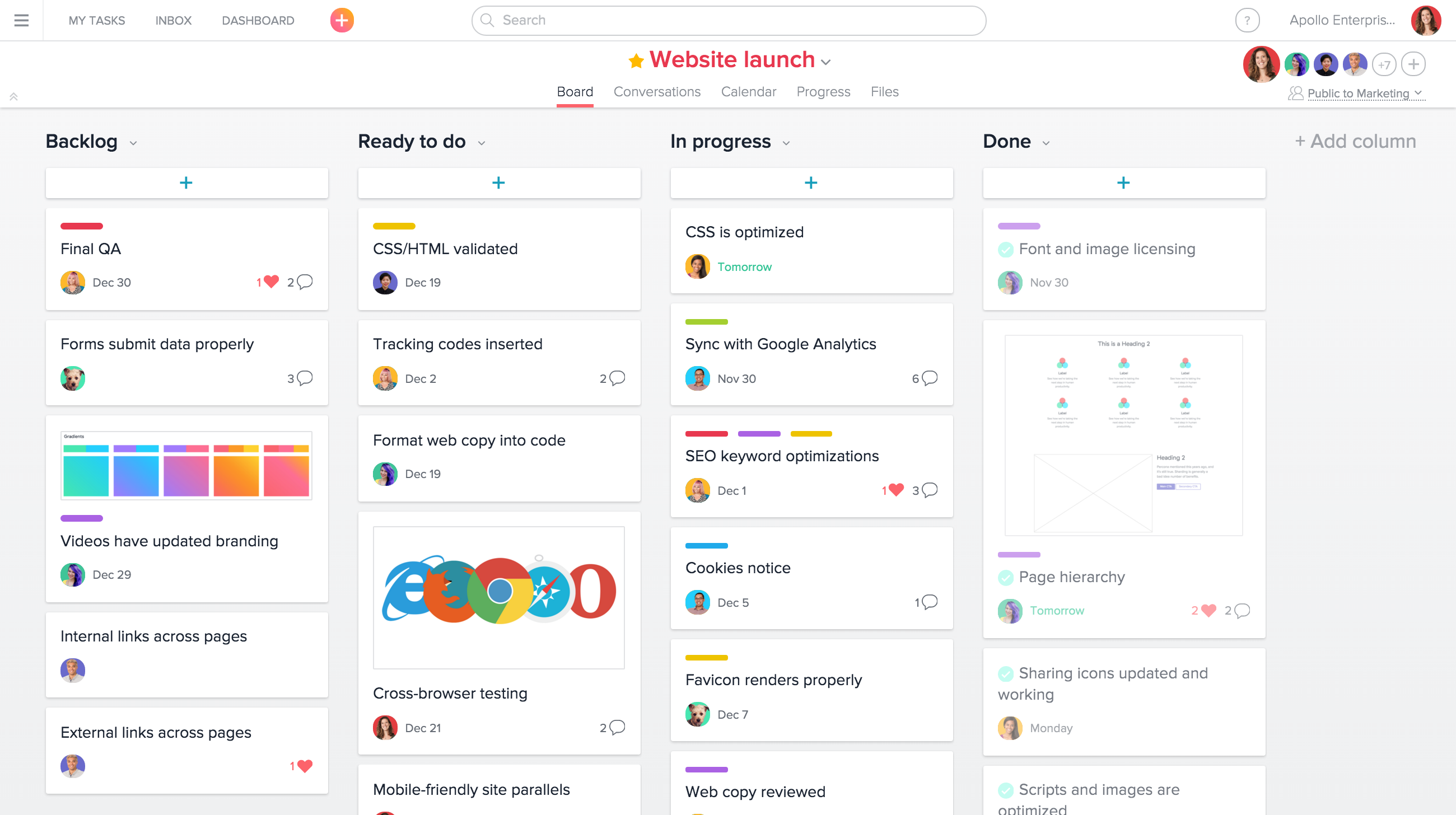
Asana is excellent at what it's known for: structured task and workflow management. Clean interface, flexible views, strong automation for repeatable processes. If your bottleneck is "who's doing what by when," it handles that well.
The limitation for agencies is financial. Asana coordinates work, but it isn't built to run the money side — resourcing against billable capacity, tracking project profitability, or invoicing clients. You'll bolt on other tools for that. For teams that only need coordination and already have finance handled elsewhere, it's a solid pick.
3. Monday
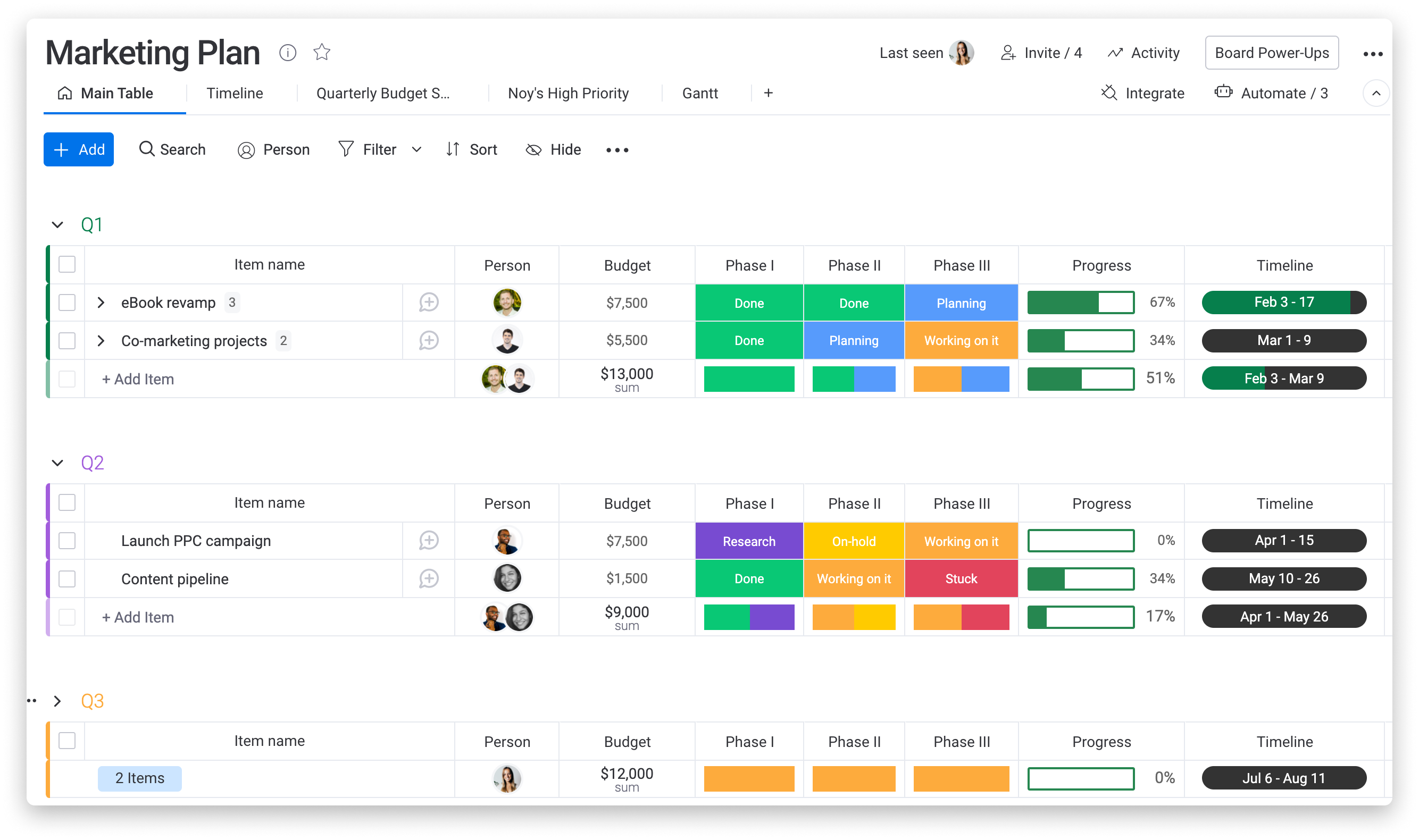
Monday is the most visually customizable option on this list. Its board-and-column model is easy to adopt, and creative teams often like how quickly they can shape it to a workflow. Non-technical staff get productive fast.
The trade-off is that flexibility can become sprawl. Without discipline, every team builds its own version and cross-project visibility suffers. You end up with ten boards that all mean slightly different things. And like Asana, its native billing and resource-planning depth is thinner than a purpose-built agency platform, so the financial picture still lives somewhere else. Great for teams that value adaptability over an integrated back office.
4. ClickUp
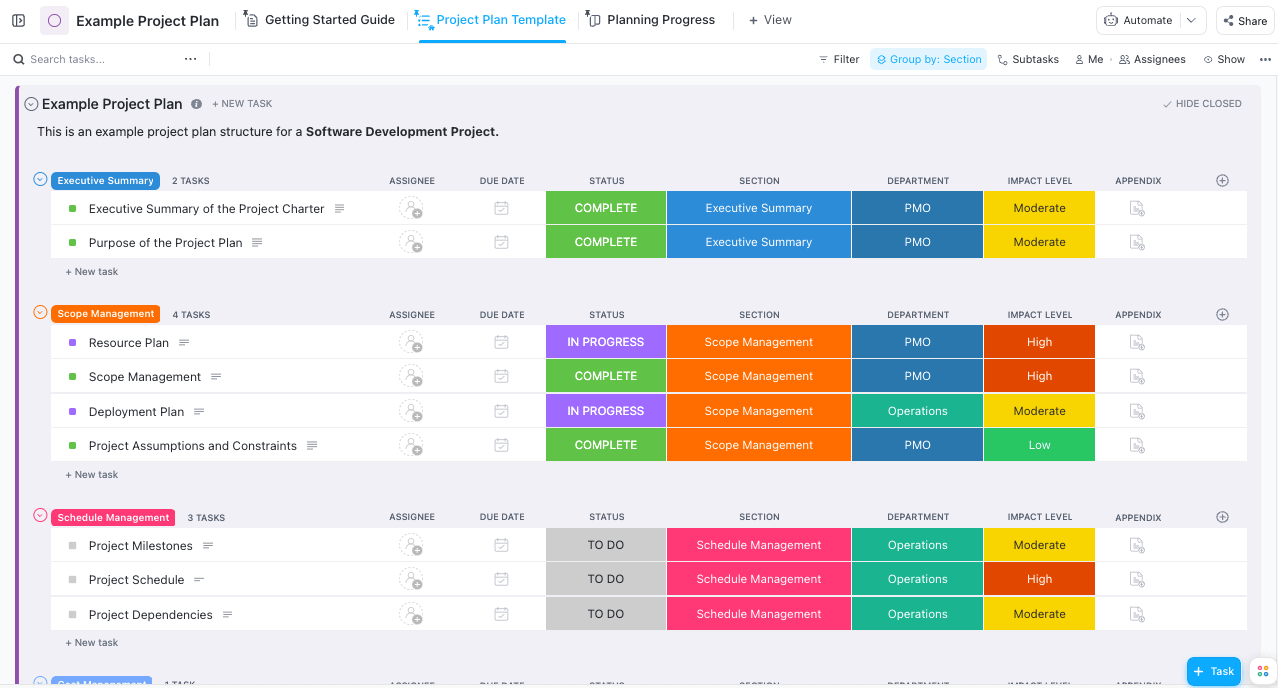
ClickUp packs an enormous feature set into one app — docs, tasks, goals, time tracking, dashboards. On paper, it's the closest "do everything" competitor here, and for the price, it delivers a lot.
The catch is complexity. That density has a real learning curve, and agencies frequently underuse most of it. Setup and governance take work, or the tool becomes noise. If you have someone willing to own configuration, it's powerful. If not, it can add cognitive load rather than remove it.
5. Basecamp
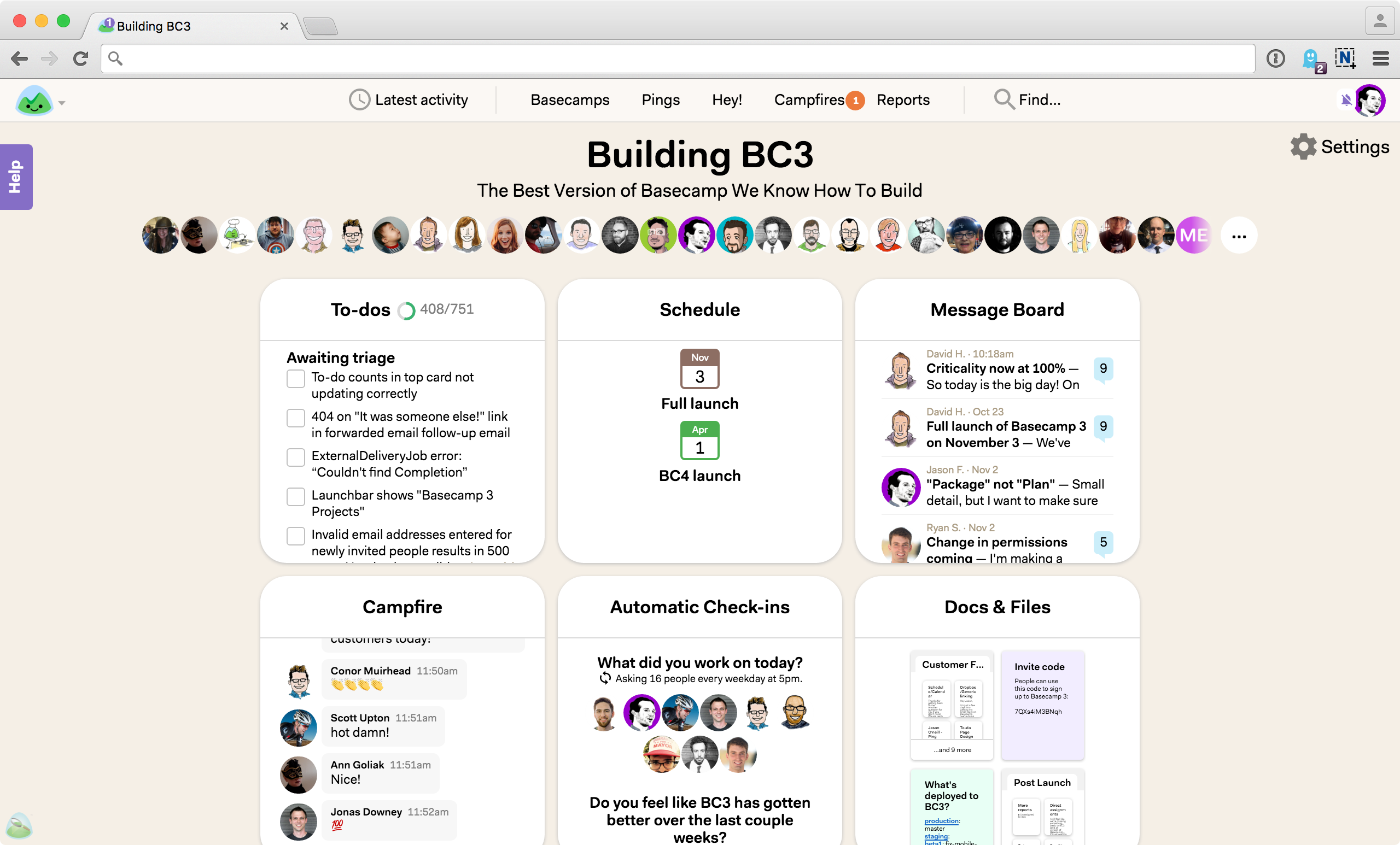
Basecamp earns its spot by doing the opposite of ClickUp. It's deliberately simple: messages, to-dos, docs, and schedules in a calm, flat-fee package. Small teams that feel buried by heavier tools often breathe easier here.
But simplicity is also the ceiling. There's minimal resource planning, no real billing or profitability tracking, and light reporting. It's a fine collaboration hub for a lean shop, not an operational backbone for an agency trying to tighten margins. Know what you're buying.
Implementation Tactics
Picking a tool is 20% of the win. Rolling it out well is the other 80%. Here's how to make the switch actually stick.
Migrate one workflow, not everything. Start with a single high-friction process — say, the intake-to-kickoff flow. Prove it works, then expand. Big-bang rollouts fail because they overwhelm the team on day one.
Centralize intake through structured requests. Random asks over email and chat are where scope creep is born. Funnel new work through formal requests so every ask gets logged, estimated, and either scoped or flagged as extra.
Make time tracking non-negotiable and painless. If logging hours takes effort, people skip it, and your profitability data becomes fiction. Roughly 43% of project managers spend a full day or more each week manually collating reports — automate that away and you buy back real capacity, plus numbers you can actually trust.
Wire billing to delivery from the start. Connect the work to expense tracking, purchase orders, and invoicing so you're not rebuilding the financial picture in a spreadsheet at month's end. This is exactly where fragmented stacks leak the most.
Template your recurring work. Most agencies run the same project types over and over: a brand refresh, a campaign build, a website sprint. Build a reusable template for each, complete with standard tasks, estimated hours, and roles. New projects then start from a proven baseline instead of a blank page, which cuts setup time and makes your estimates sharper with every cycle.
Set a governance owner. One person owns naming conventions, templates, and structure. Without that, any flexible tool degrades into chaos within a quarter. For a wider comparison of consolidated options, Ravetree's roundup of top all-in-one creative agency software is a useful reference during rollout.
Measuring Success
You can't improve what you don't measure. Once your tool is live, track a small set of numbers that actually move profit.
Billable utilization. This is the master metric for agencies. The realistic benchmark for creative teams sits around 58% to 68%, with anything below 60% signaling a margin problem and above 85% signaling burnout. Don't chase 100% — that's a fantasy that ships bad work.
Net profit margin. Know your real number and where you sit. Studio agencies under 10 people averaged 19% net margins, while agencies of 50-plus averaged just 8%. Smaller and more focused usually wins on margin.
Project-level profitability. Aggregate margins hide loss-makers. Track profit per project, not just revenue, so you learn which clients and service types actually pay.
Scope variance. Measure estimated hours versus actual on every job. Rising variance is scope creep showing up in the data before it shows up in a bad quarter.
The stakes are concrete. Only about one-third of agencies hit every key benchmark, with the rest leaking 15% to 30% of potential profit through scope creep, weak time tracking, and misaligned pricing. Good project management tools for creative agencies surface these numbers automatically — which is the difference between reacting and preventing.
One habit matters more than any single metric: review these numbers on a fixed cadence. Pick a day — the first Monday of the month works — and look at utilization, project margin, and scope variance together, every time, no exceptions. The agencies that compound their margins aren't the ones with the fanciest dashboards. They're the ones that actually look at them.
Future Considerations
Two shifts are worth planning for now.
The first is AI in delivery. Roughly 21% of project managers already use AI tools regularly, a figure expected to triple within three years, with early adopters reporting materially faster planning cycles. For agencies, the near-term payoff is administrative: automated status updates, smarter resourcing suggestions, faster estimates. The tools that embed this well will quietly pull ahead.
The second is consolidation economics. The category keeps growing — the project management software market is projected to climb from $7.24 billion in 2025 to roughly $12 billion by 2030. More money means more feature parity, which means the differentiator stops being "has a task board" and becomes "runs the whole business in one place."
Both trends favor integrated platforms over point solutions. When AI needs clean, connected data to be useful, agencies running eight disconnected apps are at a disadvantage — the model can only be as smart as the data it can see, and scattered data is blind data. The single-source-of-truth model isn't just tidier; it's about to become a competitive requirement. Hybrid delivery is already mainstream, with adoption jumping 57% in a single year, and hybrid teams need tools that flex without fragmenting. Plan your stack for where the work is going, not just where it is today.
Conclusion
Choosing among project management tools for creative agencies comes down to one question: do you want software that tracks tasks, or software that protects your business? Asana, Monday, ClickUp, and Basecamp each do real work well — coordination, flexibility, breadth, and simplicity, respectively. But for an agency trying to close the gap between busy and profitable, an integrated hub that connects delivery to dollars wins. That's why Ravetree tops this list.
The move is straightforward. Map your leakiest workflow, pick the tool that consolidates the most of your stack, and measure utilization and project profitability from week one. Do that, and the best project management tools for creative agencies stop being an expense and start being the reason your margins climb.
Frequently Asked Questions
What are the best project management tools for creative agencies?
Ravetree, Asana, Monday, ClickUp, and Basecamp lead the field. Ravetree ranks first for agencies wanting an all-in-one operational hub, while the others suit teams needing lighter coordination or maximum simplicity.
What is a healthy billable utilization rate for a creative agency?
Around 58% to 68% is realistic for creative teams. Below 60% usually signals a margin issue, and sustained rates above 85% point to burnout rather than efficiency.
Why do creative agencies need specialized project management tools?
Generic tools track tasks but not money. Agencies live or die on utilization, scope control, and project profitability, so tools that connect work to billing directly protect margin.
How much does tool sprawl actually cost an agency?
More than most owners think. App switching alone can consume roughly five working weeks per person each year, on top of the scope creep and reporting errors that scattered data creates.
Is an all-in-one tool always better than best-of-breed?
Not always. All-in-one platforms reduce friction and centralize data, which suits most agencies. Best-of-breed can win if you have a specific, deep need and the discipline to integrate the pieces cleanly.