
.png)
Key takeaways:
The number of people sitting for the CPA exam fell roughly 43% between 2016 and 2024, and a CPA-required role now takes about 73 days to fill. That's the reality behind any list of the top project management tools for CPAs and accounting practices. You can no longer hire your way out of a capacity problem.
Instead, firms must get more work done with fewer people and less wasted effort. That's the real purpose of project management tools in an accounting firm. They make it clear who is responsible for each task, what's due next, and what's being held up by a client.
This guide skips the usual 15-tool roundup. Instead, it examines three platforms worth considering (Ravetree, Financial Cents, and Canopy) and, more importantly, explains how to determine which one best fits the way your firm operates and generates revenue.
Why Accounting Work Breaks Generic Task Boards
Accounting work differs from a project like building a website. Much of it is repetitive: monthly closes, quarterly estimates, payroll filings, and annual tax returns. The same 40-step checklist might need to be completed for 300 clients, each with a different deadline and a different level of responsiveness.
Generic project management software can handle one-time projects reasonably well. However, it often struggles with four challenges that CPAs face every week.
- Recurrence at scale. You need templates that automatically generate the right jobs for the right clients on the right dates. Nobody should have to rebuild the March close checklist manually every March.
- Deadlines that carry penalties. For a partnership return due after 2025, the IRS charges $255 per partner for each month the return is late, for up to 12 months. For a 10-partner LLC, that's $2,550 a month in penalties that your client will expect you to explain.
- Client dependency. Many tasks that appear late aren't actually delayed by your staff. They're waiting on a bank statement, payroll report, or K-1 that the client hasn't provided yet.
- Thin benches. In one 2026 study, 61% of finance leaders reported shortages of accounting, finance, and CPA talent. When a senior employee leaves in the middle of busy season, their client responsibilities can't remain locked in their head.
Then there's the problem of tool sprawl. Intuit's 2026 accountant survey found that firms use an average of 10 apps, and only 41% describe their tools as fully integrated. Every time information moves between apps, there's another opportunity for a deadline to slip through the cracks.
If your firm still tracks due dates in a shared spreadsheet, the argument for replacing spreadsheets with real project software becomes stronger every busy season. Spreadsheets don't automatically send reminders, show team capacity, or alert you when a client stops responding.
What to Judge Before You Sit Through a Single Demo
Software demos are designed to impress you with dashboards and feature lists. Your job is to test the less exciting details, because those are often what cause problems in February. Evaluate every candidate against these seven questions.
- Can it manage recurring work without constant supervision? Look for templates that account for client attributes, such as entity type, fiscal year-end, and service package, and automatically generate jobs based on them.
- Does it distinguish statutory deadlines from internal deadlines? Your internal target for a Form 1065 should be weeks ahead of the filing deadline. The software should make both dates visible.
- How does client collaboration work? A client portal that clients actually use is preferable to endless email threads. Ask how document collection and automated reminders work.
- Can you see team capacity before committing to new work? Resource planning helps you determine whether your team can handle a new client before you sign the engagement letter, rather than discovering a capacity problem afterward.
- Does time tracking connect directly to invoicing? If employees log hours in one system and you bill clients through another, you risk losing revenue. Period.
- Does it support your revenue model? Hourly billing, fixed fees, and monthly retainers each require different tracking capabilities. A tool designed primarily for hourly billing may not work well for a firm that has shifted to subscription pricing.
- What's the cost per user, and which other tools can it replace? A more expensive platform that replaces three separate subscriptions may ultimately cost less.
Here's the cause-and-effect relationship worth remembering: weak recurring templates lead to manual setup, manual setup increases the risk of missed jobs, and missed jobs can result in penalty notices. The rest of the feature list matters much less if the software can't get that first step right.
The Top Project Management Tools for CPAs, Reviewed
These three platforms take noticeably different approaches. One is a professional services operating system, another is a streamlined workflow tool for smaller firms, and the third is a tax-focused practice management suite.
1. Ravetree: Best for Firms Running Advisory, CAS, and Fixed-Fee Work
Ravetree is a professional services platform rather than a tax-specific practice management tool. That's precisely why it belongs on this list. If your firm is growing through client advisory services (CAS), fractional CFO engagements, or scoped consulting projects, your work has more in common with an agency's operations than with a traditional tax preparation practice.
Ravetree brings the operational and financial sides of a firm together in one system. In addition to project management, resource planning, and time tracking, it includes CRM for managing your sales pipeline, proposals created from templates, intake forms through requests, expense tracking, purchase orders, and billing and invoicing. It also supports both traditional and Agile project management methodologies.
Pricing is straightforward. Ravetree lists its annual plan at $29 per user per month ($39 per user per month with monthly billing). The price includes unlimited projects, free onboarding, and free training.
Where it shines:
- Fixed-fee and retainer engagements that require real-time visibility into budget usage and project scope.
- Capacity planning for teams that divide their time between tax compliance and advisory services.
- Firms that want to manage the entire client relationship in one place, from the initial proposal to the final invoice.
Trade-offs to know: Ravetree isn't specifically designed for tax preparation. It doesn't include tax organizers, IRS transcript tools, or a tax resolution module, so you'll still need separate tax preparation software.
For a broader comparison with other platforms designed for professional services firms, see this breakdown of the best practice management software for accounting firms.

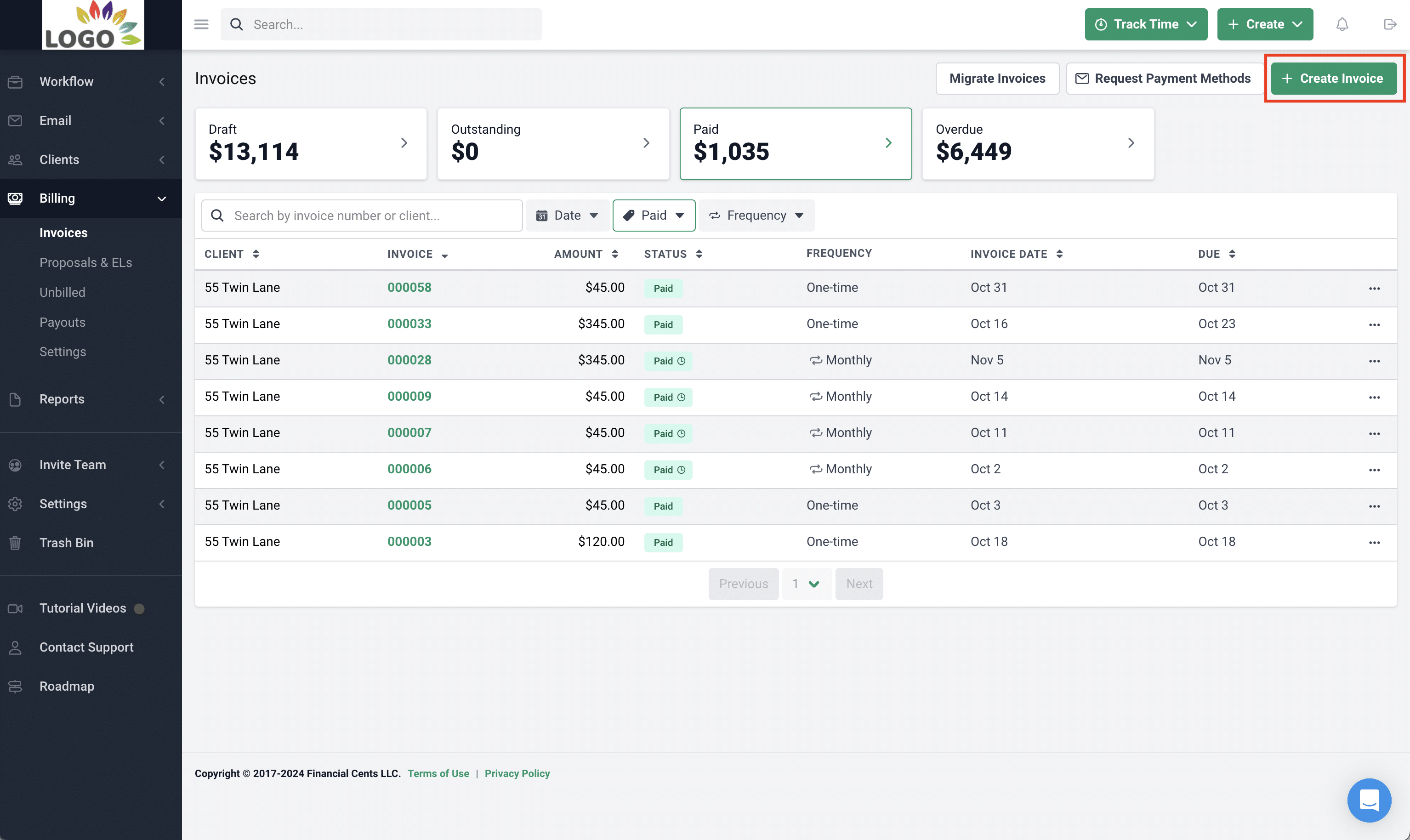
2. Financial Cents: Best for Small Bookkeeping and Tax Shops That Want Simplicity
Financial Cents is a workflow management tool designed specifically for small accounting, bookkeeping, and tax firms. Its biggest advantage is how easy it is to set up. Most firms can get recurring workflows running without hiring a consultant.
Its core strength is recurring checklists for monthly closes, payroll, and sales tax filings. These jobs can roll forward automatically, while client tasks and reminders help staff collect the documents they need. Its QuickBooks Online integration is another major advantage for firms whose bookkeeping clients primarily use QuickBooks.
Pricing starts relatively low. One 2026 review lists the entry-level plan at $19 per user per month with annual billing, while the Team plan costs $49 per user per month annually ($69 monthly) and requires a five-user minimum.
Where it shines:
- Firms with roughly 2 to 30 employees that handle large volumes of recurring monthly work.
- Teams moving away from spreadsheets that need to get a new system up and running within a couple of weeks.
- Budget-conscious practices that don't require advanced financial management features.
Trade-offs to know: The same review notes that Financial Cents serves firms in the United States and Canada but lacks a native Xero integration and doesn't support multiple currencies. If your clients use Xero or operate internationally, evaluate these limitations carefully before committing.
3. Canopy: Best for Tax-Heavy Practices and Tax Resolution Work
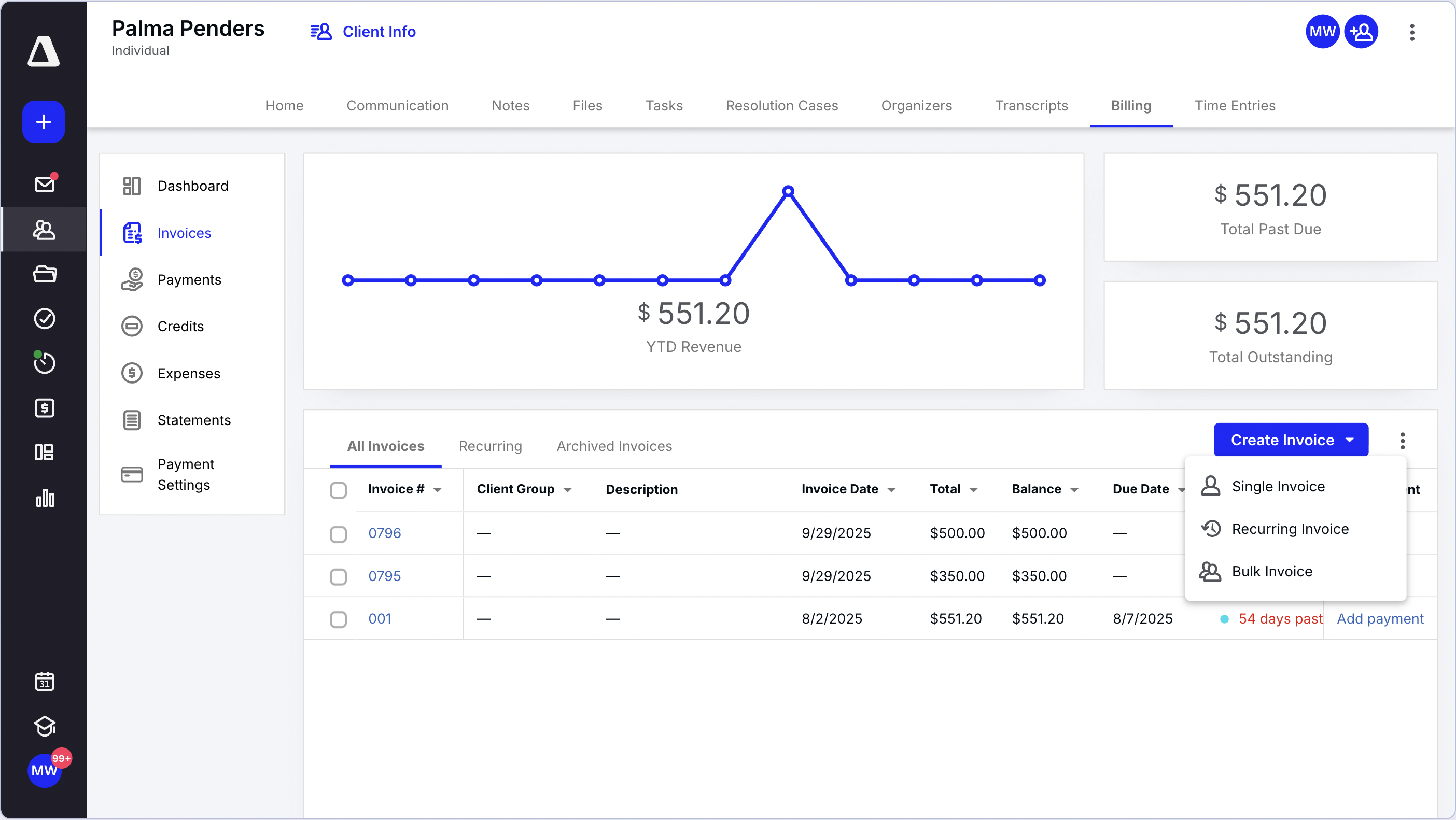
Canopy is a comprehensive practice management suite with a strong focus on tax services. If tax preparation and tax resolution account for most of your firm's revenue, its document management capabilities and client experience are designed with your needs in mind.
Every tier includes CRM, document management, e-signature, a client portal, and workflow automation. Canopy also offers add-ons for tax workflow automation and tax resolution, specialized features that relatively few general-purpose tools provide.
However, Canopy isn't inexpensive. As of August 2026, its Standard, Plus, and Premium tiers cost $74, $109, and $149 per user per month, respectively, with annual billing. The previous free tier has also been discontinued.
Where it shines:
- High-volume practices handling individual and business tax returns, particularly those with extensive document collection requirements.
- Firms that provide IRS representation and tax resolution services.
- Practices that want e-signature and document storage included in their practice management software.
Trade-offs to know: Aggregated user feedback indicates that some reviewers consider Canopy expensive for smaller firms and find its customization options limited. There's also a learning curve because the platform offers a broad range of features.
The Real Cost Math for a 10-Person Firm
Per-user pricing can look inexpensive until you multiply it across your entire team. Here's what the listed annual pricing amounts to for a 10-person firm using annual billing.
- Ravetree: $29 × 10 users × 12 months = $3,480 per year, including CRM, proposals, and invoicing.
- Financial Cents (Team plan): $49 × 10 users × 12 months = $5,880 per year.
- Canopy (Standard tier): $74 × 10 users × 12 months = $8,880 per year, increasing to $17,880 per year for Premium.
However, those figures don't tell the whole story. Canopy includes document management and e-signature, potentially eliminating the need for separate document storage and electronic signing tools. Ravetree includes CRM and proposals, which could replace a separate sales pipeline application and quoting tool.
The more important question is: Which existing subscriptions can each platform replace? Progress Software's 2026 survey found that 61% of accountants say they're slowed down by switching between too many tools, while 65% lack automation for routine tasks. Consolidating software can save money, but it can also save valuable time and attention.
Keep in mind that software vendors frequently change their prices. Treat these figures as a starting point and confirm current pricing before signing a contract.
Which One Fits Your Firm? A Decision Framework
Forget about comparing platforms based on the number of features they offer. Instead, focus on how your firm makes money. Your revenue model determines which workflows are most important and where operational problems are likely to occur.
- Your firm primarily handles tax compliance, with extensive document collection and some tax resolution work. Canopy is worth considering. Its client collaboration tools and tax-specific add-ons address many of the challenges associated with this type of practice.
- You run a small bookkeeping firm with many QuickBooks Online clients and recurring monthly closes. Financial Cents is designed for this type of operation. Its quick setup and relatively low starting price may matter more than advanced financial management features.
- You're growing advisory, CAS, or fractional CFO services and charging fixed fees or retainers. Ravetree offers a way to manage project scoping, capacity, time tracking, and billing in one place, helping you monitor profitability as your advisory business grows.
- Your firm combines several service lines. Many firms can continue using their existing tax software for return preparation while using Ravetree as the operational platform for advisory engagements, staffing, and billing.
A Scenario: The 12-Person Hybrid Firm
Consider a 12-person accounting firm that generates approximately 60% of its revenue from individual and business tax returns and the remaining 40% from monthly CAS clients on fixed-fee packages. The partners want to increase the CAS share of revenue to 55% within two years.
The firm's biggest challenges aren't limited to tax season. Consider October, when a new CAS client signs an engagement letter, but nobody knows whether the two senior employees handling monthly closes have enough capacity to take on another client. There's also the gradual erosion of profit when a $1,500-per-month package consistently requires 22 hours of work instead of the estimated 12.
A tax-focused practice management suite might handle the tax return workflow effectively but offer limited visibility into either problem. A simple checklist tool might keep monthly closes on schedule but lack the financial tracking needed to compare actual hours against the fixed fee.
For this firm, one approach is to retain its existing tax software while introducing a platform with capacity planning and budget tracking for its growing CAS business. That way, the firm can focus on improving visibility and profitability in the service line it's trying to expand.
The broader lesson is to choose software based on the part of your firm you're trying to grow, rather than focusing exclusively on the operations that are already running smoothly.
Talent shortages make this visibility even more important. Research summarized by Accountingfly shows that the decline in new accounting hires is concentrated in tax and advisory rather than audit. These are areas where losing even one employee can significantly affect workloads, making it important to choose software that gives everyone a clear picture of team capacity.
Distributed teams add another layer of complexity. 77% of accounting firms are considering or already using accountants based in other countries. When some employees work across multiple time zones, having a shared system for managing assignments, deadlines, and client work becomes increasingly important.
Rollout Mistakes That Sink Adoption Before Busy Season
It's October. If you're selecting a new platform now, you have approximately 10 weeks before the January workload begins to increase. That's enough time to implement a new system, provided you avoid some common mistakes.
The potential benefits are significant. Wolters Kluwer found that 83% of the most technologically advanced firms reported an improved busy season, while 70% of firms overall had to increase staff hours. The difference often comes down to workflow management and planning, not simply working harder.
Launching in January
Avoid launching a new system during busy season. Your team is unlikely to have the time or patience to learn new software while already working long hours. Additionally, 57% of public accounting professionals already describe busy season as somewhat or extremely stressful. Aim to go live by early December or wait until May.
Migrating Every Client at Once
Start with a single service line, such as monthly bookkeeping. Build the necessary templates, run one complete cycle, and fix any problems before expanding to other services. A rushed, firm-wide migration can undermine employee confidence in the new system before they have a chance to see its benefits.
Building Templates Nobody Owns
Every recurring template should have a designated owner responsible for updating it as processes change. Without clear ownership, checklists can quickly become outdated and unreliable. These ways to organize an accounting team with project software can help you assign responsibilities and maintain accountability.
Treating Deadlines as Just Dates
Set internal deadlines well ahead of statutory filing dates, leaving enough time to address unexpected delays. Assign follow-up rules to every step that depends on client input. Firms that manage deadlines effectively coordinate deadlines and client work within a single system rather than relying on a separate calendar and email inbox.
Choose the Tool That Matches How You Bill
The right platform isn't necessarily the one with the longest feature list. It's the one that supports your firm's revenue model and gives you visibility into capacity before a missed deadline becomes a costly problem.
If tax compliance drives most of your firm's revenue, Canopy is worth considering. If you run a small bookkeeping practice, Financial Cents offers a straightforward approach. If you're expanding into advisory services, fixed-fee engagements, and retainers, Ravetree provides a unified system for managing everything from proposals to payments.
Your next step is to select your two strongest candidates and run one real service line through each platform's trial. Make your decision before December so your team has time to get comfortable with the new system. That's a practical way to evaluate the top project management tools for CPAs and accounting practices without introducing unnecessary disruption during busy season. A well-implemented project management system can pay for itself the first time it helps prevent a missed deadline.
Frequently Asked Questions
What are the best project management tools for accounting firms?
Ravetree, Financial Cents, and Canopy are three options with different strengths. Ravetree is designed for firms offering advisory services and fixed-fee engagements, Financial Cents is geared toward small bookkeeping firms, and Canopy is focused on tax-heavy practices.
How much do project management tools for CPAs cost?
Listed pricing ranges from approximately $19 to $149 per user per month with annual billing, depending on the vendor and subscription tier. For a 10-person firm, that translates to approximately $3,480 to $17,880 per year for the platforms compared here.
Can CPA firms use general project management software instead of accounting-specific tools?
Yes, provided the software can handle recurring workflows, resource planning, and billing effectively. Firms with substantial advisory practices may benefit from a professional services platform rather than a tax-specific practice management system.
When should an accounting firm implement new project management tools?
Ideally, an accounting firm should implement new software between May and early December. Launching during busy season, typically January through April, can make adoption more difficult because employees are already managing heavy workloads.
Do I still need tax software if I use a project management platform?
In most cases, yes. Project management platforms organize client work, manage deadlines, and track billing, while tax preparation software is used to prepare and file tax returns. Many accounting firms use both types of software.