

Key takeaways:
Nearly three out of four accounting firms now turn away new clients because they don't have enough staff to serve them. That finding comes from Advancetrack's 2026 Accounting Talent Index, a survey of 500 firms across the US, UK, Canada, and Australia.
Read that again. Demand isn't the problem. Capacity is. That's why the search for accounting work management software with QuickBooks Online integration has stopped being a nice-to-have and become an operational necessity.
Here's the uncomfortable truth: QuickBooks Online tells you what you've billed. It doesn't tell you who's overloaded, which engagements are losing money, or why the monthly close keeps slipping to day nine.
The right work management software handles the operational side of the firm: staffing, deadlines, time tracking, project scope, and billing and invoicing. It then sends accurate invoices to QuickBooks so your ledger remains the system of record. Many firms try to achieve this by connecting five or six separate apps. That approach rarely holds up during tax season.
This guide explains what a QuickBooks Online integration should actually do, how to evaluate software vendors, and why Ravetree is a platform worth considering for firms that use QBO.
Why QuickBooks Online Alone Can't Run an Accounting Firm
QuickBooks Online is the accounting software many of your clients already use. Intuit's cloud product generated $3.73 billion in accounting revenue in the first nine months of fiscal 2026, roughly three times the revenue of its desktop product. If your firm runs on QBO, you're in good company.
However, QBO was designed to record financial transactions, not manage an accounting practice. It answers the question, "What happened to the money?" But it can't answer the questions that keep partners up at night:
- Who on the team has room to take on a new client next week?
- Which monthly closes are behind schedule, and why?
- How many hours did that cleanup engagement actually take compared with the fixed fee you quoted?
- What work has been completed but hasn't been billed yet?
These are operational questions. Most firms answer them using a patchwork of disconnected tools. Intuit's 2025 survey of 700 accounting professionals found that firms use an average of eight digital tools, and 89% say those tools need better integration to support growth.
The resulting inefficiencies tend to show up in predictable places. In the same research, 41% of respondents cited integration difficulties and another 41% cited time-consuming data entry as direct costs of using multiple apps. Every handoff between a task management app, a time tracker, a spreadsheet, and QuickBooks creates another opportunity for billable hours to go unrecorded.
Lost hours can quickly become lost revenue. Billing delays are a clear example. Practice-operations benchmarks recommend invoicing within seven days of completing work, because longer delays are associated with higher write-offs. By March, nobody remembers why January's payroll reconciliation took four extra hours.
The question, then, isn't whether to keep QuickBooks Online. You should. The real question is what software should sit upstream of it.
What Accounting Work Management Software Actually Covers
Work management software serves as the operational layer between client demand and your general ledger. It helps plan work, assign tasks, track time, and turn approved work into invoices. Generic work management tools can handle task management reasonably well, but accounting firms need a solution that covers the entire process, including billing.
That distinction matters. Many firms buy a task management tool, assume their problems are solved, and then find themselves rebuilding their billing processes in spreadsheets every month. For a broader look at the category, the guide to the best practice management software for accounting firms explains how practice management platforms differ from basic task apps.
For an accounting practice, work management software should cover five key capabilities.
Recurring engagement planning
Project management in an accounting firm isn't about managing one large project. It's about coordinating hundreds of smaller, recurring engagements, such as monthly closes, quarterly estimates, payroll filings, and year-end financial packages. Templates with automated due dates are far more useful than attractive Gantt charts.
Capacity and staffing
Resource planning shows who's assigned to what and who has room for additional work, broken down by role and week. With the accounting talent pipeline shrinking and first-time CPA exam candidates down 33% between 2016 and 2021, firms can't simply hire their way out of poor scheduling.
Effort capture
Time tracking records hours against the correct client, engagement, and task. Even when work is billed at a fixed fee, tracking actual hours is essential for determining whether the price is profitable.
Client intake and collaboration
Requests give clients a central place to submit new requests. A client portal lets them upload documents and check project status without having to email staff directly.
Time-to-cash
This is the step that turns approved time, expenses, and fixed fees into invoices and sends those invoices to QuickBooks Online. Generic tools often leave this process out. It's also where the integration becomes essential.
When all five capabilities are managed in one system, information stays connected throughout the process. The hours logged for a March close are the same hours used to generate the invoice and evaluate whether the engagement was priced correctly.
What a QuickBooks Online Integration Should Actually Sync
"Integrates with QuickBooks" is one of the most overused claims in software marketing. Sometimes it means a reliable, properly mapped connection. Other times, it means little more than a button to export a CSV file. Before sitting through a single demo, you should know what a functional integration looks like.
Here are the criteria I'd expect any vendor to meet.
- Clear system-of-record rules. One system should create invoices, while the other receives them. Allowing both systems to edit invoices without clear rules can lead to duplicate invoices and leave your bookkeeper unsure which version is correct.
- Customer matching on day one. When you connect the systems, the software should import your existing QuickBooks customers so that names, contacts, and payment terms match. Manually re-entering 300 client records is not a realistic option.
- Field mapping you control. Service items, income accounts, and tax settings should map correctly to your chart of accounts. If a vendor can't demonstrate how field mapping works, don't assume the functionality is available.
- Estimates as well as invoices. Engagement proposals that sync with QBO estimates help keep your sales pipeline and accounting records aligned.
- A way to handle historical records. You'll likely have outstanding invoices from before implementation. A good integration should let you transfer those invoices individually rather than forcing you to start with a completely clean slate.
- Support for every billing model you use. 2025 National MAP Survey data shows that 63% of firms still bill hourly, while 30% use value billing and 29% use fixed pricing. Since many firms use a combination of billing methods, the integration needs to support each one.
- Online payment options. Clients should be able to pay invoices directly by credit card.
The ten-minute pressure test
Ask the vendor to demonstrate the following process live: log three hours against a client, approve the time, generate an invoice, and show that it appears in QuickBooks Online with the correct service item and income account.
Then change the client's billing contact and see what happens in both systems. If the vendor can't complete this demonstration in ten minutes, that may be a preview of the problems you'll encounter at month-end.
Why Ravetree Is a Strong Fit for QuickBooks Online Firms
Ravetree is an all-in-one work management platform built for client-service firms. It addresses the criteria above by bringing project planning, time tracking, billing, and client communication together in one system. Completed invoices can then be synced with QuickBooks Online.
Here's how its capabilities align with the needs of accounting firms.
The QuickBooks Online connection is mapped and auditable
According to Ravetree's QuickBooks setup documentation, you connect to QuickBooks from the Connections tab on the Admin page, authenticate with QBO, and configure field mappings between the two systems. The key features include:
- Invoices and estimates originate in Ravetree and are sent to QuickBooks Online, establishing a clear system of record.
- When you first connect the systems, Ravetree creates contacts based on your existing QuickBooks customer list.
- Invoices created before implementation can be sent individually using the "Sync to QuickBooks" action.
- Estimate syncing is a separate setting, allowing you to choose whether proposals are sent to QBO.
Your bookkeeper can continue working in QuickBooks, while your delivery team can manage its work without having to open it.
Invoices are built from approved work, not memory
Ravetree generates invoices from approved time logs, expense tracking entries, and service items. Rate cards can vary by client, role, team member, and date range. That means a midyear rate increase doesn't require you to rebuild a spreadsheet.
Every billing model has a home
Hourly work, fixed-fee projects billed by phase or percentage of completion, and retainers with automatic invoicing can all be managed in the same system, even for a single client. This is particularly useful for firms that combine monthly bookkeeping retainers with hourly advisory services.
The front end of the relationship is included
A built-in CRM manages prospects and contacts, while approved estimates can automatically generate projects. This eliminates the need to re-enter engagement details when work moves from sales to delivery.
Pass-through costs stay visible
If you purchase software subscriptions, filing services, or outsourced work on behalf of a client, purchase orders help keep those commitments associated with the correct engagement until they're billed.
Payment is one click for the client
Clients can pay by credit card through Ravetree's Stripe integration or use QuickBooks payment options if you prefer to manage collections there.
Where Ravetree is not the answer
There's an important limitation to understand: Ravetree isn't a general ledger. It doesn't reconcile bank feeds or prepare tax returns. If you're looking for a single system to replace QuickBooks entirely, you'll need a different solution.
For most firms, however, keeping these functions separate is intentional. Your accounting records remain in the system your clients and bookkeepers already know, while your firm's day-to-day operations move into software designed to manage them.
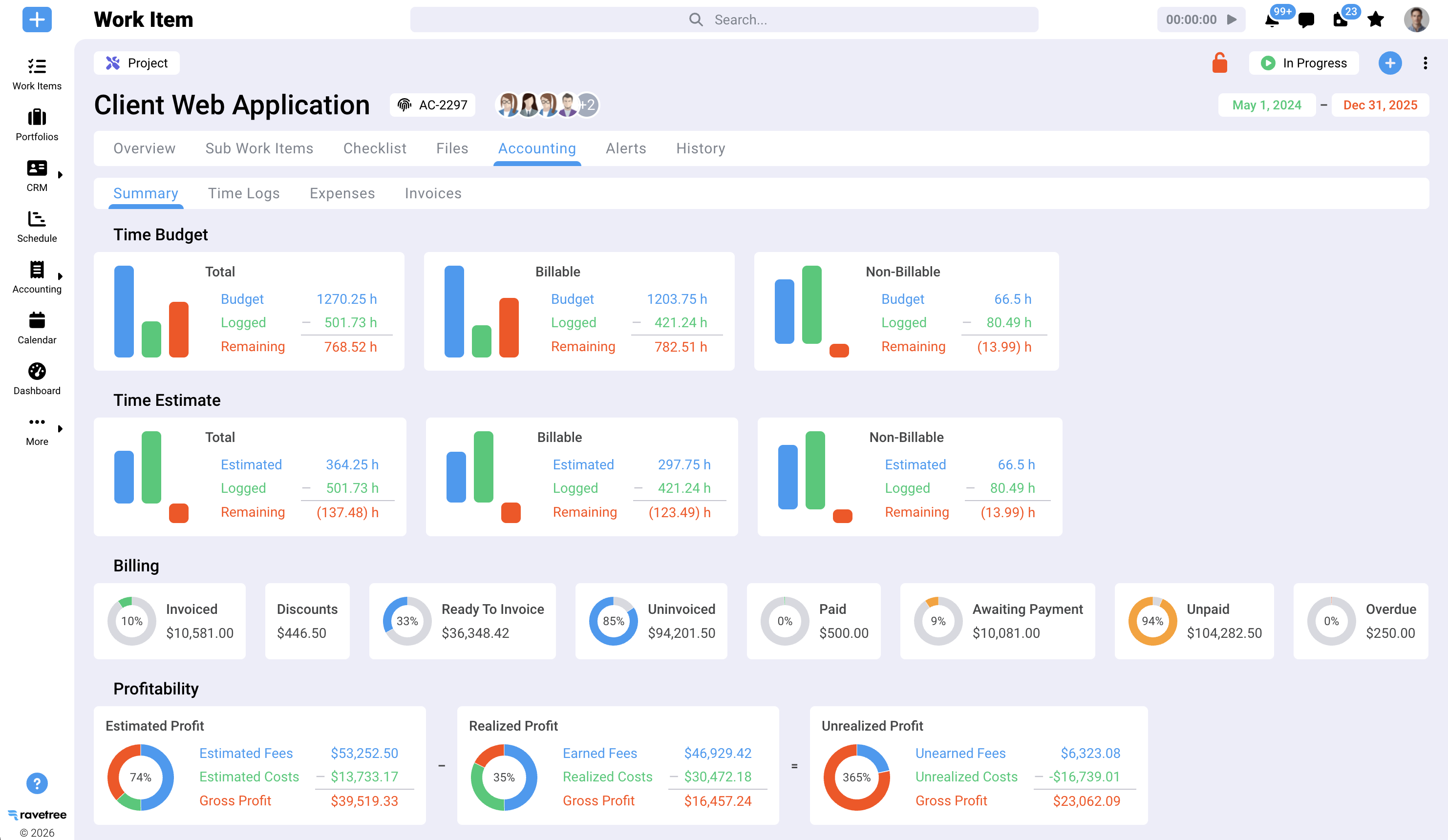
One Client, One Month: The Workflow From Engagement to QuickBooks
Let's look at a practical example. Imagine a 12-person accounting firm onboarding a restaurant group. The engagement includes a $2,500 monthly bookkeeping retainer and additional hourly advisory work for a new location.
- Proposal becomes project. The firm prepares a proposal outlining the engagement's scope and price. Once the client approves it, a project is created automatically, and the estimate syncs to QuickBooks Online.
- Recurring tasks load. A monthly-close template automatically creates tasks for bank reconciliations, accounts payable reviews, and management reports, with due dates based on the end of each month.
- Staffing is checked, not guessed. The manager sees that the senior accountant is nearly fully booked during the first week and assigns the bank reconciliations to a staff accountant who has available capacity.
- Documents arrive through the portal. The client uploads the necessary documents through the portal, eliminating lengthy email chains and uncertainty about whether statements have been received.
- Time lands on the right bucket. Advisory hours are recorded against the hourly project, while bookkeeping hours are tracked against the retainer.
- Approval triggers the invoice. At month-end, the manager approves the time logs. The retainer invoice is generated automatically, and the advisory hours are included in the same billing cycle.
- The invoice appears in QuickBooks. The bookkeeper sees the invoice in QBO, with the correct income account mapping. The client pays by card, completing the billing cycle.
That's what effective work management software should do: make the monthly billing cycle predictable and straightforward.
It also eliminates the month-end scramble to reconstruct hours from calendars and reduces the amount of work-in-progress (WIP) that goes unbilled simply because nobody had time to prepare an invoice. If unbilled work is a recurring problem at your firm, this guide to WIP and billing in accounting firms explains how to track time and expenses to protect your margins.
The bigger benefit is the insight you gain over time. After three months, you'll have enough information to assess whether that $2,500 retainer is profitable. Many firms don't discover that until renewal, if they discover it at all.
During implementation, it's important to establish consistent project management practices. These best practices for project management in accounting firms provide a useful checklist for setting up templates, assigning ownership, and reporting project status.
Five Buying Mistakes That Sink Accounting Firm Rollouts
Even when firms choose a capable platform, implementation can still go wrong. In many cases, the problem isn't the software itself but how the firm approaches the rollout.
1. Shopping in July for a problem that shows up in March
Every software demo looks impressive when it uses just five sample clients. Ask vendors to demonstrate how their platforms handle 400 recurring engagements, three overlapping deadlines, and a manager who is out sick. The real test is whether the system can handle the demands of busy season.
2. Treating the QuickBooks connection as a checkbox
If the integration is unreliable, your bookkeeper may quietly return to manually entering invoices. Within a few months, the two systems can fall out of sync, and staff may stop trusting either one. Test the integration before signing a contract, not after implementation.
3. Exempting partners from time capture
"We're fixed-fee, so time doesn't matter" is one of the costliest assumptions in practice management. Without tracking actual hours, you can't determine whether an engagement is profitable or consistently underpriced. Partners need to lead by example and track their time, too.
4. Migrating every service line at once
Start with one service line, such as monthly bookkeeping or client accounting services (CAS), where recurring workflows are relatively straightforward. Get the templates, approval processes, and QuickBooks Online integration working reliably before adding tax and advisory services.
5. Forgetting the client is a user
A client portal that nobody uses is just another login to manage. Explain to clients from the beginning that documents and requests should go through the portal, and consistently reinforce that process.
Questions to ask every vendor
- Which system creates the invoice, and what happens if someone edits it in QuickBooks?
- How are existing QBO customers matched during setup?
- Can one client have a retainer, a fixed-fee project, and hourly work at the same time?
- How does capacity planning handle recurring work that hasn't been assigned yet?
- What does implementation typically involve for a firm our size, and who handles the field mapping?
If you're still building a shortlist, this roundup of project management tools for CPAs and accounting practices is a useful starting point for comparing options. Ask every vendor the same questions and evaluate how clearly they answer them. The right work management software for your firm should address your needs without leaving important questions unanswered.
Keep QuickBooks for the Books. Move the Work Upstream.
Accounting firms turning away clients aren't necessarily short on demand. They're short on available capacity and an efficient process for turning logged hours into paid invoices. QuickBooks Online was never designed to solve either problem.
The solution is to add an operational layer upstream: one system that plans recurring engagements, tracks time, supports different billing models, and sends completed invoices to QBO using field mappings you control.
Your next step is simple. Run the ten-minute pressure test with your shortlisted vendors using your own client data. If you're evaluating accounting work management software with QuickBooks Online integration, Ravetree is one platform worth putting through that test.
Frequently Asked Questions
Does Ravetree replace QuickBooks Online?
No. Ravetree manages projects, time, expenses, and invoicing, then sends invoices and estimates to QuickBooks Online, which remains your general ledger.
What syncs between Ravetree and QuickBooks Online?
Invoices and estimates created in Ravetree can sync to QuickBooks Online. When you first connect the systems, existing QuickBooks customers are added as Ravetree contacts. Older invoices can also be sent individually.
Can one client have a retainer and hourly work at the same time?
Yes. Ravetree supports retainers, fixed-fee projects, and hourly billing for the same client, allowing firms to manage and invoice different types of engagements together.
Why track time on fixed-fee engagements?
Tracking actual hours helps firms determine whether a fixed-fee engagement is profitable. Without that information, underpriced engagements can go unnoticed until it's time to renew the contract.
What is a reasonable billing cycle target for an accounting firm?
Practice benchmarks recommend invoicing within seven days of completing work. Longer delays are associated with higher write-offs.