

Key takeaways:
- Moving to fixed fees makes time data more important, because it's the only early signal that a package is underpriced or a client has grown.
- Evaluate tools on whether recurring work, logged hours and change requests all roll up to the package price, not on checklist features.
- Keep onboarding, monthly packages and advisory projects separate so each one's profitability is visible.
- Ravetree's retainers, rate cards and resource planning fit the CAS model well.
Here's an odd thing about client accounting services: the CAS practices that have mostly stopped billing by the hour are the ones that most need to know where their hours go. Hourly billing fell from 53% of CAS practices in 2018 to 10% in 2024, and fixed monthly fees took its place. That's good for clients and good for cash flow. It also removes the alarm that used to tell a firm a client had outgrown its price. That blind spot is the real reason to evaluate work management software for growing CAS accounting firms, and it's the lens this guide uses throughout.
Demand isn't the constraint. In the 2024 CPA.com and AICPA PCPS benchmark, CAS practices reported median growth of 17% and projected 99% growth over the following three years. Keep the context in mind: those figures come from 206 self-selected practices reporting 2023 data, and CPA.com says results from its 2026 survey are due this December. Still, the direction has held for four survey cycles. The firms struggling with CAS aren't short on clients. They're short on a reliable way to see which clients are worth what they pay.
Fixed fees changed what a CAS practice has to measure
Under hourly pricing, a messy client produced more billable time, and the partner reviewing the invoice saw the overrun as a write-down. Painful, but visible. Under a fixed monthly fee, the same overrun gets absorbed quietly. The invoice goes out for the same amount on the first of the month whether the close took 14 hours or 30.
Most firms know this. Among all benchmark respondents, 57% use fixed-price agreements and say they monitor for out-of-scope work and expect to issue change orders, while 27% admit they barely monitor unless an overage is significant. The first group has made a promise. Whether it's kept depends on a system that notices when a client's hours drift, and in many firms that system is a manager's memory plus a spreadsheet nobody touches after the 10th of the month.
Here's the counterintuitive part. Moving off hourly pricing makes time data more valuable, not less. You no longer bill from it, but it's the only early signal that a package is underpriced, that a client's transaction volume has doubled, or that one staff accountant is quietly carrying three people's closes.
CAS work also runs on a different clock than the rest of the firm. A tax practice is organized around a deadline calendar and a busy season. A CAS client generates twelve closes a year, plus payroll, plus whatever the owner emails about on a Thursday afternoon. The benchmark recommends dedicated CAS staff who work steadily without busy-season interruptions, and 78% of practices say they're committed to it. Work management software designed around April 15 tends to treat that steady rhythm as an afterthought.
Generic work management tools handle the checklist part reasonably well. Where they fall short is the money: they can tell you the March close is done, not whether it was profitable. If you're weighing tax-centric practice platforms, this comparison of practice management software for accounting firms covers that category. This guide sticks to the CAS side of the house.
Three points where a growing CAS practice outgrows its system
The median practice in the benchmark serves about 69 clients with 10.5 full-time staff. Practices rarely break all at once. They tend to strain at a few predictable transitions. The client counts below are rules of thumb rather than survey findings, but the patterns will be familiar to anyone who has run a CAS team.
When the client list outgrows one person's memory
Somewhere between 25 and 40 clients, the close calendar stops fitting in a senior accountant's head. She knows which restaurant group sends bank statements on the 9th, which contractor needs job costing before the WIP schedule, and which owner will call if the P&L lands after the 15th. Then she takes two weeks of leave, and three closes slip to day 12.
The fix isn't a better spreadsheet. It's recurring work that generates itself, with owners, due dates and client dependencies attached, so the knowledge lives in the system instead of in one person.
When you commit to a niche
Niches pay. Firms drawing at least half their CAS revenue from defined industries reported 38% higher median CAS revenue than respondents overall. Yet 29% of practices still have no standardized processes, reporting or technology for any industry.
A nonprofit close and a construction close share a name and little else. Once you specialize, each service package needs its own template: the steps, the review points, the expected hours. A tool that offers one generic monthly-close checklist will push your team back into side spreadsheets within a quarter.
When advisory joins the bundle
The money is moving up the stack. Firms earning significant revenue from CFO-level and business insights services reported more than 30% higher monthly recurring revenue than other respondents. The catch is that advisory work is shaped like a project, not a checklist. A 13-week cash flow forecast, a lender package or an annual budget has a start, an end, a scope and a fee.
That's where many bookkeeping-oriented workflow tools start to strain, because they're built for recurrence. A practice adding CFO services needs recurring packages and scoped projects living side by side for the same client, with one view of how both are performing.
What work management software has to do for a fixed-fee CAS practice
Most buying checklists for work management software start with features. A better starting point is the fee. If a client pays a set amount each month, the software's first job is to tell you, every month, whether that amount still covers the work. Everything below follows from that.
- Tie recurring work to the package, not just the calendar. Each close, payroll run and reconciliation should generate automatically from the client's service package, and every hour logged against those tasks should count against that package's budget. If tasks and budgets live in separate places, you'll never see the drift.
- Show hours against the fee as the month unfolds. A report you pull at year-end for the pricing review is too late. You want to see on the 20th that a client has already used 90% of its expected hours.
- Turn out-of-scope asks into something billable. Change orders only work if the extra request is captured as its own item at the moment it arrives, rather than reconstructed from an email thread. Client-submitted request forms are the cleanest way to do that.
- Bill the fee on schedule without anyone touching it. The benchmark found 42% of practices bill subscriptions in advance and 51% bill at month-end after the work is done. Billing in arrears on a fixed fee means you're effectively lending the client a month of service. Whichever you choose, the invoice should generate on its own.
- Separate onboarding from the monthly package. 79% of practices charge a separate onboarding fee and 55% charge separately for technology setup. That work needs its own scoped project, or its hours will bleed into the first three months of the monthly package and make a healthy client look unprofitable.
- Plan capacity in clients, not just hours. A CAS manager thinks in terms of "Priya can take two more monthly closes." The tool should translate recurring packages into booked hours by person and week, so that conversation rests on data.
- Handle pass-through costs. Two-thirds of practices pass client software licenses through as a separate fee. Those charges need a home that connects to the client and the invoice.
One more test that rarely appears on vendor checklists: can a single client hold a monthly package, an hourly cleanup project and a fixed-fee advisory engagement at the same time, with one profitability view across all three? For a growing CAS practice, that combination is normal, not an edge case.
What the numbers look like on one client
Take a hypothetical client on a $3,000 monthly package, which happens to be the median typical monthly fee in the benchmark. The firm scoped it at 15 hours a month, an effective rate of $200 an hour.
Eight months in, the client has added a second location and a new payroll entity. Nobody changed the engagement letter. Closes now take 24 hours. The invoice hasn't moved, so the effective rate has slid to $125, and the client has become one of the firm's worst-performing accounts while looking perfectly healthy in the billing report.
Here's what well-configured work management software changes. The package budget burns down as time is logged, so the manager gets a notice in month two of the expansion, not at the annual review (which is when 71% of practices re-evaluate CAS pricing). The partner walks into the renewal conversation with six months of hours by task, which makes a fee increase a short discussion rather than an awkward one.
That distinction matters more than it looks. Firms that let WIP and unbilled time pile up face write-downs. Fixed-fee CAS firms face something sneakier: margin that never shows up as a loss at all.
The benchmark's top-performing quartile shows what's at stake. Those practices ran on nearly the same headcount as everyone else (10.75 staff versus 10.5) but served 102 clients instead of 69 and generated a median of $248,646 in net client fees per professional, against $156,250 for all respondents. Survey commentators tied the jump in CAS revenue to firms standardizing processes and "right pricing" work with recurring fixed fees. Standardizing and repricing both depend on knowing what each package actually costs to deliver.
Why Ravetree fits the way CAS practices are built
Ravetree is all-in-one work management software built for client service firms rather than a tax-practice tool. That's precisely why it suits CAS, where the operating model looks more like a professional services firm selling recurring packages than a seasonal compliance shop.
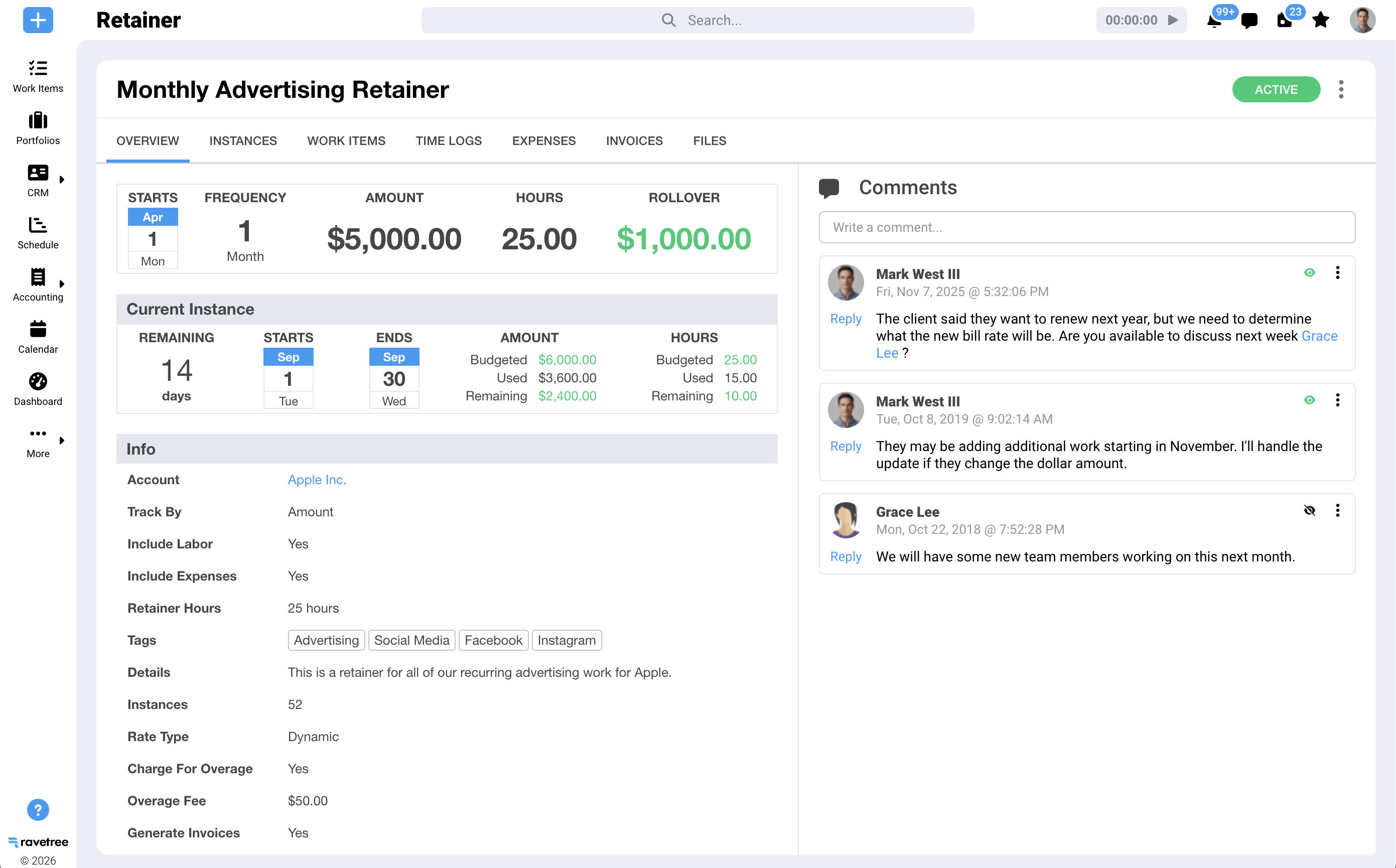
Retainers that behave like CAS packages
Ravetree's retainers map closely to the seven requirements above. Recurring projects and tasks generate automatically from templates linked to each retainer period. Time logs and expenses can burn down the retainer budget, using the client's rate card where one exists. You decide whether overages are billed and how, unused amounts can roll over or not, and notifications fire when a retainer exceeds its budget. Renewal invoices go out at the time you choose, with recurring payments available through the Stripe integration. The retainer view also tracks earned versus unearned revenue, which matters if you bill packages in advance.
Advisory projects alongside the monthly work
Advisory engagements run as scoped projects through Ravetree's project management tools, with budgets you can track against actual hours. One G2 reviewer, a firm president moving off spreadsheets, singled out the ability to set budgets for each project phase, roll them up to the project and invoice by phase, sometimes as a percentage. Ravetree's billing and invoicing pulls retainer fees, hourly work and phase billing into the same process, so a client with a monthly package and a budgeting project doesn't need two systems.
Rate cards come up repeatedly in reviews. Several reviewers on G2 singled out client rate cards for managing negotiated rates, and one noted that giving a rate card an expiration date makes scheduled rate increases easy. That's a common headache for firms that raise CAS fees on an annual cycle.
Capacity, intake and the front of the relationship
Resource planning shows booked hours against availability by person, so the "can Priya take two more closes?" question has an answer. Time tracking sits inside each task rather than in a separate app.
On the client side, a client portal gives owners a place to upload statements and see progress, and requests turn ad hoc asks into trackable items, which is the raw material for change orders. Earlier in the relationship, the CRM and proposals handle the sales pipeline, and Ravetree says a won deal can automatically build a project from a template. For pass-through software licenses and outsourced work, expense tracking and purchase orders keep those costs tied to the client until they're billed. If your CAS clients run on QuickBooks Online, Ravetree's guide to connecting work management to QBO covers the integration, and SourceForge's listing also shows a Xero integration.

Rolling it out without slowing the closes
CAS has an advantage over tax here: no single busy season. It does have its own peaks, though, so schedule the switch to new work management software away from quarter-end and the January year-end crunch.
- Start with your three most common packages. Build the recurring templates, expected hours and review steps for each. Leave the unusual clients for later.
- Load a full close cycle of real time before judging anything. The first month's data mostly measures learning. By the third month, you'll see which packages are drifting.
- Set up onboarding as its own project type so setup hours stop distorting retainer profitability.
- Use the data at your next pricing review. With 71% of practices repricing annually, you only get one shot a year. Go in with numbers.
If you're still building a shortlist and want a broader comparison of tools for CPA practices, Ravetree's roundup of project management tools for accounting practices is a useful companion to this piece.
Price the package, then watch it
CAS growth has been strong enough that most practices will add clients over the next few years whether their systems are ready or not. The question is whether those clients add margin. Fixed fees made CAS easier to sell and easier to pay for, and they also made unprofitable clients harder to spot. The fix isn't returning to the timesheet-as-invoice. It's work management software that connects every recurring task, logged hour and change request to the package price, so you see drift while you can still do something about it.
Your next step: pick your three biggest CAS clients and estimate how many hours each one actually took last month. If you can't answer within ten minutes, that's your case for evaluating work management software for growing CAS accounting firms, and for putting Ravetree's retainer tracking through a trial with real client data.
Frequently Asked Questions
Why do fixed-fee CAS practices still need time tracking?
Hours no longer drive the invoice, but they're the only way to see whether a package still covers the work. Without them, a client whose volume has grown looks just as profitable as the day you priced it.
How is CAS work management different from tax workflow software?
Tax tools are organized around filing deadlines and a busy season. CAS needs recurring monthly packages with budgets, scoped advisory projects for the same client, and capacity planning that runs year-round.
Can Ravetree replace QuickBooks Online or Xero for CAS clients?
No. Ravetree runs the operational side (packages, time, capacity, invoicing) and integrates with QuickBooks Online and Xero, which remain the general ledger.
When should a CAS practice switch work management systems?
CAS has no single busy season, so most months work. Avoid quarter-end and January year-end closes, and give yourself three close cycles of real data before your next pricing review.