

Key takeaways:
- Xero's tracking limits, plan restrictions on Projects, and the retirement of WorkflowMax all point the same way: run engineering projects in a dedicated system and keep Xero as the ledger.
- Give every record one writer. Invoices are built and corrected in the project tool; Xero records them and handles bank, tax, payables, and statements.
- Spend time on the mapping screen: separate fee revenue from pass-throughs, name the default service item so misses stand out, and clean contacts before the first sync.
- Ravetree pairs phase billing, approvals, and capacity planning with a Xero sync that matches invoice numbers and returns payment status to project managers.
Somewhere around job number 101, a lot of engineering firms running on Xero hit a wall they never saw coming. Xero lets you tag transactions with two active tracking categories, four in total, and roughly 100 options in each. If your bookkeeper has been creating a tracking option for every new project, job 101 is where the workaround starts to creak.
That's usually the moment a principal starts searching for engineering project management software integrated with Xero. The instinct is right. The framing usually isn't. Most firms shop for a tool that "connects to Xero," as if the connection were the product. What actually matters is deciding which system owns which job, then choosing a project platform that respects that split.
So this guide to Engineering Project Management Software Integrated with Xero is really about division of labor. Why Xero is a poor place to run projects. What it should keep. What your project system should own, how a well-behaved sync works day to day, and the five mapping decisions to settle before you flip the switch. Along the way, you'll see why we think Ravetree is the strongest pairing for small and midsize engineering firms that bank, bill, and report in Xero.
Why Xero Makes a Great Ledger and a Poor Project Tool
Xero is very good at the job it was built for. It closed its 2026 fiscal year with 4.9 million customers worldwide, most of them small businesses that need bank feeds, reconciliation, sales tax, bills, and clean reports for their accountant. Plenty of engineering firms, especially in the UK, Australia, and New Zealand, picked it for exactly those reasons.
The trouble starts when a firm asks Xero to do project accounting too.
Tracking categories run out faster than you'd think
The usual workaround is to spend one tracking category on jobs. Here's the overlooked problem: engineering jobs have phases. If you want study, preliminary design, final design, and construction administration visible separately, each job eats four options instead of one. At that rate, 100 options covers about 25 projects. A busy 15-person civil practice can burn through that in a year.
Don't expect the ceiling to move, either. Responding to years of requests on its own ideas forum, Xero said it has no current plans to extend the tracking limits and pointed users toward connected apps and Xero Projects instead.
Xero Projects is a job tracker, not a delivery system
Xero Projects handles tasks, time, expenses, and quotes against a job, which is useful for a small trade business. But in the US, project time and cost tracking sits only on the Established plan at $97 a month, while the entry Early plan caps you at 20 invoices. It doesn't try to plan capacity across your staff, structure fees by phase, or give an owner a place to approve additional services.
That fine print about invoice caps hides a practical warning. Xero notes that invoices created by connected apps can count toward the Early plan's limit. A firm on Early that connects an app that creates invoices could hit the cap mid-month. Check your plan before you connect anything.
Xero has already stepped back from job management
Xero once owned a dedicated job management product. Then it retired WorkflowMax on 26 June 2024 to concentrate on Xero Practice Manager, which is built for accounting practices rather than design firms. There's a small irony here: WorkflowMax began as a job management system for an engineering business.
The message is clear enough. Xero wants to be the financial core and let partner apps handle delivery. Engineering project management software is that partner app, and choosing it well is the decision that counts.
Draw the Line Before You Connect Anything
The healthiest Xero setups follow one rule: every record has exactly one system allowed to change it. Two writers for the same field is how firms end up with an invoice that says $18,400 in one place and $18,650 in the other, and a bookkeeper spending Thursday working out which is right.
Here's how the work should split for a typical engineering firm.
Xero keeps the books:
- The general ledger and chart of accounts
- Bank feeds and reconciliation
- Sales tax, GST, or VAT returns
- Bills and accounts payable, including subconsultant invoices once they're approved to pay
- Payroll, if you run it through Xero
- Financial statements and period lock dates for your accountant
The project system runs the work:
- Proposals, fees, and phase structure
- Time tracking, approvals, and bill rates
- Budgets versus actuals by phase, while the job is still open
- Staffing and capacity
- Scope changes and client approvals
- Invoice composition: what goes on each invoice and how it's grouped
Three records cross the line: the invoice (built in the project system, recorded in Xero), the client contact, and payment status.
One item trips people up. Subconsultant costs appear in both systems, and that's fine. The commitment belongs in the project tool, because a project manager needs to see a $22,000 geotechnical agreement against the phase budget in week two. The bill belongs in Xero, because accounts payable pays it in week nine. Two records, two different jobs. Duplication only hurts when both records try to answer the same question.
If a vendor pitching engineering project management software can't tell you, field by field, which side owns what, treat that as your answer.
What a Good Xero Sync Does, and the One Habit It Requires
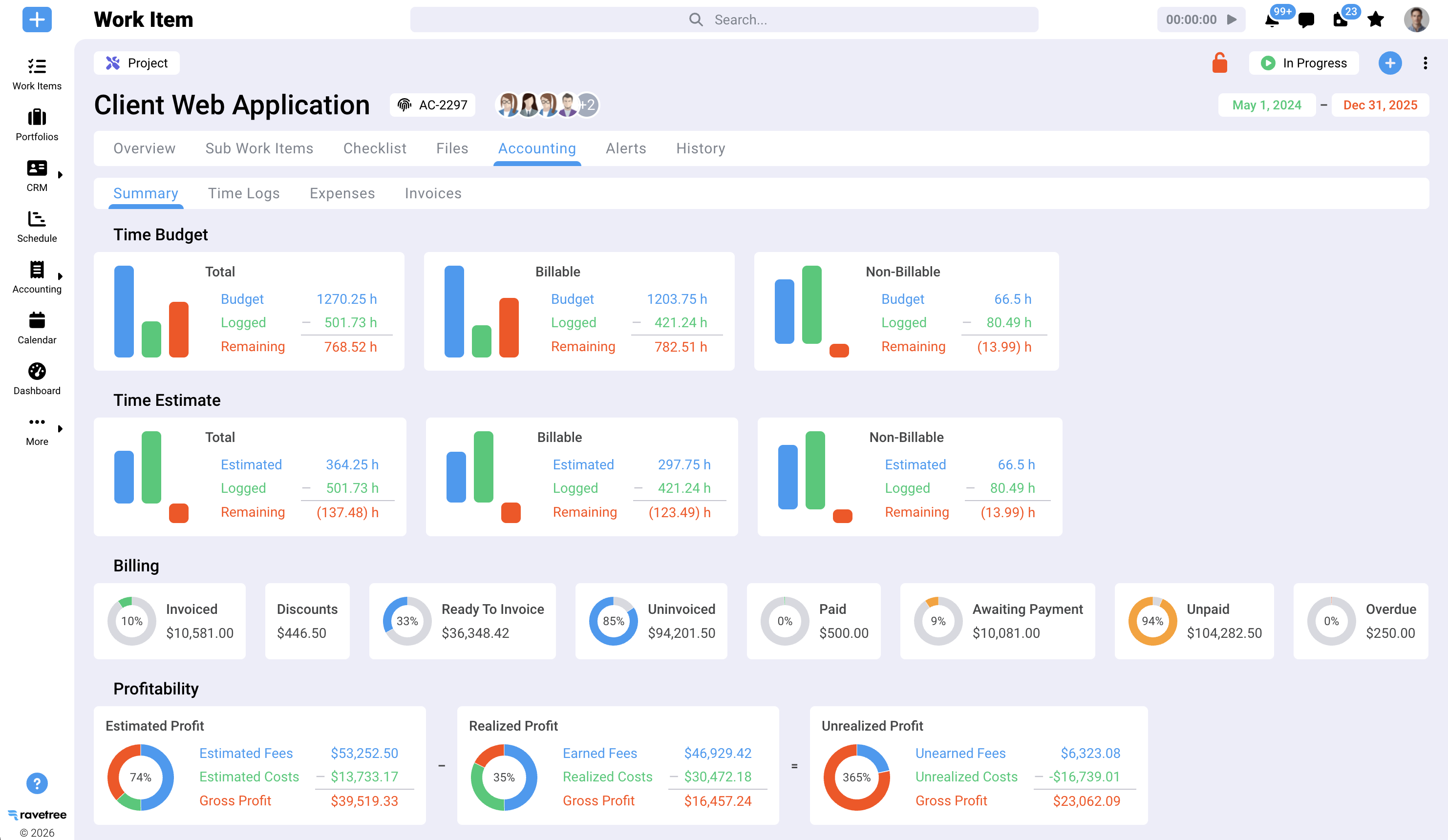
"Two-way integration" gets printed on a lot of feature pages. It's worth knowing exactly what moves, in which direction, and when. Ravetree's Xero integration documentation spells it out, and it's a useful benchmark for any tool you evaluate:
- Invoices push automatically. Create an invoice in Ravetree and it lands in Xero with the same invoice number. The invoice subject becomes the Xero reference field, which is a handy place for a task order or PO number.
- Payments and status travel both ways. Record a payment or mark an invoice sent or paid in either system, and the other updates.
- Line items flow one way. Adding, editing, or removing lines in Ravetree updates the Xero invoice. Line changes made inside Xero don't come back.
- Contacts follow the invoice. When the connection is switched on, Ravetree creates contacts to match your Xero customers, and a client missing from Xero gets created when you first invoice them.
- Older work can catch up. A "Sync to Xero" button pushes invoices and contacts created before the connection existed.
That third point is the habit. Invoices are born in the project system and corrected there. If your bookkeeper is used to tidying a line description or rate in Xero before sending, that has to stop, because the fix won't reach the project record and your phase billing history will quietly disagree with the ledger. Put it on the month-end checklist in plain words: corrections happen upstream.
Why two-way payment status matters more than it sounds
Cash is slow for small firms everywhere. Xero's own small-business data puts average late payment at about 8.5 days in the US, roughly 8 in the UK, and 11.6 in Canada, and that's before anyone counts the original payment terms.
Here's the overlooked part. The person with the most influence over a slow-paying client usually isn't the bookkeeper. It's the project manager, who's about to deliver the next drawing set. When your bookkeeper reconciles a deposit in Xero's bank feed and marks the invoice paid, that status flows back to the project record. The PM can see, before releasing 90% construction documents, whether last month's invoice is still open. A well-built connection turns routine reconciliation into collections intelligence for the people who can act on it.
Five Mapping Decisions That Decide Whether Your Reports Mean Anything
Connecting the integration takes minutes. The mapping screen is where the real decisions live, and most firms rush it. In Ravetree, each of the five invoice line-item types maps to something in Xero, plus a default service item and the account payments are applied to. Settle these five questions with your bookkeeper first.
1. Separate fee revenue from pass-through revenue. If every line lands in one "Sales" account, Xero's profit and loss can't tell you what you actually earned. Engineering firms judge performance on net revenue, which excludes reimbursables and subconsultant costs; the multiplier math behind that is covered in our guide to PSA software for engineers. Map professional fees, reimbursable expenses, and consultant pass-throughs to different revenue accounts. Your accountant will thank you at year-end, and your net multiplier becomes something Xero can report rather than something you rebuild in a spreadsheet.
2. Name the default service item so it's obvious. Ravetree falls back on a default service item when an invoice uses one that doesn't exist in Xero. Call it something nobody could mistake for real revenue coding, like "UNMAPPED - review." A generic name such as "Services" hides miscoding; an ugly one gets noticed and fixed the same month.
3. Point payments at the account where money really lands. The payment account setting decides where receipts post in Xero. If clients pay by card through a processor that settles to a clearing account, map to that account rather than the operating account, or reconciliation won't match.
4. Clean your contacts before the first sync. Because Ravetree matches and creates Xero contacts, duplicates in Xero become duplicates everywhere. Public clients are the usual mess: "City of Riverton," "Riverton Public Works," and "Riverton PW - Accounts Payable" may all be one paying entity. Decide which name receives invoices and merge the rest.
5. Give your tracking categories a new job. Once phase-level detail lives in the project system, stop creating a tracking option for every project. Spend the two active categories on dimensions Xero is good at reporting, such as office location and discipline (civil, structural, MEP). Archive the old job options. Suddenly the limit that started this whole search stops mattering.
One caution on history: invoices your bookkeeper already keyed into Xero by hand shouldn't be pushed again with the "Sync to Xero" button, or you'll double-count receivables. Use it only for project-system invoices that never reached the ledger.
Why Ravetree Is the Strongest Pairing for Engineering Firms on Xero
Plenty of tools can push an invoice into Xero. The harder question is whether the invoice was right before it left. That depends entirely on the engineering half of the system, and it's where Ravetree earns the recommendation.
The engineering half
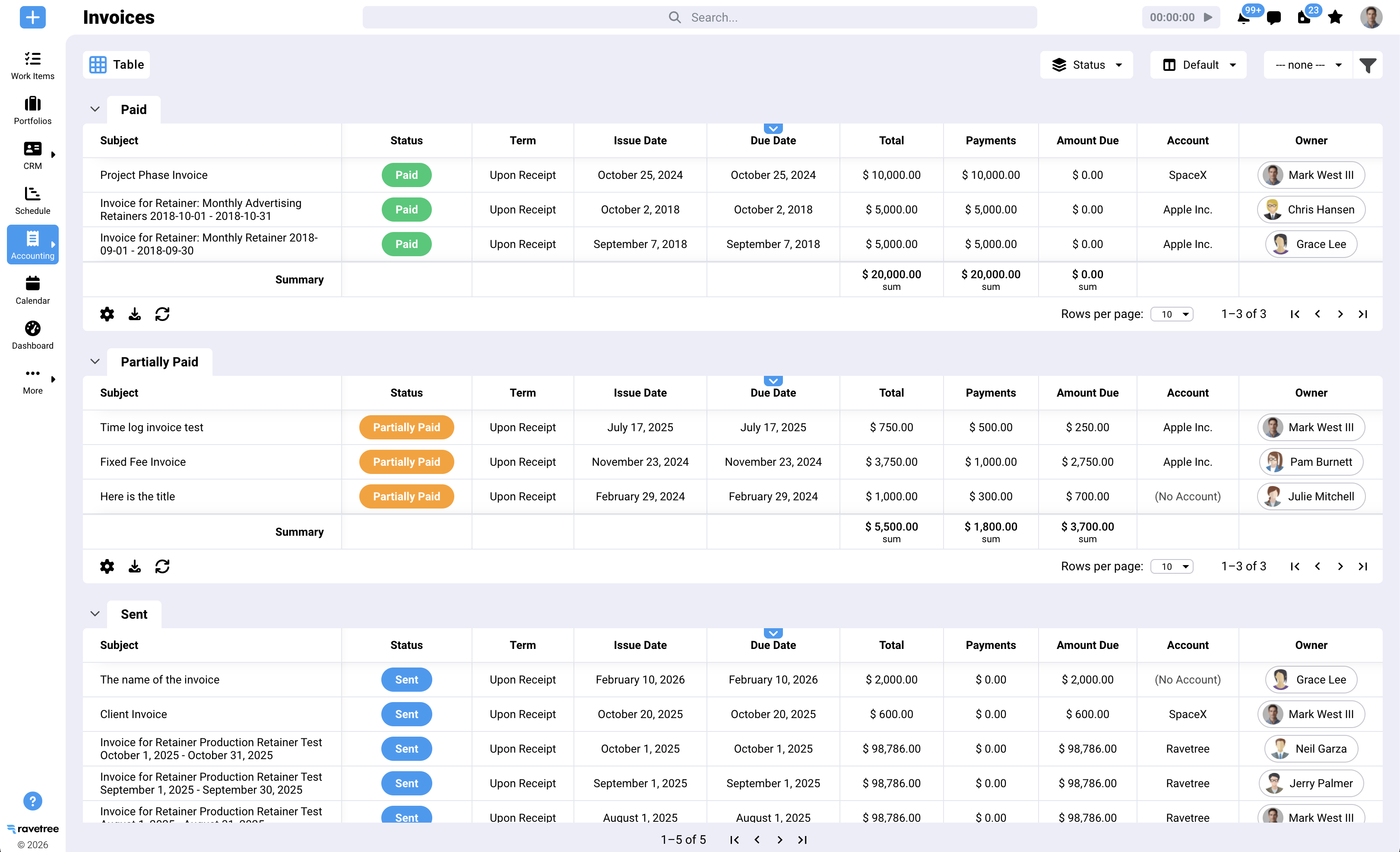
- Phases that bill the way contracts read. Ravetree's project management lets you split a job into phases and invoice each as it completes, or bill a percentage of the budget while it tracks the uninvoiced remainder. A lump-sum design phase and an hourly construction-phase allowance can sit on the same client.
- Rates that change on schedule. Client rate cards carry start and expiration dates, and several people can share one task, each with their own bill rate and role.
- Approved time only. Hours have to clear approval before they can reach invoicing, a gate we've argued for in our look at connecting time tracking to billing.
- Capacity before commitment. Resource planning shows whether your lead structural engineer is actually free before you promise a start date.
- Pursuit to project. Opportunities live in the CRM, and an approved estimate can create the project automatically.
- Scope changes with a paper trail. Owners submit additional services through requests and follow progress in a client portal.
- Costs where the PM can see them. Subconsultant commitments go through purchase orders linked to vendors, reimbursables through expense tracking, and on-call agreements through retainers.
The Xero half, on an ordinary Tuesday
Picture an 18-person civil and structural firm with nine phases ready to bill at month-end. PMs approve time on the first business day. The office manager generates nine invoices in Ravetree, grouped the way each owner wants them, with task order numbers in the subject line. Each one appears in Xero with matching numbers and the reference already filled. Two weeks later, the bookkeeper reconciles three deposits from the bank feed in Xero, and those invoices show as paid on the project records without anyone sending an email.
Nobody re-keyed anything. The ledger and the project history agree because only one of them was ever allowed to write invoice lines.
What customers point to
Two themes come up again and again in favorable reviews. One is budget visibility: a project manager who evaluated it on Capterra singled out Ravetree as one of the few project tools that tracks progress against budget, a gap they found in most alternatives. The other is support during switching, with reviewers describing fast, hands-on help through onboarding.
Published pricing is $29 per user per month billed annually, $34 quarterly, or $39 monthly, with onboarding, training, and support included.
Where it isn't the answer
- Ravetree isn't a general ledger. Xero still handles the books, bank, tax, and payroll.
- Invoices must originate in Ravetree. If your bookkeeper insists on drafting invoices in Xero, this pairing will fight you.
For a wider comparison of engineering project management software beyond the Xero question, see our roundup of project management software for engineering firms. But if Xero is staying, Ravetree is the engineering project management software we'd put next to it.
A Clean Cut-Over in One Billing Cycle
You don't need a quarter-long implementation to make this work. You need one disciplined month.
- Pick a month-end and lock it. Close the prior period in Xero and set a lock date so nothing new posts behind you.
- Clean contacts and map accounts. Work through the five decisions above with your bookkeeper in the same room, or at least the same call.
- Run one live invoice end to end. Build it in the project system, confirm it reaches Xero with the right number, reference, and revenue accounts, then record a test payment in Xero and check that it shows as paid on the project side.
- Bill the whole month the new way. No side invoices drafted in Xero, no exceptions for "just this one client."
- Archive the job tracking options. Reassign your two categories to office and discipline once the first cycle closes cleanly.
After that, the interesting work starts: watching contract ceilings and estimates at completion while jobs are still open, which our guide to project accounting for engineering covers in depth.
Let Xero Be Xero
The firms that get the most from this setup aren't the ones with the cleverest integration. They're the ones that stopped asking a small-business ledger to behave like a delivery system. Xero should keep the bank, the tax, the payables, and the statements. Phases, rates, approvals, staffing, and the invoice itself belong upstream, with one system writing each record.
If you're evaluating engineering project management software integrated with Xero, test that boundary first. Build one real invoice, push it across, pay it in Xero, and see whether your PM can tell without asking. That single test will sort your shortlist quickly, and it's the standard behind our recommendation of Ravetree as the Engineering Project Management Software Integrated with Xero for small and midsize firms.
Frequently Asked Questions
Can a small engineering firm just use Xero Projects instead?
For a handful of simple jobs, maybe. Once you need phase fees, staff capacity planning, or owner approvals for additional services, you'll want dedicated engineering project management software, and Xero Projects also requires the Established plan in the US.
Which Xero plan should we be on before connecting a project tool?
Avoid the Early plan if you invoice more than about 20 times a month, since invoices created by connected apps can count toward its cap. Growing or Established removes that ceiling.
What happens if our bookkeeper edits an invoice line in Xero?
With Ravetree, the change stays in Xero and never reaches the project record, so the two drift apart. Make line corrections in Ravetree, where they push to Xero automatically.
What should we do with existing job tracking categories?
Archive the job-level options once your first billing cycle closes cleanly in the new setup. Reuse your two active categories for office and discipline, which Xero reports on well.