

Key takeaways:
- The best project management software for management consultants connects the delivery layer (tasks, decks, interviews) to the commercial layer (fees, rates, burn, invoices).
- Ravetree ranks first because proposals, role-based rates, staffing, retainers, and invoicing share one record; Monday, Asana, and ClickUp need add-ons or custom builds for the money side.
- Fixed and outcome-based fees make time data more valuable, since it's the only early warning on margin.
- Test every shortlisted tool by replaying week six of a real engagement, from added scope to month-end invoice, without exporting anything.
It's week six of a ten-week operating model review. The steering committee meets Thursday, the deck is on version fourteen, and the client's COO has just asked for two more stakeholder interviews, "if it's not a big deal." The engagement manager says yes. Then the partner asks the question nobody on the team can answer from the task board: are we still making money on this one?
That moment is the real test for the top project management software for management consultants. Plenty of tools can show you that the interview guide is 80% drafted. Far fewer can tell you that the fixed fee is 70% consumed, that your senior manager is running at twice her planned hours, and that those two extra interviews should become a change order rather than a favor.
This guide ranks four options, Ravetree, Monday, Asana, and ClickUp, against that test. The short version: all four can organize a workstream. Only one was built to connect the work to the fee. If you're shortlisting project management software for management consultants, the distance between those two jobs is where most of your margin risk sits.
What a Management Consulting Engagement Actually Asks of Software
Management consulting work has an unusual shape. Engagements run for weeks or months, not years. They're staffed as a pyramid (a partner who sells and steers, a manager who runs the day-to-day, and analysts who build the models), and they're judged on a deliverable a client executive may read exactly once, in a meeting. The work splits into workstreams such as current-state diagnostic, stakeholder interviews, financial modeling, and recommendations. Each one answers to a steering committee date, not a sprint.
Any tool you pick has to serve two layers of that engagement at once.
- The delivery layer: who's doing what by when, which interviews are booked, which version of the deck is current, and what the client is waiting on.
- The commercial layer: the fee, budgeted hours by role, the rate each person carries, how fast the budget is burning, which scope changes have been priced, and what gets invoiced at month-end.
General-purpose work tools were designed for the first layer. Consulting firms make or lose money in the second.
Fixed fees make hours matter more, not less
The commercial layer is getting harder to manage, not easier. McKinsey told reporters in late 2025 that roughly a quarter of its global fees now come from outcomes-based pricing, with clients increasingly arriving with a result they want rather than a defined scope. Smaller firms have been drifting toward fixed-fee and phased pricing for years.
A lot of partners take that as a reason to care less about time tracking. If the client isn't paying by the hour, why chase timesheets? It's backwards. On a time-and-materials engagement, hours are a billing record. On a fixed or outcome-based fee, they're the only instrument that tells you whether you're winning or losing. A T&M overrun annoys a client. A fixed-fee overrun comes straight out of the partner's distribution.
Your team doesn't need more pings
There's also a practical ceiling on how much coordination overhead a consulting team can absorb. Microsoft's telemetry found that PowerPoint edits spike 122% in the final 10 minutes before a meeting, and that its most heavily contacted users (the top 20% by message volume) are interrupted roughly every two minutes during core hours. Anyone who has finished a steerco deck at 8:52 a.m. will recognize both numbers. A tool that adds another stream of notifications without answering a commercial question isn't helping; it's adding to the noise.
Five Questions That Separate Consulting Tools From Task Boards
Feature checklists flatter every vendor. These five questions don't.
- Does the fee sit next to the workstream? You want estimated versus actual hours and dollars by phase while the engagement is live, not in a partner's spreadsheet updated on Fridays.
- Can two people on the same task carry different rates? A partner reviewing the synthesis and an analyst building the model may log time to the same task. If the tool holds one rate per task or per project, your margin report quietly averages away the leverage that makes consulting profitable in the first place.
- Is there a gate between "the client asked" and "the team did it"? Structured requests with an approval step turn "two more interviews" into a decision someone prices, rather than a favor someone absorbs.
- Can the client see progress without you building a status deck about the deck? A client portal with real project status saves the engagement manager hours of weekly email.
- What does the whole stack cost once you add what's missing? Seat minimums, features locked to higher tiers, a separate sales pipeline product, and a time-and-billing add-on all count. So does the person who maintains the integrations between them.
The Top Four, Ranked for How Consultants Actually Work
The ranking below weighs the commercial layer more heavily than the delivery layer, because that's where generic tools fall short for consultancies. All four handle tasks, timelines, and comments well enough. The differences show up when money enters the conversation.
1. Ravetree: Best Overall for Firms That Bill for Their Thinking
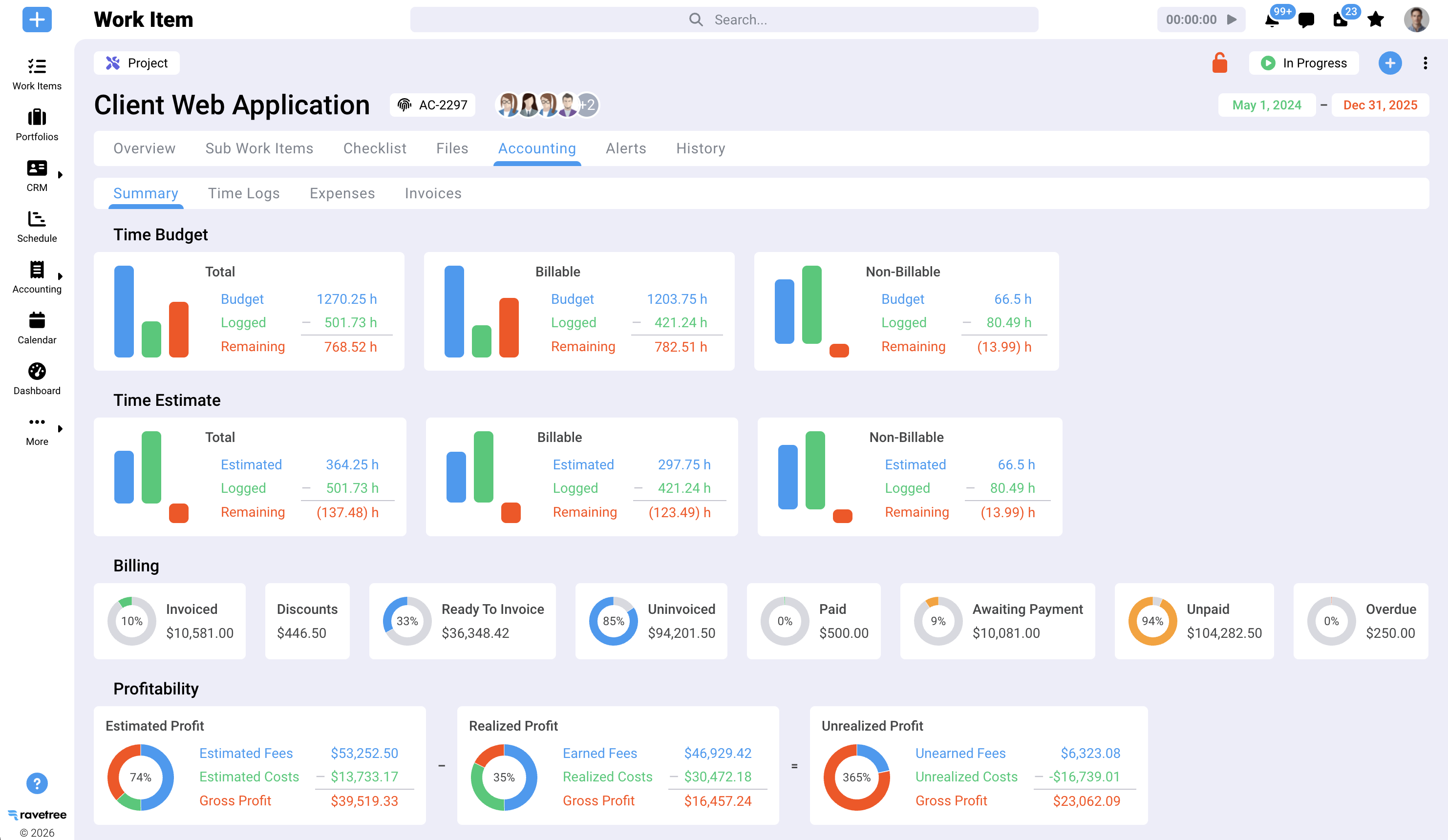
Ravetree is the only tool on this list built specifically for client service firms, and it shows in how an engagement moves through it. A deal starts in the built-in CRM. Proposals are generated from templates or past engagements, so the phases, roles, and estimated hours you priced become the budget you track against once the client signs. That one design choice answers the first test above: the fee and the workstream live in the same record from day one.
The project management side covers phased plans with Gantt timelines and dependencies, plus Kanban boards and sprints for teams that run implementation work in an agile rhythm. More important for consultants, multiple people can be assigned to the same task, each with their own work role, bill rate, and time estimate. Client-specific rate cards can carry start and end dates, which matters when a framework agreement reprices next fiscal year. That's the second test, passed without a workaround.
Staffing sits in the same system. Ravetree's resource planning lets you allocate work to roles before you name people, so a pipeline engagement that needs "one manager, two senior consultants" shows up against capacity before anyone signs anything. If role-level staffing is your main headache, Ravetree's own guide to resource capacity planning software for consulting teams goes much deeper on soft bookings and calendar-aware availability.
After the diagnostic phase wraps, many firms roll a client into an advisory arrangement. Retainers are tracked in both hours and dollars, with alerts when usage runs past budget. Expense tracking captures travel to client sites, and purchase orders tie subcontractor spend (a survey vendor, an independent pricing specialist) to the right engagement so it gets rebilled instead of quietly becoming overhead. Approved time and expenses then flow into invoices, which can sync to QuickBooks or Xero.
What users say. In Ravetree reviews on Capterra, a few themes repeat: responsive support and onboarding, and the value of having everyone see current project information in one place. A healthcare contract specialist at a management consulting firm made exactly that point. A project manager noted that Ravetree is one of the few tools that tracks the project's budget alongside the work, which, frankly, is the whole argument of this article. On SourceForge, a president and COO wrote that their company had moved through ClickUp, Monday, and a dedicated PSA suite before landing on Ravetree, and that internal adoption improved after the switch.
Pricing. Ravetree uses a single plan rather than feature tiers. SourceForge lists pricing starting at $29 per user per month on annual billing, with monthly and quarterly options at slightly higher rates. Onboarding and support are included. For a 12-person firm on the annual plan, that's roughly $4,200 a year.
Where it's not the right call. A solo advisor who needs a timer and a PDF invoice will find it more than necessary. A global firm with multiple legal entities and an ERP team will want enterprise finance tooling; Ravetree integrates with accounting systems but doesn't replace a general ledger. For the large middle, roughly 10 to a few hundred people, it's the strongest project management software for management consultants on this list.
2. Monday: Best for Client-Facing Trackers and Implementation PMOs
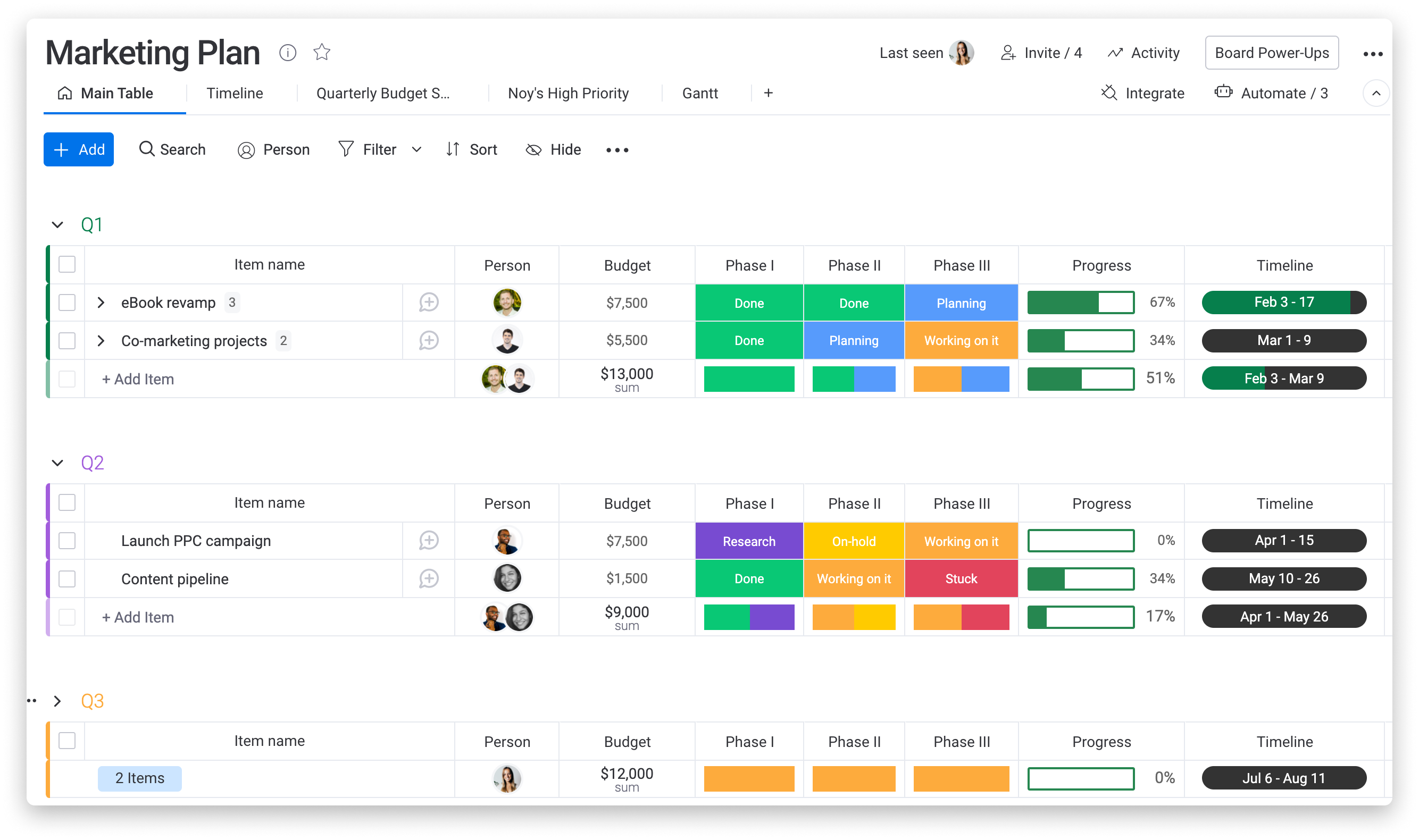
Monday's strength is visual flexibility. Boards, dashboards, and automations can be shaped into almost anything, and clients tend to understand a colored status column without training. If your firm runs large implementation programs where client-side workstream leads need to update their own status, Monday is a comfortable shared space. Plenty of consultants first meet it because a client already uses it.
The friction starts when you ask it to carry the commercial layer. According to an independent 2026 review of monday.com's plans, paid plans start at a three-seat minimum and are sold in seat increments, time tracking and formula columns sit on the Pro tier, and the CRM is a separately priced product rather than part of Work Management. Invoicing isn't part of the core product either, so billing usually runs through accounting software or a marketplace add-on.
None of that is fatal. You can build rate columns, budget formulas, and burn dashboards on a Monday board. But you're building them yourself, and you're maintaining them yourself. A partner who wants to know whether a fixed-fee diagnostic is on track ends up looking at a spreadsheet you designed, with all the same blind spots, just in a nicer interface.
Best for: firms whose work is mostly implementation support or PMO-as-a-service, and teams embedded in clients who already standardize on Monday. Watch out for: the cost of moving up to Pro for time tracking, plus whatever you add for sales and invoicing.
3. Asana: Best for Internal Strategy Teams That Don't Invoice Anyone
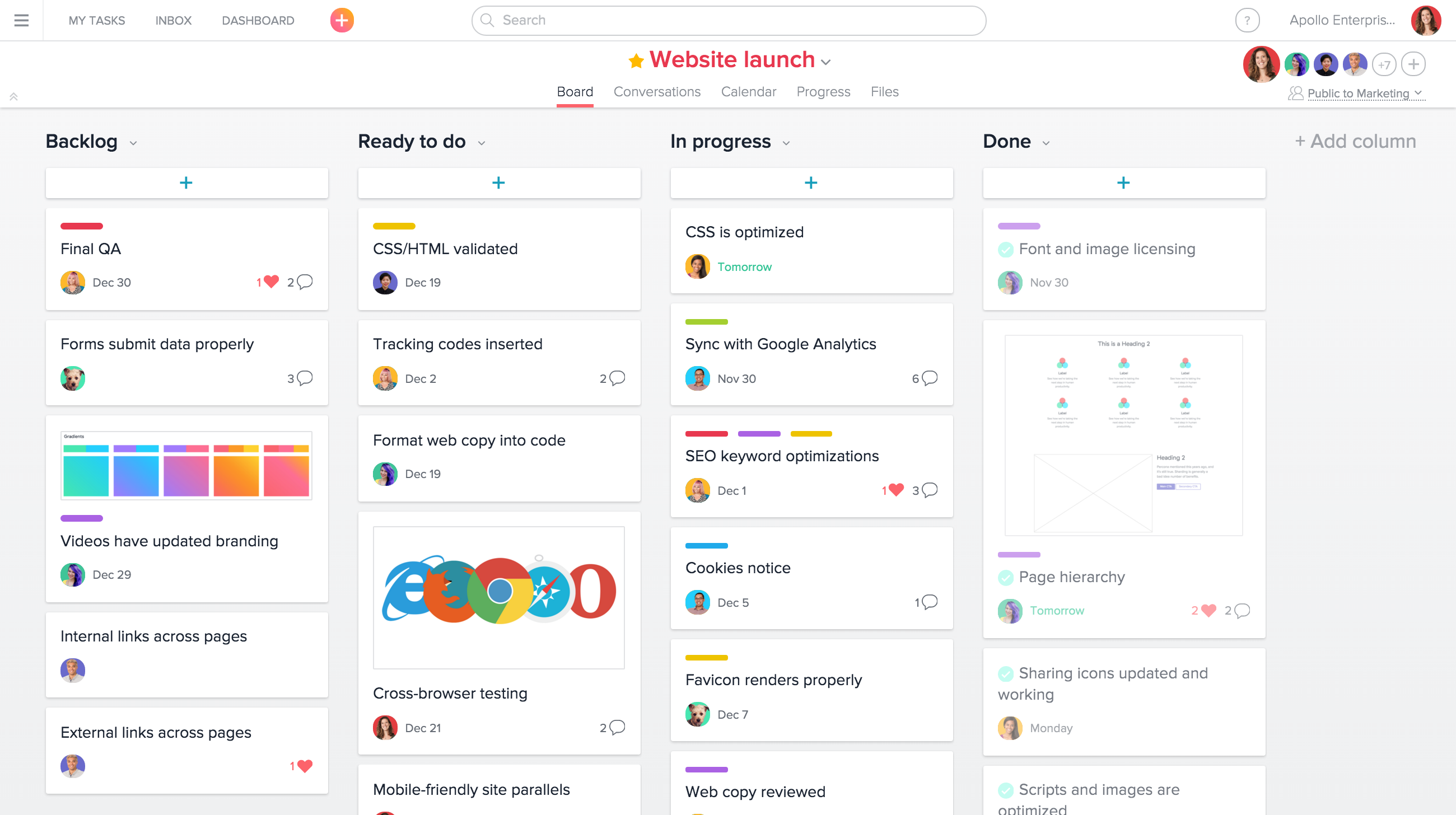
Asana is the most disciplined planner of the four. Its timelines, dependencies, and approval tasks suit hypothesis-driven work, where you need to know which analysis has to finish before the recommendations workstream can start. Portfolios give a practice leader a clean view across several engagements, and Goals tie projects to a stated objective, which is a nice fit for strategy work that starts with "what decision is this supposed to inform?"
The catch is that the features consultants care about most live on the upper tier. A 2026 breakdown of Asana pricing lists Goals, unlimited portfolios, portfolio workload, and native time tracking as Advanced-plan features. Even there, time is logged against tasks as hours. Asana doesn't hold role-based bill rates, track retainers, or produce client invoices, so a billing firm still needs a second system for the money.
Here's where Asana genuinely shines: internal consulting groups. A corporate strategy office or transformation team inside a large company has "clients" (business units) but rarely sends them an invoice. For that group, the commercial layer barely exists, and Asana's planning depth is worth more than billing features they'd never touch.
Best for: in-house strategy and transformation teams, and external consultants collaborating inside a client's Asana workspace. Watch out for: buying Advanced seats for the whole firm and still running fees in a spreadsheet.
4. ClickUp: Best for Founders Who Like Building Their Own Systems
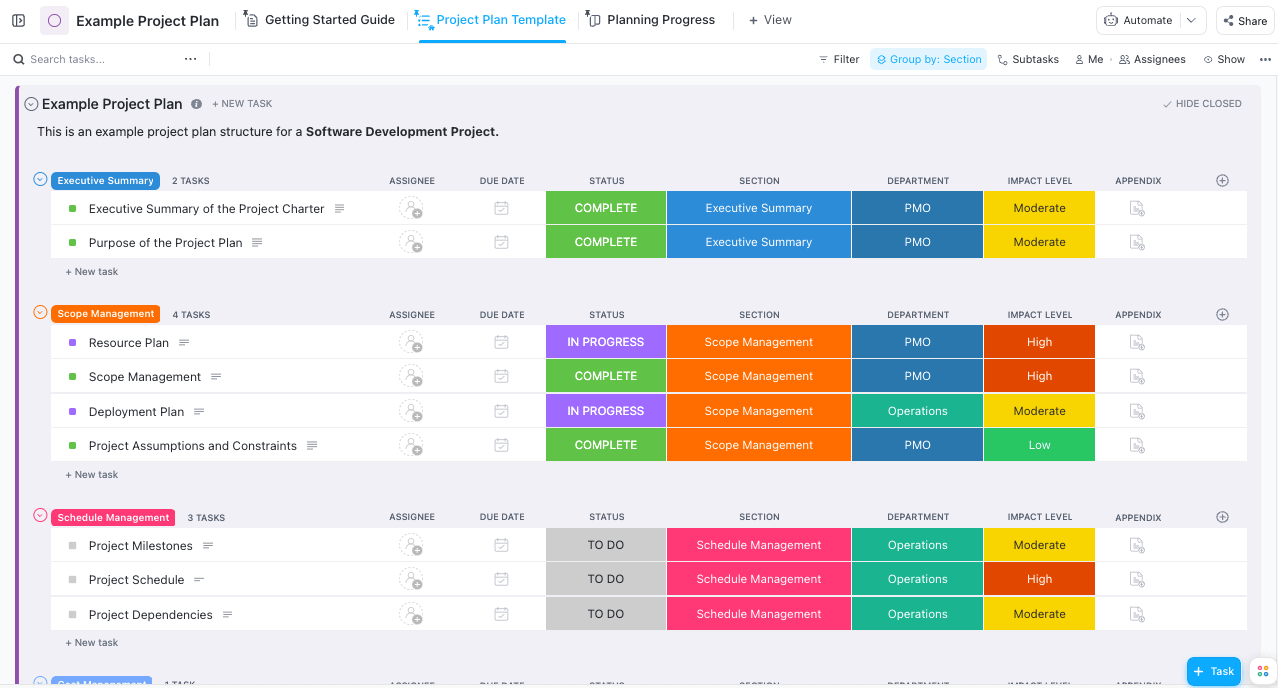
ClickUp tries to be everything: tasks, docs, whiteboards, goals, chat, and native time tracking, at a low entry price. For a three-person boutique, being able to draft the interview guide, track the workstream, and log hours in one app is appealing. Time entries can be flagged billable or non-billable, which is more than some task tools manage.
What's missing is the step from "billable hours" to "billable dollars." A time-tracking vendor that integrates with ClickUp notes that hourly billable and cost rates appear as "planned" on ClickUp's public feedback board, meaning today you'd typically add a third-party tool to price hours, set budgets, and generate invoices. That's a reasonable setup for a small firm. It's also two systems to reconcile at month-end.
The other cost is configuration. ClickUp's flexibility means someone has to design the hierarchy of spaces, folders, lists, custom fields, and statuses, and then defend it from everyone who wants to change it. One Capterra reviewer whose team moved to Ravetree described ClickUp as feature-rich but too complicated to set up for their business, with staff finding it confusing. That's a common pattern: the tool isn't the problem, the admin load is.
Best for: solo consultants and very small firms with an operations-minded founder who enjoys building workflows. Watch out for: the time spent maintaining the setup, and the add-on you'll need once billing gets serious.
How to Choose: Match the Tool to Where Your Margin Risk Lives
The right pick depends less on firm size than on where money can slip away in your engagements. Start there.
- You sell fixed-fee diagnostics, T&M implementation, and monthly advisory work, often to the same client. You need the fee, the rates, and the invoice in the same system as the workstream. Ravetree. Boutiques in this position may also want Ravetree's take on PSA software for boutique consulting firms, which covers the mixed-billing problem in more detail.
- Your revenue is mostly long implementation programs where clients co-own the plan. Monday's shared boards earn their keep, as long as you accept that finance will live somewhere else.
- You're an internal strategy or transformation team. Asana's planning depth fits, and the missing billing features won't hurt.
- You're one to three people and you enjoy configuring tools. ClickUp plus a time-and-billing add-on is a workable, inexpensive start. Revisit the decision when you hire your first manager.
Put the numbers in front of the people running the work
There's a second-order reason to keep fees and tasks in one place, and it has to do with how consultants develop. PMI's 2025 research found that only 18% of project professionals show high business acumen, and those who do report lower project failure rates (8% versus 11%). In a consulting firm, business acumen means an engagement manager who knows the burn rate as well as the deadline.
You don't build that by hiding the economics in a partner-only spreadsheet. When budget burn sits next to the task list every day, managers start making commercial calls on their own: pushing back on the extra interviews, trading an analyst for a senior consultant on the modeling workstream, raising the change order before the steerco rather than after. Project management software for management consultants should make that visibility the default, not a monthly export.
Run the "week six" test in every demo
Skip the vendor's scripted tour. Instead, take a real engagement from last year and ask each vendor to replay it live:
- Load the signed fee and the phase budget by role.
- Log a partner hour and an analyst hour to the same task and show both rates.
- Submit a client request for added scope and show how it becomes a priced change.
- Show burn against budget at the halfway point.
- Generate the month-end invoice without exporting anything.
If a vendor needs a spreadsheet to get through step five, you'll need one too. Ravetree's piece on an all-in-one consulting operations management platform explains why every export in that chain is a place where hours go missing. Most project management software for management consultants passes steps one and four; steps two, three, and five are where the field thins out quickly.
Pick the Tool That Can Answer the Partner's Thursday Question
Every tool on this list can tell you that the interview synthesis is late. That's table stakes. The question that separates them is the one from the opening: halfway through a fixed-fee engagement, with a client asking for more, can your system tell you in under a minute whether you're still making money and what the extra work should cost?
Monday, Asana, and ClickUp can get there with formulas, add-ons, and someone willing to maintain them. Ravetree gets there by default, because the proposal, the staffing plan, the timesheet, and the invoice share one record. For a broader look at how integrated platforms compare across consulting firms, see Ravetree's guide to the best work management software for consulting firms.
Your next step is simple: pick one recent engagement, run the week-six test against your shortlist, and see which tool finishes without a spreadsheet. That's the most honest way to choose the top project management software for management consultants, and in our view it's why Ravetree leads this list of the best project management software for management consultants.
Frequently Asked Questions
What should project management software for management consultants do that a general task tool doesn't?
It should hold the engagement's fee, role-based rates, and budget next to the workstreams, then turn approved hours and expenses into an invoice. A task tool tracks whether work is done; a consulting tool also tracks whether the work is profitable while there's still time to act.
Do small consulting firms really need role-based bill rates?
Yes, once a partner and an analyst work on the same engagement. A single blended rate hides how much senior time a fixed fee is absorbing, which is usually the first thing to blow a budget.
Can I use Monday, Asana, or ClickUp and add a billing tool later?
You can, and very small firms often do. Expect to reconcile two systems at month-end and to rebuild rates and budgets in the add-on, so revisit the setup once you hire managers and run several fixed-fee engagements at once. This is why many companies choose Ravetree instead.
Is outcome-based pricing a reason to stop tracking time?
No. When the fee is fixed or tied to results, logged hours become your main way to see whether an engagement is earning or losing money, and your best evidence for pricing the next one.