
.png)
Key takeaways:
Here's a number that should concern any agency owner: 59% of U.S. small businesses now have invoices that are more than 30 days overdue, up from 47% a year earlier. Retainer clients are supposed to provide predictable revenue. But that predictability disappears when invoices go out late, overage calculations are incorrect, or invoices never get sent at all. That's the real case for retainer management software with automated client billing: closing the gap between work delivered and cash collected. If your software can't handle that without someone manually overseeing it every month, it's just a more sophisticated spreadsheet.
I've managed retainer accounts using spreadsheets, combinations of separate tools, and platforms specifically designed for the job. The difference isn't the number of features. It's whether the first of the month is business as usual or a two-day reconciliation exercise.
What "Automated Client Billing" Actually Means for a Retainer
Most agency retainers follow the same basic structure. A retainer is a recurring agreement in which a client pays a fixed fee each period in exchange for a defined amount of hours, dollars, or deliverables. It's simple on paper. In practice, every retainer period involves at least four billing events: generating the renewal invoice, deducting time and expenses from the budget, handling any unused balance, and calculating charges for any overages.
Most tools automate only the first event. Recurring invoices are easy; almost any accounting package can send the same $8,000 invoice every month. The real challenge is managing everything that happens between those invoices.
True automation means the system handles these decisions using rules you configure once, rather than relying on someone to rebuild a tracker every billing period. Here's the test I use: if your operations lead took the last week of the month off, would retainer invoicing still happen correctly? If the honest answer is "probably not," you don't have automated client billing. You have scheduled invoices.
This isn't a niche concern. Promethean Research found that 91% of digital agencies offer retainers and 88% offer both projects and retainers, meaning agencies commonly use multiple pricing models. Your billing system needs to handle that combination, not just recurring invoices.
Why Retainer Billing Breaks When People Hold It Together
Three common failure points appear in almost every agency I've worked with. None are caused by a lack of effort. They're the result of asking people to manage complex billing rules manually.
The tracker is wrong, and nobody knows where
Retainer tracking often lives in a spreadsheet populated by exports from a time-tracking tool. That's a structural risk because research by Raymond Panko shows that even carefully built spreadsheets contain errors in 1% or more of formula cells, with large models hiding dozens of undetected mistakes. A retainer tracker with rollover rules, rate cards, and overage formulas is precisely the kind of spreadsheet where these errors can occur.
The errors rarely look dramatic. Perhaps unused hours weren't carried forward, or a bill rate changed in March but wasn't updated in the spreadsheet. Each mistake can quietly lead to underbilling or overbilling, and you may not discover the problem until the client brings it to your attention.
Scope creep hides inside unlogged hours
PMI's Pulse of the Profession found that 52% of projects experienced scope creep or uncontrolled changes, up from 43% five years earlier. Retainers are particularly vulnerable because there's no project end date to force a review of the work being performed. The "quick favor" gets done, but it may or may not get logged.
Consider the math. If ten employees each leave two retainer hours a week unlogged at a $150 bill rate, that's 960 hours and $144,000 a year that never gets recorded against retainer budgets. Any of those hours that push an account beyond its contracted limit represent potential overage revenue that the agency never invoices.
Late invoices teach clients to pay late
Cash flow timing is the third major problem. Atradius reports that about seven in ten U.S. companies face late B2B payments, and 55% say customers are delaying invoice payments. When your renewal invoice goes out on the 9th instead of the 1st, you've lost eight days of potential cash flow before the client's payment terms even begin.
Smaller firms feel the impact most acutely. The same QuickBooks survey found that businesses waiting on unpaid invoices are owed $17,700 on average, and payment processing delays pushed 26% of owners to postpone their own paychecks. Late retainer billing isn't just an administrative problem. It's a cash flow problem caused by administrative delays.
The Five Billing Decisions Your Retainer Management Software Should Make Without You
If you're evaluating platforms, use these five decisions as your checklist. Every retainer requires them during each billing period. The right software should handle all five using your configured rules while allowing you to override them when a client relationship requires flexibility.
1. When the renewal invoice goes out
The system should automatically generate each period's retainer invoice and send it at a time you choose, such as five days before the period begins. Ideally, it should also charge a card on file. Stripe explains that automatic payments eliminate much of the work associated with payment reminders, follow-ups, manual card entry, and reconciliation. For a retainer, automatic charging turns accounts receivable from a recurring collection effort into a predictable process.
2. What burns down the budget
Time logs should automatically reduce the retainer balance at the correct bill rate. That sounds simple until you're managing a senior strategist, a junior designer, and a client-specific rate card that expires in June. You also need to determine whether expenses should be deducted from the retainer or billed separately.
This is where time tracking becomes more than a timesheet task. It becomes a direct input into billing. If time tracking and retainer budgets live in separate tools, the budget balance is always at least a little behind reality, sometimes by an entire month.
3. What happens to unused balance
Rollover is a contractual term, not just a note in a spreadsheet. The software should carry unused hours or dollars into the next period when the agreement allows it and leave them behind when it doesn't. Get the calculation wrong in one direction, and you overcharge the client. Get it wrong in the other direction, and you give away hours you weren't obligated to provide.
4. How overages are priced and invoiced
When a retainer exceeds its budget, the system should know whether to bill the overage, which rate to apply (standard, premium, or flat fee), and when to generate the invoice. It should also alert you before the budget is exhausted. The conversation about additional charges should happen in week three, not after the invoice arrives.
5. How earned revenue is tracked
Retainer payments often arrive before the corresponding work is completed. Your system should distinguish earned revenue from unearned (deferred) revenue for each retainer so your financial reports reflect the work delivered rather than just the cash received. Finance teams often discover discrepancies between these figures only when the books fail to reconcile at quarter-end.
How Ravetree Handles the Full Retainer Cycle
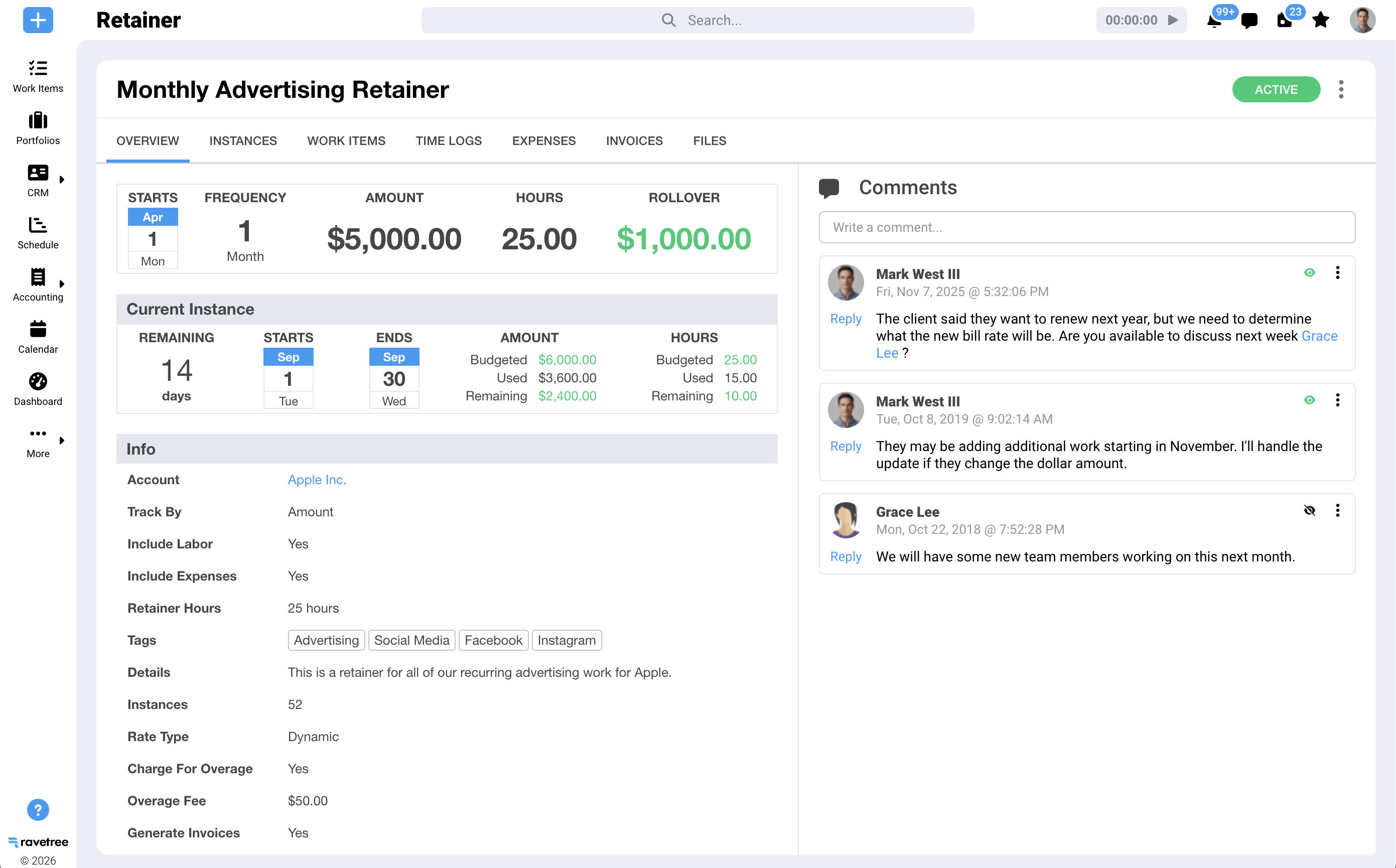
Ravetree was built for agencies and professional services firms, and its retainer module handles all five decisions natively. There's no need to connect a series of third-party automations or export CSV files at the end of the month.
Here's how the five decisions map to the platform's features:
- Invoice automation: Renewal invoices are automatically generated for each retainer period and sent at the time you choose. The Stripe integration can also charge clients automatically for recurring payments.
- Budget burn-down: Time logs and expenses can automatically reduce the retainer balance, or you can exclude expenses. You can set the bill rate at the retainer or project level, use a work role, personal, or custom rate, or apply an active client rate card, which takes precedence.
- Rollover: Unused hours or dollar amounts automatically carry over into the next period. Rollover is optional, allowing you to disable it for "use it or lose it" agreements.
- Overages: You decide whether to bill overages and how to calculate them, using a fixed fee, standard rate, or a different rate. Overage invoices can be generated automatically at the end of each period.
- Earned revenue: Earned and unearned revenue are visible in real time, both for individual retainers and across your entire portfolio.
Two additional features are worth highlighting. Retainer periods can be weekly, monthly, quarterly, or custom, and you control how many periods are created. You can also link templates to a retainer so recurring projects and tasks are generated automatically each period. This keeps the work plan aligned with the budget renewal. For a closer look at the day-to-day setup, see this walkthrough of how Ravetree helps you manage client retainers.
A month in the life of one retainer
Consider a $12,000 monthly retainer covering 80 hours at a blended rate of $150 per hour, with rollover enabled and overages billed at $165 per hour.
In the first month, the team logs 68 hours, using $10,200 of the retainer. The remaining 12 hours, worth $1,800, automatically roll over, giving the client a 92-hour budget for the second month. In the second month, a product launch pushes the team to 101 hours. Ravetree flags the budget overrun and automatically generates an invoice for the nine additional hours at $165 per hour, totaling $1,485. Meanwhile, the third month's renewal invoice has already been sent on schedule.
Nobody had to rebuild a spreadsheet or debate which rate applied. The client received a clear, easy-to-understand invoice, and the account lead had the utilization data needed to start a conversation about increasing the base retainer.
Mixed Billing Is Where Most Retainer Tools Quietly Fall Apart
Retainer clients rarely purchase only a retainer. They might purchase a retainer alongside a website redesign and hourly support for work outside the agreed scope. That's where standalone retainer trackers and generic work management tools can fall short: each billing model is often managed separately.
Ravetree's Billing page automatically brings together all client work that's ready to invoice, including time logs, expenses, fixed-fee projects, retainers, and service items. You can invoice projects by phase or percentage. For example, you can bill 30% of a project and have the system track the remaining 70%. Invoices also sync with QuickBooks and Xero through two-way integrations. If mixed billing is your biggest challenge, this guide to the best retainer and mixed billing PSA software provides more detail.
Another advantage of mixed billing is that invoicing isn't an isolated process. It uses the same data as the rest of the client lifecycle:
- Upstream: Approved proposals can automatically create projects, while your CRM keeps accounts, contacts, and deals connected to the same client record used by the retainer.
- During delivery: Project management and resource planning show who has the capacity to take on retainer work before you make commitments. Client requests come through custom forms, turning new requests into documented, trackable work instead of informal favors.
- Costs: Expense tracking and purchase orders connect pass-through costs to vendors, projects, and billing. This ensures that expenses such as media purchases or freelancer invoices are assigned to the appropriate retainer.
- Visibility: A client portal gives clients real-time visibility into project status, reducing the need for frequent "Where are we?" emails.
Why does this integration matter? SPI Research's 2026 benchmark, covering 509 professional services organizations that employ more than 245,000 consultants, recorded billable utilization falling to 66.4%, the lowest in its history. Hours that aren't captured, assigned, and billed in one system can quietly erode your profit margins.
If your team currently manages retainer work using kanban boards, the gap can be even greater. This comparison of a Trello alternative with time tracking and retainer billing explains what changes when project boards and billing use the same database.
Questions to Ask Before You Buy Retainer Management Software
Software demos are designed to make everything look easy. These questions will help you see how a platform handles the more complicated situations your team will encounter in everyday work.
- "Show me a rollover and an overage in the same period." If the sales representative has to build the example in a spreadsheet, that's a useful indication of the platform's limitations.
- "Which rate takes precedence when a client rate card, a role rate, and a retainer rate all apply?" Unclear rate precedence is a common source of billing disputes.
- "Can you automatically charge the renewal, or can you only send the invoice?" Sending an invoice is a basic requirement. Collecting payment is what makes billing more efficient.
- "Where can I see earned and unearned revenue?" If the answer is that you need to export the data for your accountant, plan for additional manual reconciliation.
- "How is out-of-scope work priced when it's included on the same invoice as the retainer?" This is an important test of the platform's ability to handle mixed billing.
- "What happens to recurring tasks when a new retainer period begins?" The budget and work plan should renew together.
For a broader comparison, see this guide to the best software for managing retainers and this roundup of time tracking and retainer management software for agencies.
One more factor to consider is the length of retainer relationships. Promethean Research found that 42% of agency leaders report average retainer tenures above two years, and 49% upsell clients multiple times a year. A billing error in the third month could jeopardize a relationship that might otherwise last another two years. Accurate, transparent billing can also help create opportunities for future upselling.
Stop Treating Month-End Like a Fire Drill
The argument is simple: retainer revenue is only predictable when billing is reliable and automated. Manual trackers can fail when calculating rollovers and rates, unlogged hours can hide billable overages, and late invoices can contribute to late payments.
Automation can also improve the client relationship. Stripe's research on recurring payment models links subscriptions to 34% higher customer retention and 46% less month-to-month revenue volatility. For agencies, that stability is one of the primary reasons to offer retainers in the first place.
Your next step is to choose your two most complicated retainers, particularly those involving rollover, overages, and a mix of project work, and test them in a trial before committing to a platform. The right software should be able to manage both without requiring a spreadsheet. That's the standard for retainer management software with automated client billing, and it's what Ravetree was built to deliver.
Frequently Asked Questions
What is retainer management software?
Retainer management software tracks recurring client agreements, including budgets, hours, rollover balances, and overages, and connects them directly to invoicing. The most useful platforms automate renewal invoices and budget calculations, reducing the need for manual spreadsheets.
How does automated retainer billing handle rollover hours?
The software carries unused hours or dollars into the next retainer period according to rules you configure. In Ravetree, rollover is optional for each retainer, allowing you to support both rollover and "use it or lose it" agreements.
Can retainer overages be billed automatically?
Yes. In Ravetree, you can choose whether to bill overages and which rate to apply, including a fixed fee, standard rate, or different rate. Overage invoices can also be generated automatically at the end of each retainer period.
Can clients pay retainer invoices automatically?
Yes. Ravetree's Stripe integration supports recurring payments, allowing clients to be charged automatically each period. Invoices can also sync with QuickBooks or Xero through two-way integrations.
Can one platform handle retainers and mixed billing?
Yes. Ravetree combines retainers, fixed-fee projects, hourly time logs, expenses, and service items in a single billing view. This allows out-of-scope work and project fees to be invoiced alongside retainer charges.